

Participant
May 2, 2023

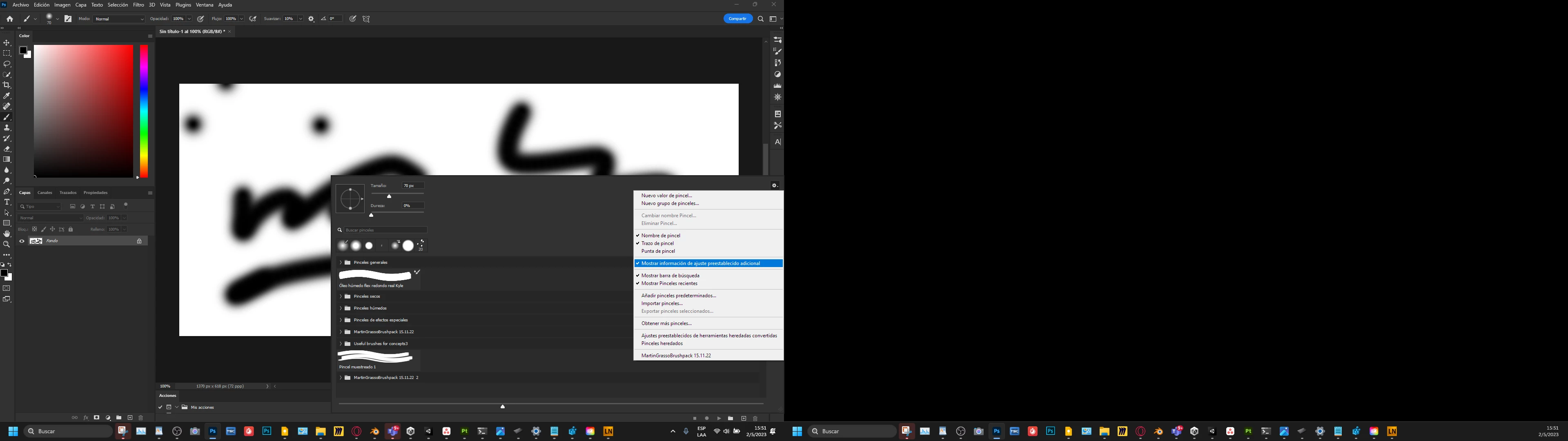
El mouse desaparece en los menus

  • May 2, 2023
  • 3 replies
  • 235 views

El mouse desaparece en los menus. Tengo que navegar a ojo porque no aparece. Funciona normal fuera de photoshop. Ya no se que hacer.

 

3 replies

CShubert
Community Manager
Community Manager
May 8, 2023

Thank you for the update @Nits92 


Let's make sure we're in a default state and there are no stale settings somewhere: 

Restore your preferences using this manual method:  

https://helpx.adobe.com/photoshop/using/preferences.html#Manually 

Does it work correctly? 

If that doesn't solve it, you can quit Photoshop and put the Settings folder back. 


It may help if we could see your Photoshop System Info. Launch Photoshop, and select Help >System Info...and copy/paste the text in a reply.  

Participant
May 8, 2023

No, the problem persist. 

CShubert
Community Manager
Community Manager
May 3, 2023

Hi @Nits92 


Go to Preferences > Technology Previews... and enable “Older GPU mode (pre 2016)” - Restart Photoshop. Does the problem persist?


It may help if we could see your Photoshop System Info. Launch Photoshop, and select Help >System Info...and copy/paste the text in a reply.