
Participant
August 6, 2026

Erro no programa ao tentar usar ferramenta generativa.

  • August 6, 2026
  • 1 reply
  • 8 views

Estou enfrentando problemas recorrentes ao utilizar a ferramenta IA Generativa no Photoshop.

Ao abrir o Photoshop, os ícones da ferramenta de seleção muitas vezes não aparecem. Quando consigo fazer uma seleção e clico em "Preenchimento Generativo", frequentemente é exibida a seguinte mensagem de erro:

"Não foi possível atualizar os arquivos de objeto inteligentes devido a um erro no programa (b46572.222)."

Em outras ocasiões, em vez de exibir essa mensagem, a ferramenta gera apenas um fundo preto, sem realizar o preenchimento da imagem.

Esse problema ocorre há mais de seis meses. Como a ferramenta ainda funcionava ocasionalmente, nunca abri um chamado de suporte. No entanto, a situação piorou significativamente.

Atualmente, preciso fechar e reabrir o Photoshop diversas vezes até que a IA Generativa volte a funcionar. Além disso, após algumas horas de uso contínuo, o problema retorna, obrigando-me a repetir todo esse processo novamente.

Gostaria de ressaltar que estou utilizando a versão mais recente do Photoshop, portanto o software está atualizado.

Esse problema está impactando diretamente minha produtividade, já que utilizo a IA Generativa diariamente em meu fluxo de trabalho. Gostaria de saber se existe alguma solução definitiva ou procedimento recomendado para corrigir esse comportamento.
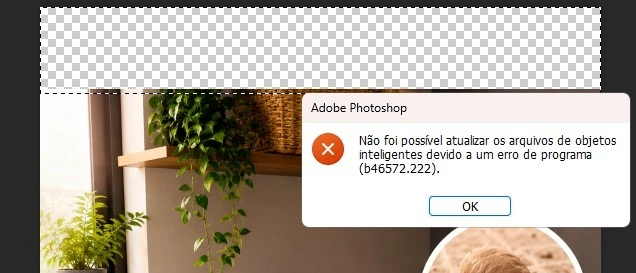
 

1 reply

Anshul_Saini
Community Manager
Community Manager
August 6, 2026

Hi ​@Mikael_Araújo,

Thank you for the detailed report and the screenshot. The combination of symptoms you're describing, missing selection icons on launch, the specific program error (b46572.222) referencing Smart Object files during Generative Fill, and the black output instead of a proper generation, points to a session state issue where Photoshop's connection to the generative AI service becomes corrupted during extended use.
 

A related fix was shipped in version 27.9 that addressed a program error. Since you mention you're on the latest version, I'd like to narrow this down further:
 

A few questions to help us investigate:

  • Exact version number. Could you go to Help > System info and copy & paste it here? This helps confirm whether the fix is already in your build.

  • Network environment: Are you working behind a corporate firewall, VPN, or proxy?

  • You mentioned it worsens after "a few hours of continuous use." Does the issue appear only after extended sessions, or does it sometimes occur immediately after a fresh launch? And when it does work after a restart, approximately how long before it breaks again?

  • When Generative Fill stops working, do other cloud-connected features (e.g., Neural Filters, Remove Background via the Contextual Task Bar, or syncing Libraries) also stop functioning?
     

This information will be helpful for our engineers.


Best,

Anshul Saini