



Hani.sawiress
Inspiring
May 15, 2025

Error opening indexed PNG within PDF from Acrobat in Photoshop

  • May 15, 2025
  • 2 replies
  • 318 views

I'm experiencing an issue when trying to edit pages from a PDF in Photoshop via Acrobat's "Edit Using" functionality. My PDF consists of a color cover and black and white interior pages saved as indexed PNG images.

Steps to Reproduce:

  1. Open the PDF file in Adobe Acrobat. This PDF contains a colored cover and subsequent pages saved as indexed PNG images (black and white).
  2. Navigate to one of the black and white interior pages (saved as an indexed PNG).
  3. Right-click on the desired page.
  4. Select "Edit Using" and then "Adobe Photoshop [Your Photoshop Version]".

Expected Result:

Photoshop should launch, and the selected page should open for editing.

Actual Result:

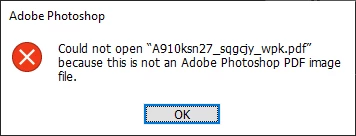
Photoshop launches, but an error message appears stating: "Could not open '[filename].pdf' because this is not a Photoshop PDF image file."

Additional Information:

  • The cover page (which is in color and presumably not an indexed PNG) might open correctly in Photoshop using the same method (though I haven't specifically tested this in this bug report).
  • The issue seems specific to pages within the PDF that are saved as indexed PNG images.
  • My current versions are: Adobe Acrobat [2025.001.20474] and Adobe Photoshop [26.6.0.].
  • I can open that page by dropping the PDF file into photoshop and select whtever page I want. there is no problem oppenning PDF within photoshop. but the problem occured between arobat and photoshop.

This workflow of editing PDF pages directly in Photoshop from Acrobat is crucial for my work, and this bug is significantly hindering my ability to make quick modifications to the black and white content. I hope this information is helpful in identifying and resolving this issue.
2 replies

Hani.sawiress
Inspiring
May 15, 2025

Thank you @Sameer K for your prompt response.

I'm providing the requested information to help troubleshoot the workflow issue I'm experiencing with Photoshop:


System Information: I've attached the system information file as requested. attached to the original post

PDF Handling: Photoshop opens PDFs normally, including documents with various color modes, without any issues when opened directly.
Timeline of Issue: I'm unable to recall the exact date, but my workflow has not been functioning normally for approximately one to two months.
Photoshop Beta: I've tested the same workflow in Photoshop Beta, and the problem persists there as well.
Screen Recording: A screen recording demonstrating the issue is attached. attached to the original post
I hope this additional information helps in diagnosing the problem. Please let me know if you require anything further.

Sameer K
Community Manager
Community Manager
May 15, 2025

Hey, @Hani.sawiress. Thanks for the detailed post. I'll need more info to help you figure this out. Please share a video of the issue and the system info from Photoshop Help > System info > Copy and paste into a text document > Upload and attach here.


Does the PDF open normally if opened directly from Photoshop? Does this happen with a specific set of PDF images with a specific set of assets? When did this last work normally, and has this started to happen since a recent update for Photoshop? 


Also, please test and confirm if the issue exists with Photoshop (Beta). You can get Photoshop (beta) from the Creative Cloud > Apps tab > Beta Apps section. 


Thanks! 
Sameer K

(Type '@' and type my name to mention me when you reply)