



Open for Voting
Everytime I open my PS, the function called "Target Path" is enabled. I never used this feature and I'm not even sure if it is useful for something. I want to permanently disable it, but the app do not does this.
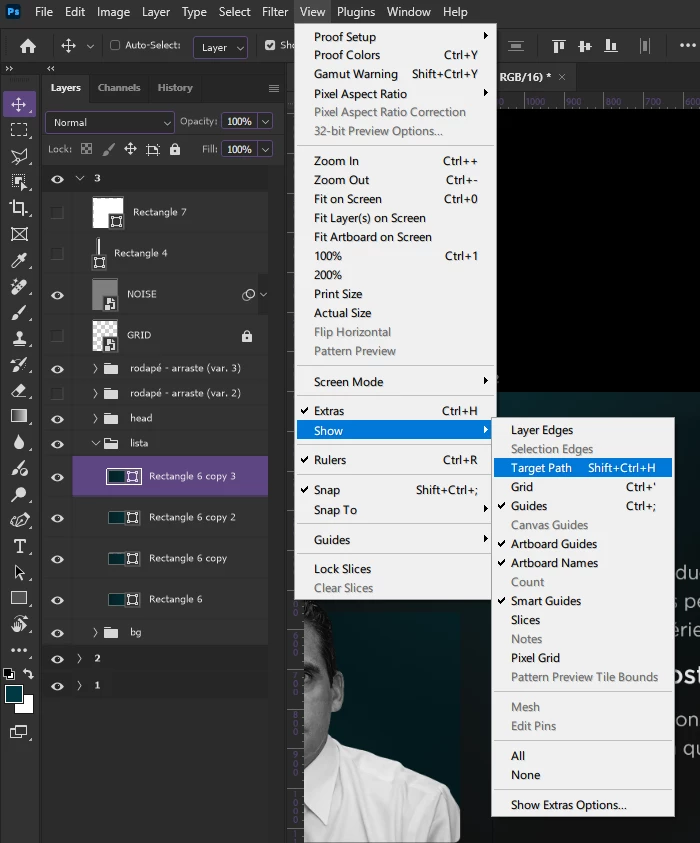
Steps to replicate it:
- Open Photoshop, create a new file and create a shape;
- Open the menu “View”, so “Show” and see that Target Path is enabled;
- Try to transform the shape, it will transform just a invisible bounding box
It keeps turning on after you restart the app. I already reinstalled PS to see if it fixes the bug, but was not the case. Also, the proprieties panel is locked at the “Shape” propriety and I have to manually fix it.
Sys info:
Adobe Photoshop Version: 27.4.0 20260218.r.15 6bd4063  x64 (final, Release)
Number of Launches: 120
Operating System: Windows 11 64-bit
Version: 11 or greater 10.0.26100.6899
System architecture: Intel CPU Family:0, Model:0, Stepping:0, AVX2
Physical processor count: 6
Processor speed: 2904 MHz
Built-in memory: 32708 MB
Free memory: 17972 MB
Memory available to Photoshop: 25143 MB
Memory used by Photoshop: 60 %
Crash Handler: Adobe
DCX Version: 9.22.0
SAM SDK Version: 15.1.0
ACP.local Status:
 - SDK Version: 5.11.0
 - Core Sync Status: Reachable and compatible
 - Core Sync Running: 7.8.10.1
 - Min Core Sync Required: 4.3.66.28
Live Edit Client SDK Version: v6.1.1
Adobe Firefly: Please use any generative AI feature to view the latest version.
OpenColorIO version: 2.5.1
C2PA library version: Adobe CAI SDK: adobe_api/1.22.3
NGL Version: 1.42.0.5
Chalkboard: Disabled.
Chalkboard Doc Create: Disabled.
D3D12Warp renderer: Disabled.
Precise Color Management for HDR Display: Disabled.
Alias Layers: Disabled.
Highbeam: Enabled.
Image tile size: 128K
Image cache levels: 4
Font Preview: Large
HarfBuzz Version: 11.0.0
TextEngine: ATE 7.10.0 (19249c2)
 ======= GPU
Native API stable: True
OpenCL API stable: True
GPUDeny:               0
GPUForce:              0
useGPU:                1
useOpenCL:             1
isGPUCapable:          1
isGPUAllowed:          1
GPUName:               NVIDIA GeForce GTX 1650
GPUVendor:             NVIDIA
NVIDIA GeForce GTX 1650  UNKNOWN, NVIDIA
IsNativeGPUCapable:    1
IsOpenCLGPUCapable:    1
HasSufficientRAM:      1
  GPU accessible RAM:                 3,935 MB
  Required GPU accessible RAM:        1,500 MB
UseGraphicsProcessorChecked:   1
UseOpenCLChecked:              1
Windows remote desktop:  0
Windows available feature level:     12.1
Windows required feature level:      12.0
Windows has required feature level:  1
Display: 1
  Display Bounds: (0, 0) -> (1920, 1080)
  Display scale: 1
  Main Display
  Display Type: SDR
  Display Profile: sRGB display profile with display hardware configuration data derived from calibration
 ------- Sniffer output
[0 ms]
  Launch GPUSnifferThread

[1 ms]
  Start RunAllAPIs

[1 ms]
  C:\Program Files\Adobe\Adobe Photoshop 2026\sniffer.exe -baseTimeMS=16076437 -comment=Photoshop Version: Adobe Photoshop 27.4.0 20260218.r.15 6bd4063 x64

[1 ms]
  Start GetSnifferResult
 AdChoices