


Participant
October 29, 2025

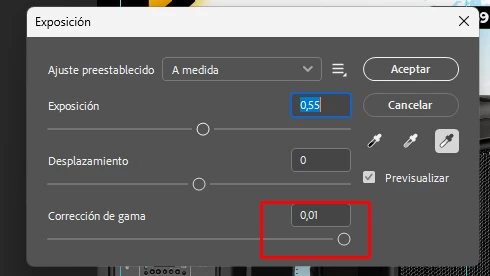
Exposure adjustment sets Gamma Correction to 0.01 automatically (Photoshop v27.x / Windows 11)

  • October 29, 2025
  • 5 replies
  • 153 views

Steps to reproduce:
1. Open Photoshop v27.x on Windows 11.
2. Open any image (8-bit PNG/JPG).
3. Go to Image > Adjustments > Exposure...
4. Move the Exposure slider (for example, +0.5).
5. Observe the Gamma Correction slider: it instantly jumps to 0.01 and the preview becomes heavily distorted.

Actual result:
Gamma Correction resets to 0.01 automatically after moving the Exposure slider, producing a washed-out / broken preview.

Expected result:
Gamma should remain stable or adjust smoothly; it should not reset to an extreme value.

System info:
- Photoshop version: 27
- OS: Windows 11
- GPU: RTX 5070 (12GB)
- GPU acceleration: Enabled
- Bit depth: 8 bits/channel
5 replies

aninALonte
Participating Frequently
February 15, 2026

This happens to me 2.  

Participant
November 14, 2025

Hi!

I've tried restoring Photoshop's preferences, but I still can't get the exposure slider to work correctly. I'm still experiencing the same issue as in the video I attached in another comment below...

What I've had to do is create a fill or adjustment/exposure layer in the Layers panel, and that works correctly for now. I have two computers, one with Windows 10 and the current one with Windows 11, and it seems this error only occurs with Windows 11... I've even completely uninstalled Photoshop, and the problem persists.

I don't know why, but ever since I migrated my operating system to Windows 11, I've had several problems with the Adobe Suit. For example, if I bring several objects from Illustrator to Photoshop (using smart object) and then select the smart object from photoshop and then modify it in illustrator—perhaps the position of those elements—when I save the changes in illustrator, the objects in Photoshop don't adjust; they're cut off, as if they had a clipping mask, but they don't. This is a new bug that only happens on my Windows 11, Also, when printing from Photoshop or Illustrator, I have to open several windows because Windows 11 has a different printing method. The user interface is gone!; it requires many steps, many clicks, and it's quite cumbersome. I suppose I'll have to get used to these issues.

aninALonte
Participating Frequently
February 15, 2026


juan_camilo_7521

did you find a fix please?

Participant
October 29, 2025

Hi @Srishti Bali 


Thanks for the answer, I'm going to attach a video of my problem. It happens with any type of file, I even tried changing the bit depth to 16-bit for the files, but nothing fixed it. I've been dealing with this for a couple of days. I'm going to try resetting the preferences as you suggested. I don't use any plugins, just the base program.

davescm
Community Expert
Community Expert
October 29, 2025

I cannot replicate this here either using Windows 11 and  Photoshop Version: 27.0.0 20251015.r.25

RTX3090 24GB 
Dave

Srishti Bali
Community Manager
Community Manager
October 29, 2025

Hi @juan_camilo_7521,


Thanks for sharing these detailed steps — that really helps! I tried replicating this on my Windows machine (Photoshop v27.x), but it’s working as expected for me. The Gamma Correction value stays at 1.00 even after adjusting the Exposure slider.


Could you please share a few more details to help us narrow this down?

  • Does this happen with all images or only specific files?

  • Have you tried resetting Photoshop preferences after creating a backup of your current settings? (This is important as we might need the backup later.) You can find the steps to back up and reset preferences here: Reset Photoshop preferences.

  • Are any third-party plug-ins installed or running in the background?


We’re assuming this might be a post-update glitch, but let’s confirm with a few more checks before escalating.


Regards,

Srishti