


Exposure is changing when I export. Even looks different in the preview or screeshot of same screen.
I am having an issue with photoshop that I have never had before. I am working with a very large .psb file and it is a depth map image that I am creating so I am using exposure adjustment layers to adjust the lighting of certain layers. I was able to get it to look how I wanted to in my .psb file in photoshop, but when I try to export or save it as a png or jpeg the exposure is off. The layers I worked on with the adjustment layers are over exposed, but it's just how I want it when I'm looking at in photoshop. I even tried taking a screenshot of it while in photoshop but even the screeshot was different. Shouldn't it look exactly the same? That's whats really throwing me. Not sure what I'm doing wrong or if this is a bug or if its my computer. My computer is new. I have a Macbook pro 2024 but just bought it in September 2025. MacOS Tahoe 26.2. I'm using Photoshop 2025 26.10.0 release.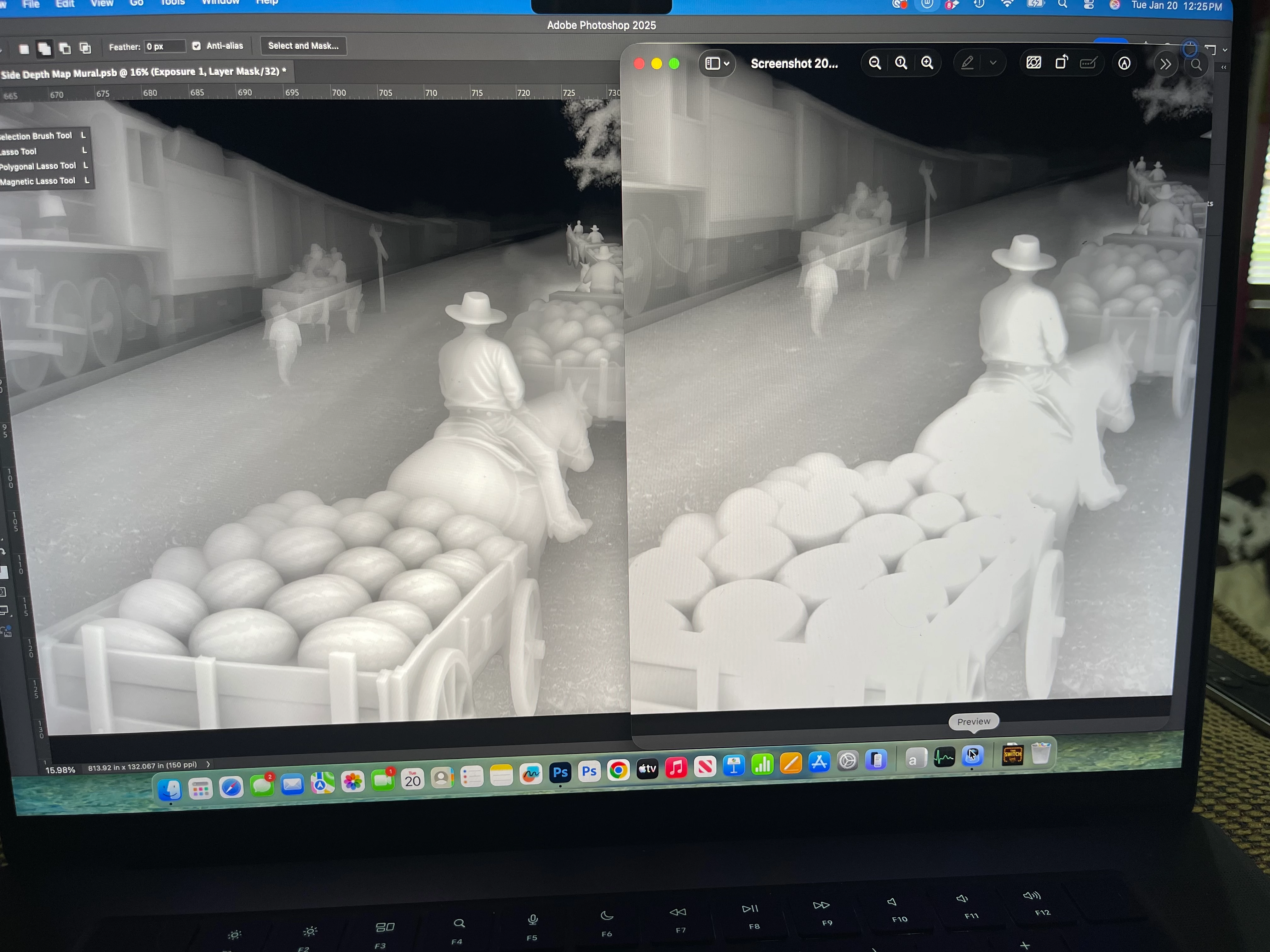
 AdChoices