
Participant
August 24, 2026

Firefly Image 5 / Generative Fill frequently fails in Photoshop 27.9.1

  • August 24, 2026
  • 2 replies
  • 29 views

Hello,

I am experiencing a serious and ongoing problem with Firefly Image 5 and Generative Fill in Photoshop.

I am using Photoshop version 27.9.1 on Windows 11.

The problem started on Friday, August 21, 2026. Before that, Firefly Image 5 worked normally for me.

Since then, generation in Photoshop has become very unstable. Sometimes it generates successfully once or a few times, but then it suddenly stops working.

I receive errors such as:

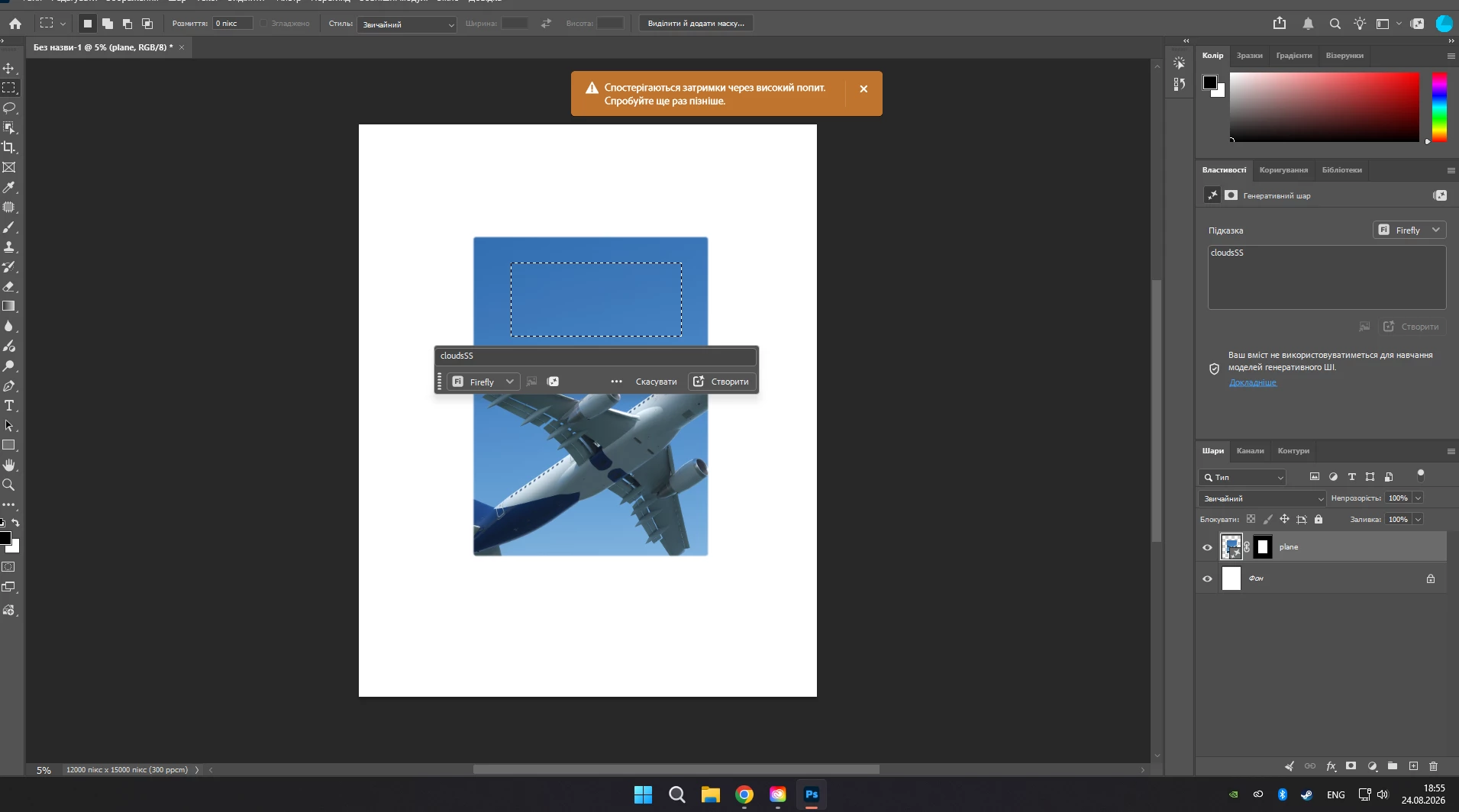
  • “Delays due to high demand. Please try again later.”

  • “There is no connection to the server. Please check your internet connection.”

My internet connection is stable, and other online services work normally.

Today, August 24, I started using Generative Fill at approximately 9:00 AM. The first three generations worked normally, but immediately after that the same problem returned. Further generations started failing with the “high demand” message and sometimes server connection errors.

The problem is not related to one specific Photoshop document. I also tested it by creating a completely new empty document and trying to generate content there.

For example:

  1. I create a new document.

  2. I select a layer or area.

  3. I choose Firefly Image 5.

  4. I enter a prompt.

  5. I click Generate.

Sometimes it works, but very often it fails with the errors mentioned above.

This is seriously affecting my work because I specifically need Firefly Image 5 and Generative Fill inside Photoshop for editing photos. I use it to select parts of an image and replace clothing, add objects, remove objects, or modify specific areas while keeping the rest of the image unchanged.

The Firefly web version is not a suitable replacement for this workflow because I need the direct Generative Fill integration inside Photoshop.

I have attached a screenshot showing the error.

Could you please investigate whether there is currently a problem with Firefly Image 5 or Generative Fill servers, or an issue affecting Photoshop 27.9.1?

This problem has been occurring intermittently since August 21 and makes the feature unreliable for normal work.

Thank you.
 

    2 replies

    Trebosia LLC
    Participant
    August 24, 2026

    Same is happening to me. This version also bugged my entire Photoshop, and I had to recreate a bunch of my actions. Super annoying

    Anshul_Saini
    Community Manager
    Community Manager
    August 24, 2026

    Hi ​@easygoing_Flamingo7562,

    Thank you for the very detailed report. The “Delays due to high demand” message can occur when the generative service is experiencing elevated demand. However, because you’re also intermittently receiving “There is no connection to the server,” and this has been happening since August 21, I’d like to gather a few comparisons before concluding that both messages have the same cause.
     

    The next time Photoshop starts failing, could you please test the following while the problem is occurring:

    1. In the same Photoshop session, switch from Firefly Image 5 to Firefly Fill & Expand and try one generation. Does that work, or does it also produce an error?

    2. Open Firefly on the web and try a generation there. I understand that the web version doesn’t replace your Photoshop workflow; we’re only using this as a diagnostic comparison.

    3. Let us know whether you’re using a VPN, proxy, corporate/managed network, antivirus web protection, or firewall. If possible, briefly test from another network, such as a mobile hotspot.

    4. When the failure begins, does it eventually start working again without restarting Photoshop or signing out? If so, approximately how long does recovery take?
     

    Please also go to Help > System Info > Copy in Photoshop and paste the contents here. One additional test would be useful: install the latest Photoshop Beta 27.11 from Creative Cloud Desktop > Apps > Beta and see whether Firefly Image 5 exhibits the same intermittent behavior there.
     

    Please don’t clear caches or reinstall Photoshop yet. Since successful generations occur before failures begin, I’d first like to compare the models, Photoshop versions, network path, and Firefly web behavior while the failure is active.
     

    Once we have those results, we’ll have a much better idea of whether this needs to be investigated as a Photoshop-specific issue or a broader generative-service/connectivity issue.
     

    Best,

    Anshul Saini