Known Participant
August 20, 2024

"Generate Image" button grayed out after working weeks ago

  • August 20, 2024
  • 6 replies
  • 1795 views

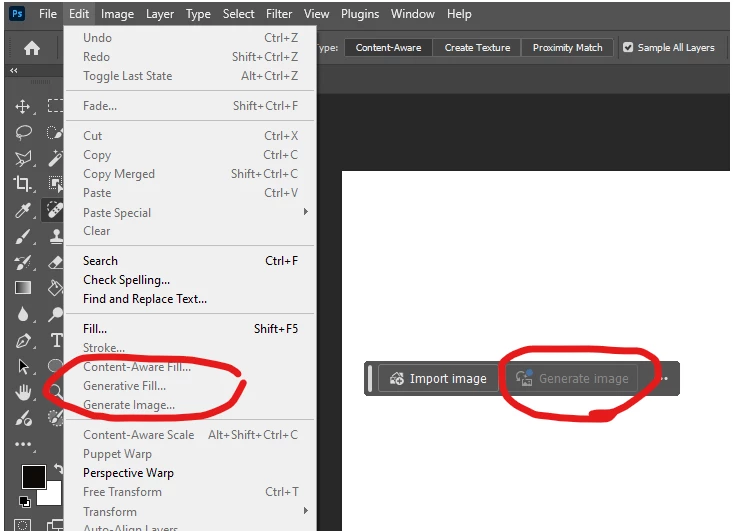
I can create from “New” and set the size for a white background working start, but “Generate Image” is grayed out on both the contextual bar and the drop downs. I’ve used it before successfully. 

The only thing I could find in searching is to make sure that under

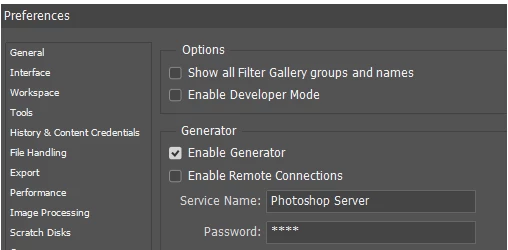
   File >  Preferences > Plugins > Enable Generator checkbox is ticked.

But I checked that and, as you can see in the second image, it is ticked.

I’m not sure what more to do and really wanted to generate some images for a newsletter I’m doing. 

I'm on a Win 11 PC with a current subscription to Adobe Creative Suite.


6 replies

Known Participant
April 23, 2025

Shoot.  I'm sorry but (a) yes, I got it working and (b) I don't remember what we did eight months ago that got me an answer.  Either we fixed a setting somewhere or someone might have explained that I was doing something wrong, but I am using it now. I'm sorry that that's no help. 

Stephen Marsh
Community Expert
Community Expert
April 22, 2025

@lasha_9976 


Generative Fill requires a selection and may also depend on the layer state (for example, no clipping mask).


Generate Image doesn't require a selection.


You also have to agree to the TOS and have a valid/18+ DOB entered into your Adobe user profile/account.

Stephen Marsh
Community Expert
Community Expert
April 22, 2025

I missed this post. I just wanted to let you know that "Enable Generator" pre-dates the AI Generative Fill/Generate Image and is unrelated.


https://helpx.adobe.com/au/photoshop/using/generate-assets-layers.html

Participant
April 22, 2025

got the same prob;em, did you resolve it?


Anshul_Saini
Community Manager
Community Manager
April 23, 2025

Hi @lasha_9976 — thanks for chiming in!


Just to echo what Stephen mentioned: For Generate Image, no selection is needed, but all Gen AI features do require that:

  • You’ve accepted the Terms of Use

  • Your Adobe account has a valid DOB (18+) set

  • You’re signed into Photoshop with a valid subscription

In addition, you could also try the following:

  • Switch to a different internet connection (sometimes network restrictions or firewalls can cause hiccups)

  • Back up your current preferences and reset to fresh preferences to rule out any corruption

Let us know if that makes any difference. We are happy to help troubleshoot further! 😊

Best,

Anshul Saini

Known Participant
August 20, 2024

Thanks, but it's set to 8 so that's not it.  Other ideas?

Ged_Traynor
Community Expert
Community Expert
August 20, 2024

@MiloInSanDiego check Image > Mode, generate image will be disabled if your document is set to 32 bits/channel