
Participating Frequently
July 24, 2026

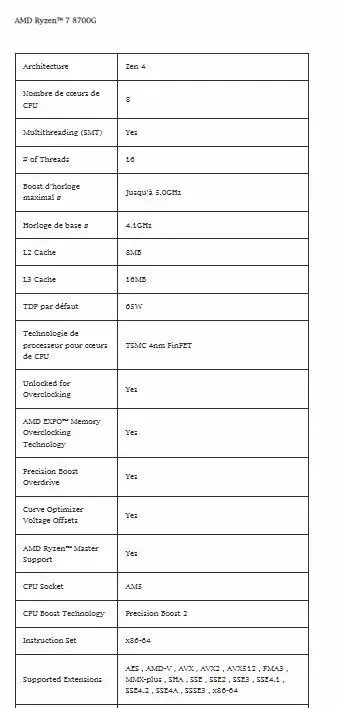
I can't download a new version of Photoshop; an upgrade isn't possible, and my CPU has all the required extensions, but CPU-Z displays them incorrectly.

  • July 24, 2026
  • 1 reply
  • 14 views

The CPU-Z screenshot in the old post was incorrect; the AI also explained that CPU-Z doesn't always display everything correctly.


The CPU-Z screenshot in the old post was incorrect; the AI also explained that CPU-Z doesn't always display everything correctly.


https://esp-tech.myshopify.com/products/amd-ryzen%E2%84%A2-7-8700f?srsltid=AfmBOopv-drGSZdwZ9EiYTku7tZgPin83rXtqFj71bbKmVFPydWwzy_X&shpxid=31301322-3706-4cc0-a7c2-0140c5187e9a&variant=55200585220430&fbclid=IwZXh0bgNhZW0CMTAAYnJpZBExbzJBZkg4ZlBYTjVaZzNJQXNydGMGYXBwX2lkEDIyMjAzOTE3ODgyMDA4OTIAAR7iR9WHXQGclmhxCoSccx_lEBERN7hEXCNrYVHKre2guJlO9MBhx8zAZtVOgQ_aem_YTv7XDi_BFLfxFoEqQBNuw


    1 reply

    Community Expert
    July 24, 2026

    Your posted AI is one thing. That are the technical specification of the CPU.

    The result of CPU-Z shows the CPU specification in combination with the other hardware components of your computer. It’s possible that your mainboard doesn’t support all specifications of the CPU. Maybe an update of the appropriate chipset drivers can help.

    The fact is that you cannot install Photoshop unless your computer meets the required specifications.
    As previously mentioned in the earlier thread, you need to check your hardware and configure, upgrade, or modify it accordingly to meet the requirements.

    The problem definitely does not lie with the Adobe software.

    My System: Intel i7-8700K - 64GB RAM - NVidia Geforce RTX 3060 - Windows 11 Pro 25H2 -- LR-Classic 15 - Photoshop 27 - Nik Collection 9 - PureRAW 6 - Topaz Photo AI