


Issues with saving tiff-files
After the latest update a few days ago I’ve started getting weird issues with my tiff-files. First of all, I save my projects as tiff-files to keep the layers and have better compatibility with all the other photo applications (such as the classic Windows Photo Viewer which I still prefer over other MS viewers).
For some reason most of the tiffs now show me this error message instead of the actual photo:

That had never happened before. Now out of 8 of my latest photos, I get this for 6 of them. All photos have layers and the sizes are similar (100-200MB). I noticed that if I tick the “Save Image Pyramid” checkbox in the “TIFF Options” menu when saving, the viewer can show the image again. I’ve never had to use that option before and it also increases the file size and makes the saving process take longer.
Then issue #2: Saving gets stuck. I click save and see the percentage going up until it freezes at random point. Nothing happens. I tried waiting for 15 minutes but it did not finish. I also tried “Save as...” to get a new file and my work saved. Nope. Same outcome. Then I tried saving as .PSD. Nope.
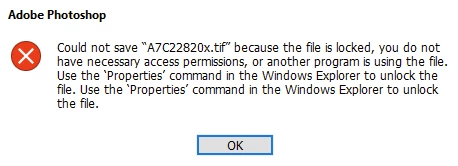
Issue #3: Files get locked. This is related to issue #2. After a failed saving process the .tiff-file gets locked. Normal rename/delete methods don’t work. I can’t do anything with the file. Once I restart Windows Explorer I might be able to delete the file but even this doesn’t work every time. Photoshop does something weird to the files during the saving process and ends up locking the file.
 AdChoices