


Inspiring
September 20, 2024

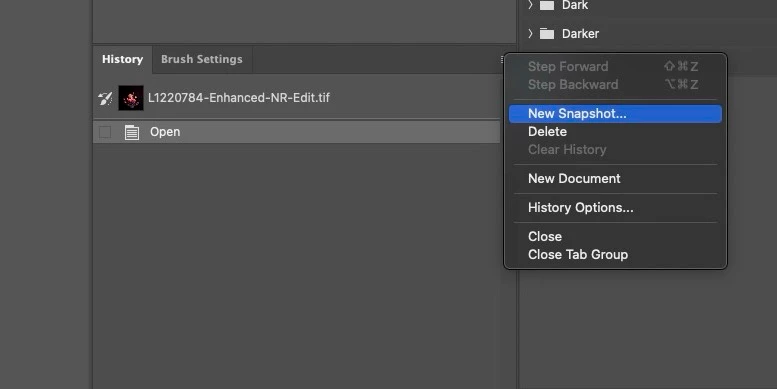
New snapshot options (after the ellipsis)

  • September 20, 2024
  • 25 replies
  • 2121 views

Hi-

In Photoshop 25.12 on Mac 14.6.1 going into the history flyout panel to "New Snapshot" no longer opens the additional options box for selecting current layer.  Instead, a new overal snapshot is produced like it would be if you clicked the little camera icon at the bottom of the palette.  Any idea if something has changed?
 

25 replies

Stephen Marsh
Community Expert
Community Expert
January 30, 2025

@tharrington - You're welcome, I'm glad that you find the script useful as an alternative while this issue is investigated. If the script is installed in the application's Presets/Scripts directory, then a custom keyboard shortcut can be applied without requiring an action.

Inspiring
January 30, 2025

The issue still exists in Photoshop 26.3.0.  I am grateful for the scipt that was written below.  Assigning action to this script has worked well as a workaround. 

Klaus Madengruber
Participant
January 22, 2025

Is there any update on this issue?


I don't understand why something that worked perfectly well, simply disappears? 

Bojan Živković11378569
Community Expert
Community Expert
January 15, 2025

You can rename a snapshot just like you would a layer; simply double-click on the snapshot name. You can use it even while recording Photoshop actions, but that can be cumbersome, of course. Each time, you must select Snapshot 1 and rename it; this can be a workaround in case you need it at any time.

Participating Frequently
January 14, 2025

Hello, 

if it can help, I did a script in an older version where it was working, like 24.7.4, choose to put an option in action panel to change the name, and import the atn in the other photoshop version,  .. also with the ability to set the historic brush..  Just, it needs to create all cases of names before... 

in the 25.11.0 i succeed to chang name and kind of snapshop,

in the 26.2.0, it's going worse... i didn't succed to change name anymore...


so, what's next ?


i dont know how to send atn file, so here a links :


thankshttps://www.swisstransfer.com/d/070ed352-4504-47a5-bf53-22d76ce47c2b 


Klaus Madengruber
Participant
November 14, 2024

Has this been resolved. It's very annoying. the nameing doesn't work in the beta version 26.1.0 nor the main version 26.0.0


Please sort this out quickly!. 


thanks

Participating Frequently
November 14, 2024

Thanks for updating. I have already updated this about the team. 


Thanks, 

Shivani 

Participating Frequently
October 21, 2024

Hi all! Thanks for your patience. 


I've logged a bug for this issue. Please make sure to add your vote to the post. 


Thanks, 

Shivani 

owhatthehecynot
Participant
January 8, 2025

So I have noticed for a few months, even before the 2025 Photoshop update (v26.0+), that "New Snapshot" wasn't working properly, along with the History Brush. I did figure out that the "New Snapshot" dialog box was no longer popping up when you choose "New Snapshot". This is an issue because it was automatically creating a "Full Document" snapshot without being able to select "Current Layer," which renders the history brush unusable (at least for how I use it). The workaround I found was reinstalling the first version of the 2024 PS (v25.0). I am sure it is in later versions because I used it not to long ago, but it is not working in the last version of the 2024 PS (v25.12.1). Hopefully this is something that Adobe will correct in upcoming versions for 2025? In the meantime, this is a work around to help any of you who use it on the regular. I will note, I am up to date in the Apple OS, but I don't feel that would affect this issue, just wanted to note it.

Inspiring
October 16, 2024

I updated as well and the bug persists.  M1 Ultra macOS 14.7 Photoshop 26.0.0

Inspiring
October 16, 2024

Hi Shivani, yes I updated today and the error is still there.

Stephen Marsh
Community Expert
Community Expert
October 16, 2024
quote

I hope this get fixed soon. We use snapshots in a lot of actions and need the naming option. Please Adobe Team fix this soon? Pretty please? @jk19035953 


Until this is fixed, the following code will add a name field to the previous script so that you can enter the name and select the options:


/*
New Snapshot Script.jsx
A temporary hack to workaround a bug in Ps 2024 (25.12.0)
v1.0 - 21st September 2024, Stephen Marsh
v1.1 - 16th October 2024, Added a field to enter the snapshot name
v1.2 - 17th October 2024, Added code to auto increment the default Snapshot name # number
https://community.adobe.com/t5/photoshop-ecosystem-bugs/new-snapshot-options-after-the-ellipsis/idc-p/14872580
*/

#target photoshop

// Main function to create snapshot
function makeSnapshot(theName, fromParam) {
    var s2t = function (s) {
        return app.stringIDToTypeID(s);
    };
    var descriptor = new ActionDescriptor();
    var reference = new ActionReference();
    var reference2 = new ActionReference();
    reference.putClass(s2t("snapshotClass"));
    descriptor.putReference(s2t("null"), reference);
    reference2.putProperty(s2t("historyState"), s2t("currentHistoryState"));
    descriptor.putReference(s2t("from"), reference2);
    descriptor.putString(s2t("name"), theName);
    descriptor.putEnumerated(s2t("using"), s2t("historyState"), s2t(fromParam));
    // Change DialogModes.NO to DialogModes.ALL to confirm overwrite
    executeAction(s2t("make"), descriptor, DialogModes.ALL);
}

var dlg = new Window("dialog", "New Snapshot Script");
dlg.orientation = "column";
dlg.alignChildren = ["fill", "top"];
dlg.spacing = 10;
dlg.margins = 16;

// Get the history states
var historyStates = app.activeDocument.historyStates;

// Create variables to store the highest snapshot number and track if "Snapshot 1" exists
var highestSnapshotNumber = 0;
var snapshotOneExists = false;

// Loop through the history states and check for snapshots named "Snapshot #"
for (var i = 0; i < historyStates.length; i++) {
    if (historyStates[i].snapshot) {
        var snapshotName = historyStates[i].name;
        // Check if the snapshot name follows the pattern "Snapshot #"
        var match = snapshotName.match(/^Snapshot (\d+)$/);
        if (match) {
            var snapshotNumber = parseInt(match[1], 10);
            // Update the highest snapshot number
            if (snapshotNumber > highestSnapshotNumber) {
                highestSnapshotNumber = snapshotNumber;
            }
            // Check if "Snapshot 1" exists
            if (snapshotNumber === 1) {
                snapshotOneExists = true;
            }
        }
    }
}

// Determine the next snapshot name
var nextSnapshotName = snapshotOneExists ? "Snapshot " + (highestSnapshotNumber + 1) : "Snapshot 1";

// Add edittext for the snapshot name
dlg.add("statictext", undefined, "Snapshot Name:");
var nameInput = dlg.add("edittext", undefined, nextSnapshotName);
nameInput.characters = 20;

// Create dropdown with user-friendly labels
var dropdownItems = [
    ["Full Document", "fullDocument"],
    ["Merged Layers", "mergeLayersNew"],
    ["Current Layer", "currentLayer"]
];
dlg.add("statictext", undefined, "From:");
var dropdown = dlg.add("dropdownlist");
for (var i = 0; i < dropdownItems.length; i++) {
    dropdown.add("item", dropdownItems[i][0]);
}
dropdown.selection = 0;

// Create buttons
var btnGroup = dlg.add("group");
btnGroup.orientation = "row";
btnGroup.alignChildren = ["fill", "top"];
var cancelBtn = btnGroup.add("button", undefined, "Cancel");
var okBtn = btnGroup.add("button", undefined, "OK");

// Button click handlers
okBtn.onClick = function () {
    var selectedValue = dropdownItems[dropdown.selection.index][1];
    var snapshotName = nameInput.text; // Get the user-entered name
    makeSnapshot(snapshotName, selectedValue);
    dlg.close();

};

cancelBtn.onClick = function () {
    dlg.close();
};

// Show the dialog
dlg.show();


https://prepression.blogspot.com/2017/11/downloading-and-installing-adobe-scripts.html

Participating Frequently
October 16, 2024

Hey there, 


We're sorry for the trouble. Could you please update Photoshop to the latest version, 26.0, and check if the issue persists? 

https://adobe.ly/3Yp09RU


Thanks, 

Shivani