
Participant
Oct 22, 2024 5:49 PM UTC
Open for Voting

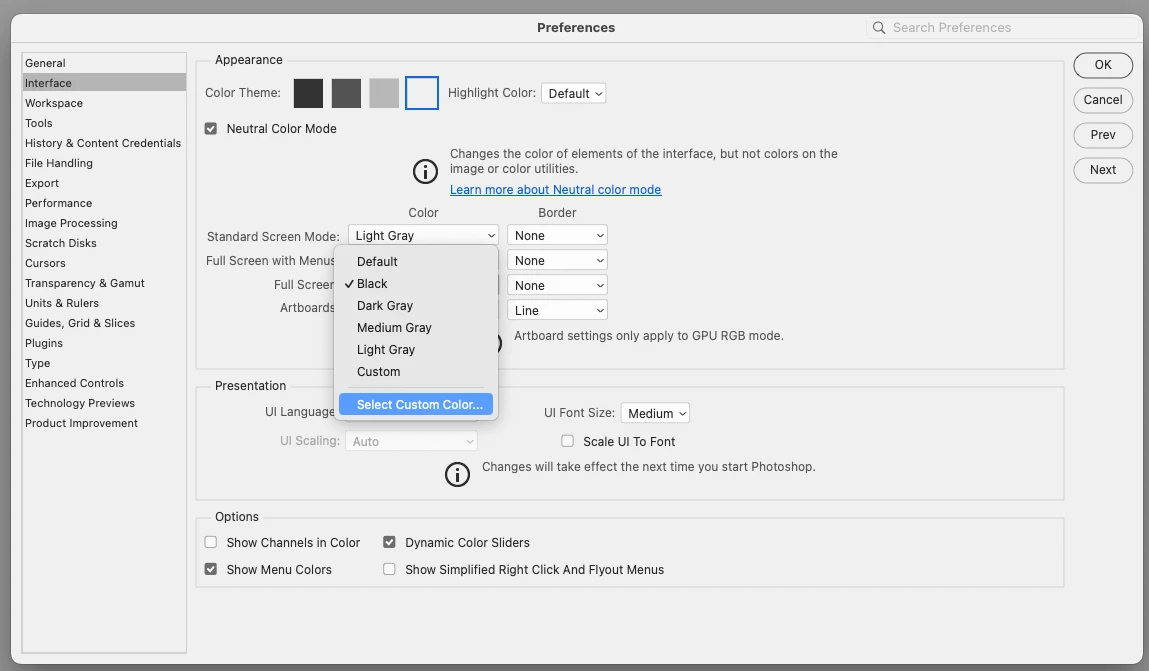
Not able to select a custom color in the preferences / interface window Photoshop 2025

Prior to Photoshop 2025 selecting a custom color (white) in the Preferences / Interface window was to simply click on select a Custon Color and a color selector would pop up. With Photoshop 2025 / Mac nothing pops up. Has the process changed?
4 replies

Conrad_C
Community Expert
Community Expert
Oct 22, 2024 8:58 PM UTC
quote

It still works when right-clicking in the workspace backdrop - which is where I've always done this anyway; so I would never have noticed this.

By @D Fosse 


That’s the same reason I never noticed this, at least for the workspace backdrop…I always right-click. So right-clicking is a workaround for the backdrop, for now.


Mac users, if secondary click is not enabled for your current Mac input device, Control-click the backdrop. 

Translate
D Fosse
Community Expert
Community Expert
Oct 22, 2024 8:39 PM UTC

Actually that whole rolldown is dead, nothing happens with any of the options.


It still works when right-clicking in the workspace backdrop - which is where I've always done this anyway; so I would never have noticed this.

Translate
davescm
Community Expert
Community Expert
Oct 22, 2024 8:31 PM UTC

Same in Windows 11 with v26.0.0

I've moved this to bugs, removed the Mac reference from the title and tagged it as Windows and Mac.


Dave

Translate
Conrad_C
Community Expert
Community Expert
Oct 22, 2024 6:05 PM UTC

I just tried this and got the same thing (Select Custom Color does nothing in all four pop-up menus there), so a moderator should consider moving this thread to the Bugs forum.


Photoshop 26.0.0

macOS 14.7

Translate