

Inspiring
Dec 17, 2018 10:09 AM UTC
Released

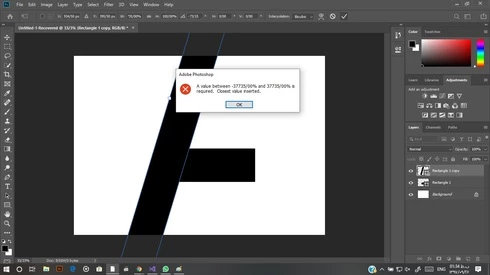
P: A value between ....% to ...% is required. closest value inserted

i want to transform a shape but every time i see this error. how can i fix it? 
14 replies

Participant
Jun 13, 2025 12:09 PM UTC

it's workkss on me, thank you so much🥹

Translate
Participant
Nov 2, 2023 5:18 PM UTC

Hello, I now have this issue again. Can someone please assist?


Translate
Inspiring
May 22, 2020 4:46 PM UTC
آقا مرسی. حل شد
Translate
Legend
Nov 15, 2019 1:51 AM UTC
This issue should be fixed in the current version, Photoshop 2020 v21.x or later. Let us know if you're still having trouble.
Translate
Inspiring
Sep 21, 2019 5:43 AM UTC
the cause of this problem is the change in the middle east region of windows makes
 symbol of dot and backslash should be changed 
so for solving this problem:


control panel --> clock and region --> click region --> additional settings...

--> change decimal symbel ( / )  to ( . ) --> and change - digit grouping symbel ( , ) to ( . )

--> save all change --> close photoshop and open again --> thats all --> problem fix 🙂

Translate
Inspiring
Sep 4, 2019 4:31 PM UTC
داداش دمت گرم نزدیک بود ویندوز سیستم هم عوض کنم بخاطر این مشکل لعنتی لایک داری!
Translate
Inspiring
Aug 31, 2019 6:03 AM UTC
دمت گرم
Translate
Inspiring
Aug 13, 2019 8:28 AM UTC

control panel --> clock and region --> click region --> additional settings...

--> change decimal symbel ( / )  to ( . ) --> and change - digit grouping symbel ( , ) to ( . )

--> save all change --> close photoshop and open again --> thats all --> problem fix 🙂


Translate
Inspiring
Aug 13, 2019 8:27 AM UTC
سلام، انگلیسیم زیاد خوب نیست فارسی تایپ می کنم

در واقع مشکل بخاطر این موضوع هست که علامت
.
در موقع تغییر به فرمت فارسی و تغییر به تقویم فارسی تغییر میکنه به علامت
/
برای حل این مشکل به این صورت عمل کنید


control panel --> clock and region --> click region --> additional settings...

--> change decimal symbel ( / )  to ( . ) --> and change - digit grouping symbel ( , ) to ( . )

--> save all change --> close photoshop and open again --> thats all --> problem fix 🙂


Translate
