
Inspiring
May 9, 2012

P: Actions do not work properly, while "Open Documents as Tabs" are not selected

  • May 9, 2012
  • 16 replies
  • 533 views

Photoshop CS6: While the "Preferences" - "Interface" - "Open Documents as Tabs" are not selected, then some commands in the Actions do not work properly! For example: Copy and paste layer from another document (file) recorded as Action. Please help me! I cannot stand the tabbed interface! Used Adobe Photoshop Version: 13.0 (13.0 20120315.r.428 2012/03/15:21:00:00) x64
This topic has been closed for replies.

16 replies

Inspiring
February 24, 2016
Whenever i create action and i do save for web to save file into jpeg and gif format in action its record in html format so how i can save my file into jpeg and gif format. 
Legend
February 3, 2015
This was fixed in Photoshop CS6 (13.0.1) or later
SG...
Adobe Employee
Adobe Employee
June 12, 2012
Thanks John. I'll get these logged so we can investigate.

regards,
steve
JJMack
Community Expert
Community Expert
June 12, 2012

This script will fail CS6 32Bit preference set to use floating windows,

/* ==========================================================
// 2012 John J. McAssey (JJMack)
// ======================================================= */

// This script is supplied as is. It is provided as freeware.
// The author accepts no liability for any problems arising from its use.

/* Help

$$$/JavaScripts/PasteImageRoll/About=JJMack's PasteImageRoll^r^rCopyright 2012 Mouseprints.^r^rCreate a document for printing on roll paper^rcan also be used as a wall hanging when^rall selected images have the same orientation.^rImages will be rotated to match cell orientation
JJMack's Collage Script

*/

//Set Defaults here
var dfltRes = 300; // default print DPI
var dfltCpys = 1; // default image copies
var dfltPw = 16; // default roll paper width in inches
var dfltPl = ''; // default roll paper length in feet. if set to null script will use 100 ft.
var dfltCw = 4; // default cell width in inches best if it divides paper with evenly.
var dfltCh = 6; // default cell height in inches
//End Defaults

var startRulerUnits = app.preferences.rulerUnits;
app.preferences.rulerUnits = Units.PIXELS; // tell ps to work with pixels

try {
// begin dialog layout
var RollPaperDialog = new Window('dialog');
RollPaperDialog.text = 'Paste Image Roll';
RollPaperDialog.frameLocation = [70, 70];
RollPaperDialog.alignChildren = 'center';

RollPaperDialog.PrintResPnl = RollPaperDialog.add('panel', [2, 2, 200, 56], 'Print Resolution');
RollPaperDialog.PrintResPnl.add('statictext', [10, 16, 50, 48], 'DPI ');
RollPaperDialog.PrintResPnl.docResEdt = RollPaperDialog.PrintResPnl.add('edittext', [50, 13, 90, 34], dfltRes, {name:'prtRes'});
RollPaperDialog.PrintResPnl.docResEdt.helpTip = 'Image Resolution';
RollPaperDialog.PrintResPnl.add('statictext', [96, 16, 140, 48], 'Copies ');
RollPaperDialog.PrintResPnl.imgCpysEdt = RollPaperDialog.PrintResPnl.add('edittext', [140, 13, 175, 34], dfltCpys, {name:'imgCpys'});
RollPaperDialog.PrintResPnl.imgCpysEdt.helpTip = 'Number of copies of selected Images';

RollPaperDialog.PaperSizePnl = RollPaperDialog.add('panel', [2, 2, 200, 56], 'Roll Paper Size');
RollPaperDialog.PaperSizePnl.add('statictext', [10, 16, 50, 48], 'Width ');
RollPaperDialog.PaperSizePnl.aspectWidthEdt = RollPaperDialog.PaperSizePnl.add('edittext', [50, 13, 90, 34], dfltPw, {name:'pprWth'});
RollPaperDialog.PaperSizePnl.aspectWidthEdt.helpTip = 'Roll width in inches';
RollPaperDialog.PaperSizePnl.add('statictext', [96, 16, 140, 48], 'Length ');
RollPaperDialog.PaperSizePnl.aspectHeightEdt = RollPaperDialog.PaperSizePnl.add('edittext', [140, 13, 175, 34], dfltPl, {name:'pprLnth'});
RollPaperDialog.PaperSizePnl.aspectHeightEdt.helpTip = 'Remaing roll length in feet';

RollPaperDialog.CellSizePnl = RollPaperDialog.add('panel', [2, 2, 200, 56], 'Tile Cell Size');
RollPaperDialog.CellSizePnl.add('statictext', [10, 16, 50, 48], 'Width ');
RollPaperDialog.CellSizePnl.aspectWidthEdt = RollPaperDialog.CellSizePnl.add('edittext', [50, 13, 90, 34], dfltCw, {name:'cllWth'});
RollPaperDialog.CellSizePnl.aspectWidthEdt.helpTip = 'Width in inches';
RollPaperDialog.CellSizePnl.add('statictext', [96, 16, 140, 48], 'Height ');
RollPaperDialog.CellSizePnl.aspectHeightEdt = RollPaperDialog.CellSizePnl.add('edittext', [140, 13, 175, 34], dfltCh, {name:'cllHgt'});
RollPaperDialog.CellSizePnl.aspectHeightEdt.helpTip = 'Height in inches';

var buttons = RollPaperDialog.add('group');
buttons.orientation = 'row';
var okBtn = buttons.add('button');
okBtn.text = 'OK';
okBtn.properties = {name: 'ok'};
var cancelBtn = buttons.add('button');
cancelBtn.text = 'Cancel';
cancelBtn.properties = {name: 'cancel'};

// display dialog and only continues on OK button press (OK = 1, Cancel = 2)
if (RollPaperDialog.show() == 1) {
//variables passed from user interface
var res = String(RollPaperDialog.PrintResPnl.prtRes.text);
var copies = String(RollPaperDialog.PrintResPnl.imgCpys.text);
var pprwidth = String(RollPaperDialog.PaperSizePnl.pprWth.text);
var pprlength = String(RollPaperDialog.PaperSizePnl.pprLnth.text); if (pprlength=='') { pprlength= 100; }
var cellwidth = String(RollPaperDialog.CellSizePnl.cllWth.text);
var cellheight = String(RollPaperDialog.CellSizePnl.cllHgt.text);

var maxpaperwidth=pprwidth*res; // Printer Paper width in pixels inches*res
var maxpaperlnth=pprlength*12*res; // Printer Paper Roll length in pixels
var width=cellwidth*res; // Document Cell width in pixels inches*res
var height=cellheight*res; // Document Cell height in pixels inches*res
var cols=0; // Document number of columns will be determined by script using paper width and cell width
var rows=0; // Document rows will be determined by script using columns and # of images selected

if (width>maxpaperwidth) { throw "error1"; }
cols=Math.round((maxpaperwidth/width)-.499); //round down
if (height>maxpaperlnth) { throw "error2"; }
var file = new Array();
file = app.openDialog();//opens dialog,choose images
if (file.lengthmaxpaperlnth) { throw "error4"; }
var doc = app.documents.add(width*cols, height*rows, res);
var currrow=0; var pasted=0;
for (var i=0;iheight ) { backFile.rotateCanvas(-90.0); } // Rotate portraits
if (backFile.height.valuewidth ) { backFile.rotateCanvas(-90.0); } // Rotate landscapes
if (backFile.width.value/backFile.height.value > width/height) { backFile.resizeImage(null, height, null, ResampleMethod.BICUBIC); } // wider
else {backFile.resizeImage(width, null, null, ResampleMethod.BICUBIC);} // same aspect ratio or taller
backFile.selection.selectAll();
backFile.selection.copy(); //copy resized image into clipboard
backFile.close(SaveOptions.DONOTSAVECHANGES); //close image without saving changes

for (var n=0;n ), desc, DialogModes.NO );
}catch(e){}
}

JJMack
JJMack
Community Expert
Community Expert
June 12, 2012
SG...
Adobe Employee
Adobe Employee
June 8, 2012
Hi John,

I'm sorry you're having to use CS3. Can you point me to a sample script that shows the failure with CS4/5? That sounds different than what we're investigating here (since this the OP is CS6 specific).

Also, can you give more info on how the new Image Interpolation preference is braking your scripts?

regards,
steve
JJMack
Community Expert
Community Expert
June 8, 2012
Yes what is happening is the command executes before the switch completes so there is no active document ready to be worked on. Any command that requires an open document will fail.at that point.
JJMack
Inspiring
June 8, 2012
I'd like to bring to your attention a bug that occurs only in the Windows version of PS CS6:

A. DESCRIPTION:
When the "Open Documents as Tabs" option is unchecked under Preferences > Interface, the execution of certain actions gives errors.

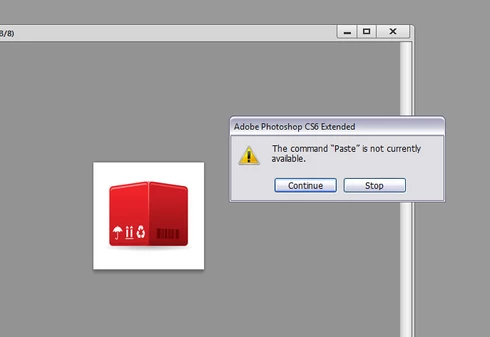
More specifically: if an action opens a second document, copies the content into the clipboard, closes this document and pastes the content onto the first document, the action will halt ("The command paste is not be available").

B. STEPS TO REPRODUCE:
1. Go to the actions panel, hit the Record button to record a new action, and do these steps:
Ctrl-N
Ctrl-N
Ctrl-A
Ctrl-C
Close document without saving
Ctrl-V
Stop recording the action

2. Press Ctrl-K to open the preferences window and uncheck "Open Documents as Tabs" under the Interface tab.

3. Run the action and you will get an error.
Note that this problem doesn't occur on MacOS.
Here's an image that shows the expanded steps of such a basic action:


Thank you
Panos Efstathiadis
www.panosfx.com

JJMack
Community Expert
Community Expert
May 31, 2012
Many Scripts and Actions fail when one edits in floating windows photoshop tries to execute some commands before the current document in ready to be worked on.. I would like to use CS6 that I paid for I hate Tabbed editing. CS6 Scripting also has a bug with User Interpolation preference setting when it the new default setting Bicubic Automatic this brakes some of my scripts.

I also paid for CS5 and Adobe deferred fixing the problem that effect many actions. This bug is also in CS6 and CS4. I spent an hour on the Phone with Adobe support before shelling out for CS6 the told me the bug was fixed in CS6.

So CS3 is the stable Photoshop I use. I would like to use ACR 7 but if I do the ACR 7 Smart Object layers will mot be compatible with CS3
JJMack
JJMack
Community Expert
Community Expert
May 19, 2012
Scripts also fail the same way with Photoshop CS6 32bit floating windows script loses or doesn't set or build the current document object.
JJMack