
Inspiring
May 9, 2012

P: Actions do not work properly, while "Open Documents as Tabs" are not selected

  • May 9, 2012
  • 16 replies
  • 533 views

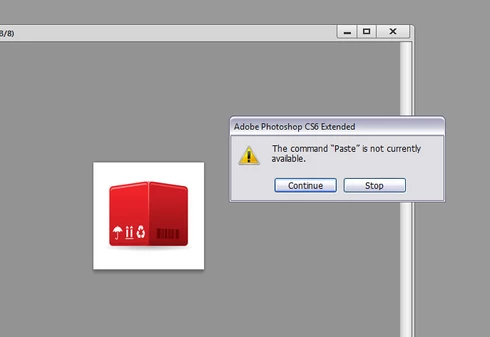
Photoshop CS6: While the "Preferences" - "Interface" - "Open Documents as Tabs" are not selected, then some commands in the Actions do not work properly! For example: Copy and paste layer from another document (file) recorded as Action. Please help me! I cannot stand the tabbed interface! Used Adobe Photoshop Version: 13.0 (13.0 20120315.r.428 2012/03/15:21:00:00) x64
This topic has been closed for replies.

16 replies

Known Participant
May 19, 2012
I also have this issue - see http://forums.adobe.com/message/44215... for more details.

Dave
Inspiring
May 10, 2012
Thank you, guys! But I have a lot of Actions that been created in the PS CS5.1, that do not work now. Hope this bug will be covered in a future updates. Best regards!
SG...
Adobe Employee
Adobe Employee
May 9, 2012
Hi Sergei,

Another thing to try is moving your 'Make' step from the top down to be in-between the 'Close' and 'Paste' steps.

regards,
steve
Pete.Green
Community Manager
May 9, 2012
Hi Sergei,

Thanks for the downloadable action. That helped us see where the problem lies.
I've been able to reproduce the issue in CS6 in Windows (not on Mac), but not in CS5. Seems it's a new bug, I'll make sure it gets looked at.

It looks like the "Paste" command is happening too fast, and before the first image really comes to focus to be able to paste in.

As a workaround, here's what you can do.
Record these steps in your action AFTER the Close command.
Select the Close command, and click the "Record" button in Actions Panel.
Click the Panel Flyout and choose "Playback Options"
Click "Step by Step" and click OK
Then click Stop recording
THEN
Select the Paste step, click Record again
Click the Panel Flyout and choose "Playback Options"
Click Accelerated, then click OK.

This will cause Photoshop to slow down a bit between the close and paste command in order to wait for the image to become in focus.

Hope this helps!
Pete
Inspiring
May 9, 2012
Dear Peter! I have uploaded ZIPped ATN-file to my web-server, you can get it here: http://www.lepyokhin.com/misc/testset... The file contains ATN-file and tested PSD file, that should be placed to the C:\ drive, at the root-folder. Then you can try the Action with "Open Documents as Tabs" toggled on and off. Hope this can help to understand the problem. With best regards, Sergei.
Pete.Green
Community Manager
May 9, 2012
I'm able to setup an action to do the following:

My action steps:
Selects all
Copy Merged
Select Next Document
Paste

In my tests in both Win and Mac I'm able to perform this action successfully both with tabbed, and non-tabbed (floating) windows

Could you provide a screenshot of your action steps in the actions panel? or provide some other information that might be causing the issue?

Thanks