Participant
April 29, 2025

P: Adjusting layer properties doesn't work for Hue/Saturation/lum. HSL layers

  • April 29, 2025
  • 64 replies
  • 11649 views

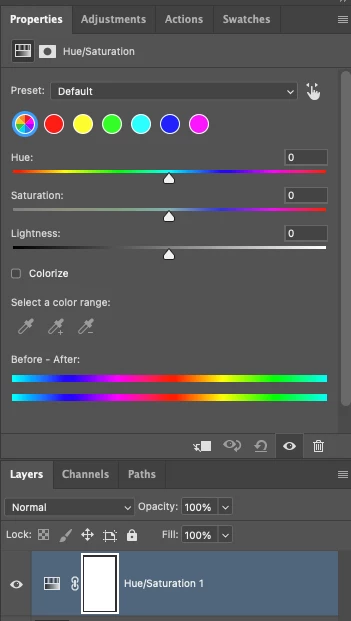
The tab to click on and change the properties for an adjustment layer randomly disappears. Quitting and re-opening the app solves the issue, but it will happen again within minutes, usually when switching between different projects or different app on the computer. 

On Photoshop v26.6 - Mac Mini M4 pro, 32gb ram, 1tb ssd.


Any help would be appreciated!
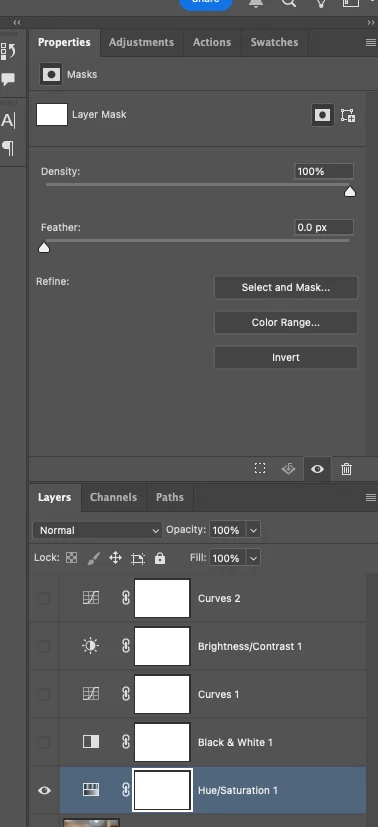
ss

64 replies

Known Participant
May 6, 2025

I have been running into the exact same problem. Yet to figure out how to reproduce it.


At first I blamed my outdated Intel iMac, because it does tend to happen during heavy workloads, as the whole system gets laggy. But now I see that it happens on the latest Apple Silicon as well.


I could add:

1. It returns to normal just after you close and re-open the PSD, without having to restart Photoshop.

2. If you try "Refresh prominent colors" from the contextual bar, you see an error says 'Could not complete the Refresh prominent colors command because of a program error."

Participating Frequently
May 3, 2025

BUG:


Maybe I'm doing something wrong but when I use the 'default' colors and adjust my yellows to change the hue (using the slider) I see a change to both the image and the circle thumbnail. BUT when I use the 'prominent' colors and adjust the yellow nothing happens to the thumbnail and the image ONLY gets partially adjusted: the photo's yellow tones shift with my adjustments but the solid block of yellow remains unmodified - the hue does not shift to pink. This is contrary to changes we see using the 'default' color choices.


Secondary example when I use the 'prominent' color and adjust the beige thumbnail you see a color adjustment to both the image and the circular thumbnail. So in this instance the beige gets adjusted and the thumbnail shows a split for before and after colors.


NOTE: the bear and yellow block are one layer - not stacked layers. something seems broken here.


please see the attached snaps for reference.

c.pfaffenbichler
Community Expert
Community Expert
May 5, 2025

Please provide the file with the Adjustment Layers. 

Community Manager
April 29, 2025

Hi @Sam Singleton! Welcome to the community!

I tried testing around but couldn't reproduce this issue, unfortunately. Have you found any way to consistently cause the adjustment layer properties to disappear? Is this only happening with the Hue/Saturation adjustment layers?


For now, one thing we could try is resetting preferences. This will restore Photoshop to its default state and often helps with miscellaneous errors. Just make sure to create a backup beforehand, as it will reset your workspaces, brushes, and other settings.

Thank you! 

Alek

*(If you mention me with an @, like @Aleke, I’ll get a notification and can respond faster.)*
Participant
April 29, 2025

I have been a loyal Photoshop user for over 6 years, but I must express my extreme disappointment with the latest updates.

Once again, the UI has been completely restructured, making it extremely difficult to access and use essential functions, especially within Adjustment Layers like Hue/Saturation. Instead of focusing on stability and performance, it seems the team is constantly rearranging UI elements without real user benefit.

As a professional and an Art Lead managing a studio team, this update has caused a full day's loss of productivity. Important features became inaccessible or confusing, and numerous bugs appeared. For the first time, basic functionality such as using the keyboard with non-English layouts is broken. I cannot even add a Hue/Saturation layer easily anymore — and I can't tell if it's a bug or simply an unintuitive new workflow.

Small but critical issues are piling up with each update, undermining trust in Photoshop as a stable tool for professional work. This situation is forcing me — for the first time — to seriously consider switching to alternative software for my studio.

I urge Adobe's management to reconsider the current approach: stop unnecessary UI changes and prioritize stability, reliability, and user workflows.

Deeply disappointed,
A long-time user seeking ways to roll back to an older version immediately.

davescm
Community Expert
Community Expert
April 29, 2025

Hi,
'...I cannot even add a Hue/Saturation layer easily anymore...'

What is it that you see different about the Hue/Sat adjustment layer? The only difference I see here is that the drop down menu of target colour ranges has been replaced by a set of clickable circles. The shortcuts to those colour ranges work the same as in earlier versions (Alt+2, Alt+3...etc.)
The adjustments panel used to have reveal arrows for presets and single adjustments. Those now appear as tabs, rather than reveal arrows, but it doesn't seem any more or less convenient particularly as the last tab used sticks. The panel also lets you arrange the icons as a list or in rows and again the setting sticks. Shortcuts can of course still be assigned to the adjustment layers.


I agree that there are some long standing bugs I would like to see fixed.


As far as roll back, you can install the current and previous versions from the CC app and, if you uncheck remove previous versions, they can stay on your system through future updates. I have several versions installed here (mainly for testing).

Dave