Participant
April 29, 2025

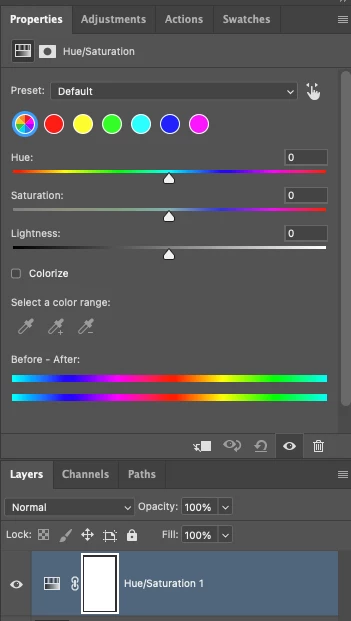
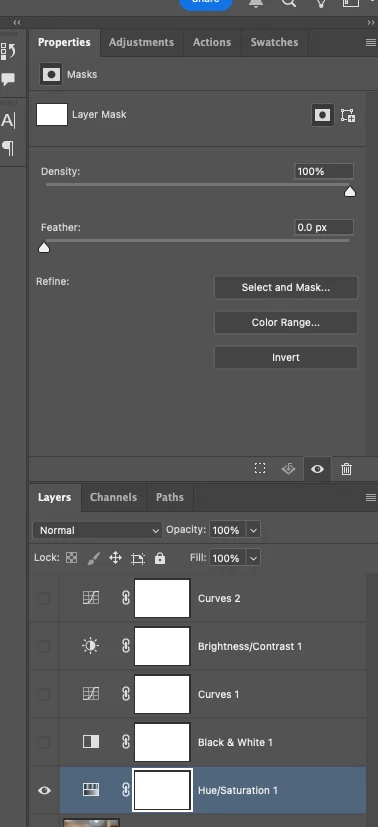
P: Adjusting layer properties doesn't work for Hue/Saturation/lum. HSL layers

  • April 29, 2025
  • 70 replies
  • 12612 views

The tab to click on and change the properties for an adjustment layer randomly disappears. Quitting and re-opening the app solves the issue, but it will happen again within minutes, usually when switching between different projects or different app on the computer. 

On Photoshop v26.6 - Mac Mini M4 pro, 32gb ram, 1tb ssd.


Any help would be appreciated!
ss

70 replies

Community Manager
July 18, 2025

Hi @antonioi21376345, @Michal G_1, and everyone else affected. Thank you so much for your reports and for sharing the videos.

The team has reviewed your findings and is actively looking into the issue. We’ll work on getting a fix out as soon as possible.


A workaround you can try for now is to convert the layers into a smart object and then rasterize, instead of merging the group.
Really appreciate your patience and help in flagging this!

Best,
Alek

*(If you mention me with an @, like @Aleke, I’ll get a notification and can respond faster.)*
Participating Frequently
July 17, 2025

@Aleke New video of odd behavior. Notice how the properties disappear when the HS layer is moved above "Group Copy 1" .. and then reappear if the layer is moved back down. 

https://youtu.be/2aN4WduWqsY

July 12, 2025
July 12, 2025

The problem persists in version 26.8.1 on Windows.

When you perform a merge group operation on any layer group, you cannot access the hue/saturation layer properties; only the mask properties for that layer are displayed.

Participant
July 8, 2025

workaround is to quit and re-open for now 🤷‍♂

ThijmeBreukers
Participant
July 8, 2025

I have the exact same problem; very frustrating; would love to learn a workaround or fix...! thank you 

Participant
July 1, 2025

Also still having this issue with 26.8

Participating Frequently
June 24, 2025

I haven't noticed any rythm or reason for the bad layers. Only that once a bad adjustment layer appears, all subsequent hue/sat adjustment layers are also bugged (i.e., with mask tabs, but no property tabs). Relaunching PS, any file works fine and new adjustment layers work... until at some point another bad one crops up. I could send a file in which this has happened, but they're quite large and I do not hold copyright to the images... they'd be secure?

Known Participant
May 30, 2025

Attached a video example. Project A Loads both Hue/Sat and Mask properties no issue. Project B loads Hue/Saturation as a Mask only layer and won't display the layer propertiers to adjust, no matter what.

Inconsistently happens in 16bit and 32bit projects, couldn't trigger it in 8bit projects.

Anshul_Saini
Community Manager
Community Manager
May 30, 2025

Hi @Angel_Leyenda,


Thanks for reporting this issue.


To help us investigate further and escalate this properly to the product team, could you please share the following:
 1. A sample PSD file where this issue occurs (preferably “Project B” as mentioned).
 2. Your system information from Photoshop: Go to Help > System Info and copy the full output into a .txt file.
 3. Any specific steps (if known) that you take before the adjustment layer becomes non-functional.


Once we have this information, we can investigate further what’s causing this and share it with engineering for a closer look.


Appreciate your help in narrowing this down!

Best,

Anshul Saini

Participating Frequently
May 28, 2025

PS 26.7.0 running on Mac OSX Sequoia 15.4.1:


Creating a new Hue/Sat adjustment layer intermittently results in a layer whose Properties panel includes ONLY a mask, and no properties. 

PS must be re-launched in order to access the hue/sat controls. 


Additionally, the "direct selection" tool can on longer be selected by use of a keyboard shortcut. I.e. the key board shortcut is in place, but the key fails to select the tool. 

Srishti_Bali
Legend
May 28, 2025

Hi @antonioi21376345


Sorry to hear you're experiencing this issue. Has this issue started occurring after the recent release? I recommend resetting Photoshop preferences to see if that resolves the problem.

Before doing so, please make sure to back up your preferences, as resetting will restore everything to default settings.


Steps are shared here.


Regards,

Srishti