Participant
April 29, 2025

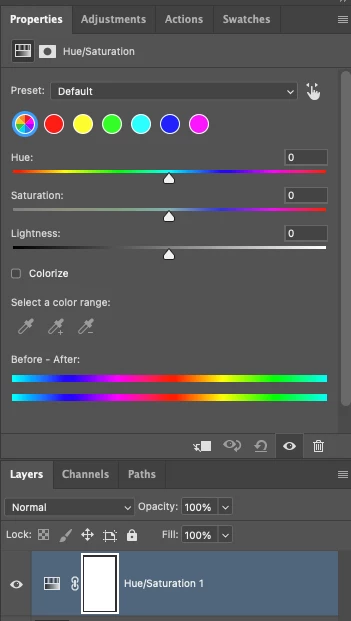
P: Adjusting layer properties doesn't work for Hue/Saturation/lum. HSL layers

  • April 29, 2025
  • 66 replies
  • 11927 views

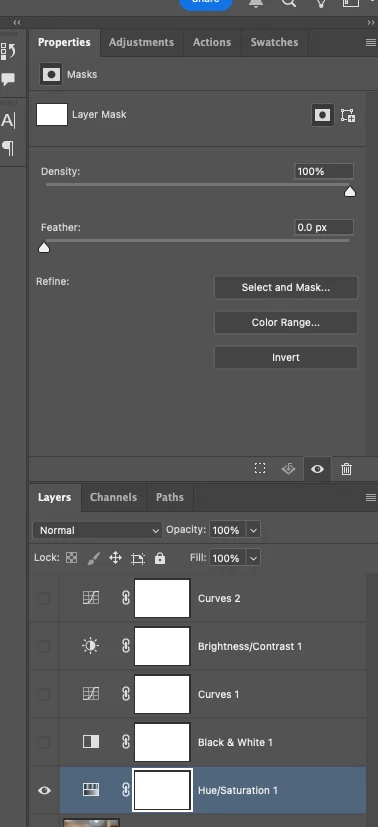
The tab to click on and change the properties for an adjustment layer randomly disappears. Quitting and re-opening the app solves the issue, but it will happen again within minutes, usually when switching between different projects or different app on the computer. 

On Photoshop v26.6 - Mac Mini M4 pro, 32gb ram, 1tb ssd.


Any help would be appreciated!
ss

66 replies

Participant
July 28, 2025

Hello
I'm looking to change the hue/saturation. but sometimes when i add it as an adjsutment layers it doesn't wanna work. There is no color or saturation adjustment panel. It just says no mask selected. could you help me, please
Best,


Participant
July 24, 2025

置顶回复的办法不管用,等于说这个问题还没解决,自从这个色相饱和度更新形式之后,就有这个问题,和大家的情况一样,我只是在表达,置顶回复的方法不管用。

Known Participant
July 24, 2025

@Aleke you do realize that the workaround you are suggesting has nothing to do with the issue at hand?

Participant
July 24, 2025

Exactly same bug, appears only on Hue/Saturation layer. And only on this one specific picture. I can create and use H/S layer on the other picture, but when I drag it to first picture, edit panel is replaced by mask panel.
I don't know, problem with memory? Number of layers?
Mac mini M1 2020, 16GB, Sequoia 15.5

AxelMatt
Community Expert
Community Expert
July 24, 2025

@LYPIN89 What exactly doesn't work? Please be more specific.

Only saying "I doesn't work" doesn't help anybody.


My System: Intel i7-8700K - 64GB RAM - NVidia Geforce RTX 3060 - Windows 11 Pro 25H2 -- LR-Classic 15 - Photoshop 27 - Nik Collection 8 - PureRAW 6 - Topaz Photo AI
Participant
July 23, 2025

不管用。。。

Community Manager
July 18, 2025

Hi @antonioi21376345, @Michal G_1, and everyone else affected. Thank you so much for your reports and for sharing the videos.

The team has reviewed your findings and is actively looking into the issue. We’ll work on getting a fix out as soon as possible.


A workaround you can try for now is to convert the layers into a smart object and then rasterize, instead of merging the group.
Really appreciate your patience and help in flagging this!

Best,
Alek

*(If you mention me with an @, like @Aleke, I’ll get a notification and can respond faster.)*
Participating Frequently
July 17, 2025

@Aleke New video of odd behavior. Notice how the properties disappear when the HS layer is moved above "Group Copy 1" .. and then reappear if the layer is moved back down. 

https://youtu.be/2aN4WduWqsY

July 12, 2025
July 12, 2025

The problem persists in version 26.8.1 on Windows.

When you perform a merge group operation on any layer group, you cannot access the hue/saturation layer properties; only the mask properties for that layer are displayed.