Participant
April 29, 2025

P: Adjusting layer properties doesn't work for Hue/Saturation/lum. HSL layers

  • April 29, 2025
  • 70 replies
  • 12614 views

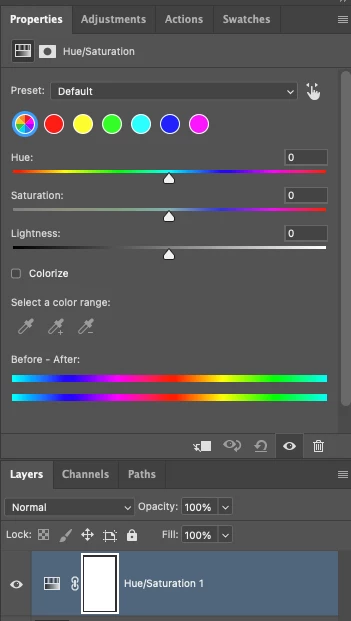
The tab to click on and change the properties for an adjustment layer randomly disappears. Quitting and re-opening the app solves the issue, but it will happen again within minutes, usually when switching between different projects or different app on the computer. 

On Photoshop v26.6 - Mac Mini M4 pro, 32gb ram, 1tb ssd.


Any help would be appreciated!
ss

70 replies

Known Participant
September 6, 2025

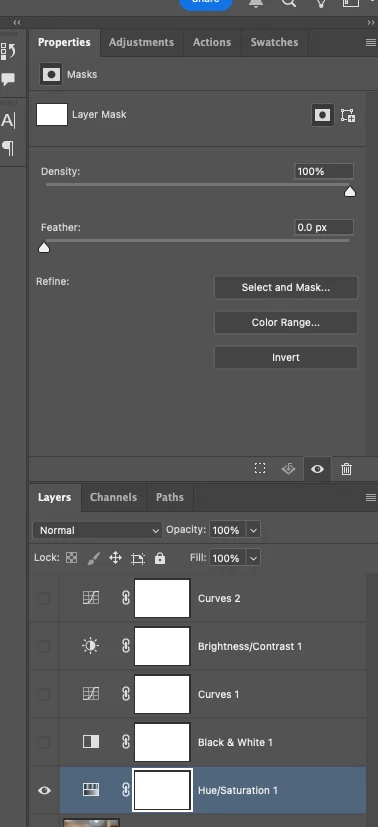
Just got a new position, setting up new imac and photoshop and getting my workspace how i like it, and find the Hue/Saturation adjustment layer just...doesnt work. It has nothing to do with color values, just "Density" and "Feather". All other adjustment layers have their properties display correctly. I can use H/S as a destructive edit, but thats it.


I havent even gone into Preferences yet, so its not a "reset preferences" issue.

Trevor.Dennis
Community Expert
Community Expert
September 6, 2025

Can you show us a screen shot of your workspace with layers and properties panels?

So this is a new system, and Photoshop has been installed for the very first time?

Is this the release version of Photoshop?  Beta now has a new Color & Vibrance adjustment layer.

It sounds like you are able to select the Hue/Sat adjustment layer, but it is not showing what you expect in the Properties panel.


Anything you can tell or show us to clarify would help.  

Trevor.Dennis
Community Expert
Community Expert
September 6, 2025

Just realised whaty is going on.

You have the mask selected

Participant
September 4, 2025

Bonjour,

Depuis plusieurs mois maintenant quand j'utilise la fonction "teinte saturation" je n'ai pas accès aux propriétés. Parfois elles s'affichent et parfois non 

Est ce que vous pouvez m'aider

Merci

Catherine


Participant
September 4, 2025

Voici une capture d'écran 

Merci de votre aide

Participating Frequently
September 1, 2025

Still cant believ this hasnt been fixed with multiple people reporting it across multiple builds of the program...

When are we going to get an update on the fix for this?

Sameer K
Community Manager
Community Manager
September 2, 2025

Hey, @Chris37411006chc0. We understand your frustration. The team has been investigating this, but due to the intermittent nature of this issue, we haven't found a repeatable pattern to reproduce it. We're reviewing every instance reported here to find the trigger. 


I hope you understand. Thanks!
Sameer K
(Type '@' and type my name to mention me when you reply

Participating Frequently
September 2, 2025
@mystic_soldier7700

Have you tried grouping all the layers of a rather large (~2gb, many
layers) file together ⌘-G, duplicating the group ⌘-J, merging the copy ⌘-E,
and then creating a new HSL adjustment layer above the merged copy? That
usually bugs out on my system.
Known Participant
August 24, 2025

I just updated to 26.10 and unfortunately this problem still exists. I use a TON of HSL adjustment layers and having to quit and relaunch PS every time this pops up (which is typically once or twice per image I edit) is extremely frustrating. If anyone from Adobe would like me to screen record an edit to show when it happens, I would be happy to. I can't see the pattern for when it happens, so maybe an engineer from Adobe would see what the issue is.

Participating Frequently
August 24, 2025
I’ve noticed that if I move the hsl layer down below the image layer, I can
make adjustments and then move it back up. Which is super dumb, but
sometimes faster than relaunching. This sucks adobe.
c.pfaffenbichler
Community Expert
Community Expert
August 21, 2025

»Am I paying a yearly subscription, or am I working as a BETA tester?«

Are you using the general release version or the Beta version? 

Participating Frequently
August 21, 2025
I'm using general release, but they're asking me switch to Beta in order to
have a basic adjustment layer *possibly* work.
Inspiring
August 21, 2025
quote

Your customer base is discontent. 


By @antonioi21376345 


Considering they've made $22.6B by end of may this year (10% up year over year) the discontent doesnt really show in numbers:P

Participating Frequently
August 11, 2025

Excuse me? Am I paying a yearly subscription, or am I working as a BETA tester? -- Please tell your higher ups that these beta fixes are insufficient. Your customer base is discontent. 

Participating Frequently
August 11, 2025

Good morning.


Ive got an ongoing issue where the hue and sturation tool within photoshop keeps breaking, there doesnt seem to be a aprticular reason why, but every so often the tool stopps displaying the properties, and instead just shows the density slider and feather slide from a differing menu. Ive found a reddit post about this being an ongoing bug now for over 3 months, just wndering how people are fixing it.


Part of me is hoping im doing something stupid instead here, but all other tools work fine

screenshots showing both areas slected so no confusion im not clicking the mask etc.

Version 26.9

Windows 11

Thanks 

Participating Frequently
August 8, 2025

It's getting worse for me

Participant
August 8, 2025

I am also having the same issue at least in Photoshop Beta. Sometimes closing Ps and opening the project again and adding a new Hu/Saturation adjustments fixes it. But not all the time. Sometimes only if I open in an older version of PS it works.

Adobe, we are paying more and more for your software, please fix these basic things!