Participant
April 29, 2025

P: Adjusting layer properties doesn't work for Hue/Saturation/lum. HSL layers

  • April 29, 2025
  • 70 replies
  • 12596 views

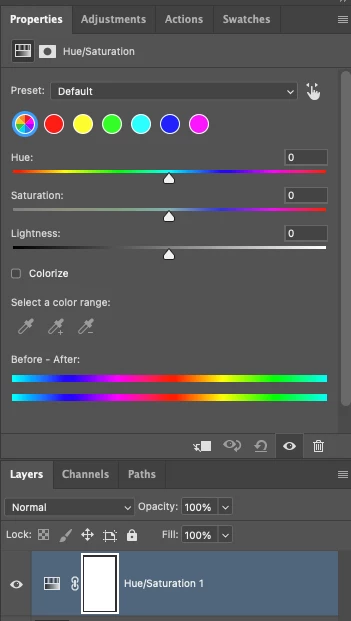
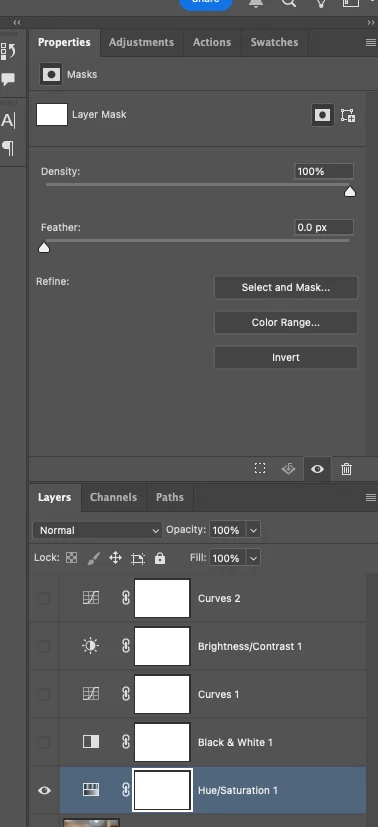
The tab to click on and change the properties for an adjustment layer randomly disappears. Quitting and re-opening the app solves the issue, but it will happen again within minutes, usually when switching between different projects or different app on the computer. 

On Photoshop v26.6 - Mac Mini M4 pro, 32gb ram, 1tb ssd.


Any help would be appreciated!
ss

70 replies

Inspiring
October 23, 2025

@Anshul_Saini @Sameer K 


I have found a way to 100% reproduce it, at least on my machine it is.


Photoshop 26.11

macOS Tahoe 26.0.1 on Mac Studio M4 Max


  1. Open any image
  2. Create a blank layer
  3. Create a Hue/Sat adjustment layer
  4. ⌘⌥+G to clip that Hue/Sat to the blank layer
  5. Group the two newly created layers (see attached image)
  6. ⌘+E to merge the group into a layer
  7. Create another Hue/Sat adjustment layer
  8. There you go. No layer properties.


9. Move it down and the properties panel becomes available again. (as @antonioi21376345 mentioned). Move it back up and you lose it again.


---


So something goes wrong when you flatten a group that contains a clipping hue/sat adj layer?

I hope this is the trigger you are looking for.


I first replied to this thread on May 6th. It's been too long.

We need this fixed.


I am from China, so I probably won't be able to join your debug session. Good luck.


---


Guys, if you can reproduce this too, please help the adobe team.


Sameer K
Community Manager
Community Manager
October 23, 2025

@11010397 —Awesome! Thank you so much for your effort. I've recreated this on Windows. I'll share the steps and the video replay with the team to verify. 

Best, 
Sameer K

ronny g30407266
Participant
October 6, 2025

Same here — it’s been two months since this issue started, and Adobe @Anshul_Sainistill hasn’t fixed it. Isn’t all the money we pay enough to get this resolved? 

Anshul_Saini
Community Manager
Community Manager
October 7, 2025

Hi @ronny g30407266 @CC5F96 @Dziekonski Photography,


Thank you all for continuing to share your reports and screenshots about the Hue/Saturation adjustment layer properties issue. We understand how frustrating this has been and how much it’s impacting ongoing work.


Our internal teams have tested this extensively across different environments, but so far, we’ve not been able to reproduce the issue. That’s why your reports are especially important; they help us understand where and under what circumstances this behavior occurs.


To help us narrow this down further, please try the following step if you can:

  • Please create a new user profile (admin) on your system and install Photoshop within it.

  • Launch Photoshop under the new admin user profile and test the Hue/Saturation adjustment layer to see if the issue still occurs.

This will help determine whether the problem is related to something within your existing user account (such as a corrupted preference or permission conflict).


If the issue persists even in the new profile, please let us know; that’s valuable information for our engineering team. And if you’re able to reproduce it consistently in a new user admin profile, don’t forget to DM me your Adobe email ID, phone number, and system details so I can arrange a live debug session with the product team.

We’ll schedule the ebug session between 10:00 AM and 3:00 PM PST, and our goal is to capture the issue in real-time.


We truly appreciate your help and cooperation as we continue to investigate this. Special thanks to community members and experts who’ve been sharing observations. This helps ensure the issue gets the right visibility internally.


Best regards,

Anshul Saini

Participating Frequently
October 6, 2025

Just had this issue now. Using Photoshop 2025 (updated to version 26.11.0 a few days ago) on a Macbook Pro. Hue-adjustment layer not working/displaying properly (showing density/feather?). Even when I don't use an adjustment layer and just use hue/saturation still displays this way. I restarted several times, still not working. Is there a workaround? I  have a deadline today.

Participant
October 6, 2025

I've been having the same issue with Photoshop 2025 (current version 26.11.0). I'm on Mac Studio M1 Ultra. I need to close and re-open images to make the hue/sat adjustemtns about 90% of the time. If I click on the floating saturation bar, I get this error code:


Anshul_Saini
Community Manager
Community Manager
October 3, 2025

Hi everyone,


Thank you all for your continued patience and detailed reports on this issue. We completely understand how disruptive this has been, and we truly appreciate everyone who’s shared screenshots and feedback so far.


Our internal teams have been actively testing this across multiple environments, but it appears to be environment-specific.


To help us move this forward, we’re now arranging a live debug session with members of the Photoshop product and engineering teams early next week (Monday or Tuesday, between 10:00 AM and 3:00 PM PST.


If anyone here can reproduce this issue 100% of the time (not intermittently), please send me a direct message (DM) with the following details:

  • Your Adobe email ID (the one linked to your Creative Cloud account)

  • A phone number where we can reach you during that window


We’ll coordinate directly with you to set up a brief debugging session, allowing the team to capture the root cause in real-time.


Thank you again for your help in investigating this matter.


Best,

Anshul Saini

Participant
October 2, 2025

Totally agree that it is beyond comprehension that adobe has not fixed this issue. I was the member who first raised this issue here and still today, the only solution is to quit PS and restart to have HueSat layer funciton correctly. PS is currently a broken broken that exists only to fustrate its users.

October 2, 2025

It's ridiculous that Adobe hasn't been able to diagnose this bug for so long, offering solutions that don't work. This is how seriously you treat your users...

@Aleke  @CMass @Srishti Bali @Anshul_Saini 

yzeal
Participant
September 30, 2025

Same issue here: the properties panel only displays the masks option, can't select hue/saturation. It's only the hue/saturation adjustment layer, all the other adjustment layers work normally. Restarting Photoshop fixes the issue for a while.

This is on Windows 11 in Photoshop 26.11.0.

Participant
September 19, 2025

Apparently this is a common issue when using the Beta version. 

Participant
September 18, 2025

Same here in 2025, did anyone have a solution? 
Mine does't even show the sliders, just the mask options (grayed out because the mask isn't selected)

Any tips appreciated 🙂

Bojan Živković11378569
Community Expert
Community Expert
September 18, 2025

Please post a screenshot showing the Layers panel alongside the Properties panel.