Participant
Apr 29, 2025 8:57 AM UTC
In Development

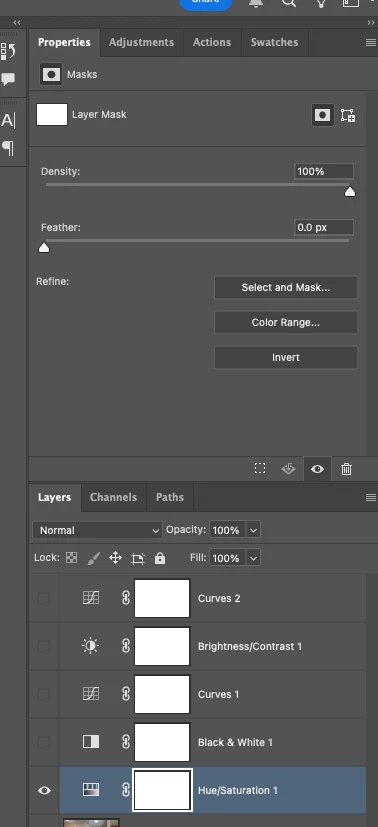
P: Adjusting layer properties doesn't work for Hue/Saturation/lum. HSL layers

The tab to click on and change the properties for an adjustment layer randomly disappears. Quitting and re-opening the app solves the issue, but it will happen again within minutes, usually when switching between different projects or different app on the computer. 

On Photoshop v26.6 - Mac Mini M4 pro, 32gb ram, 1tb ssd.


Any help would be appreciated!
ss
Pinned Reply By Srishti Bali

Hi All,


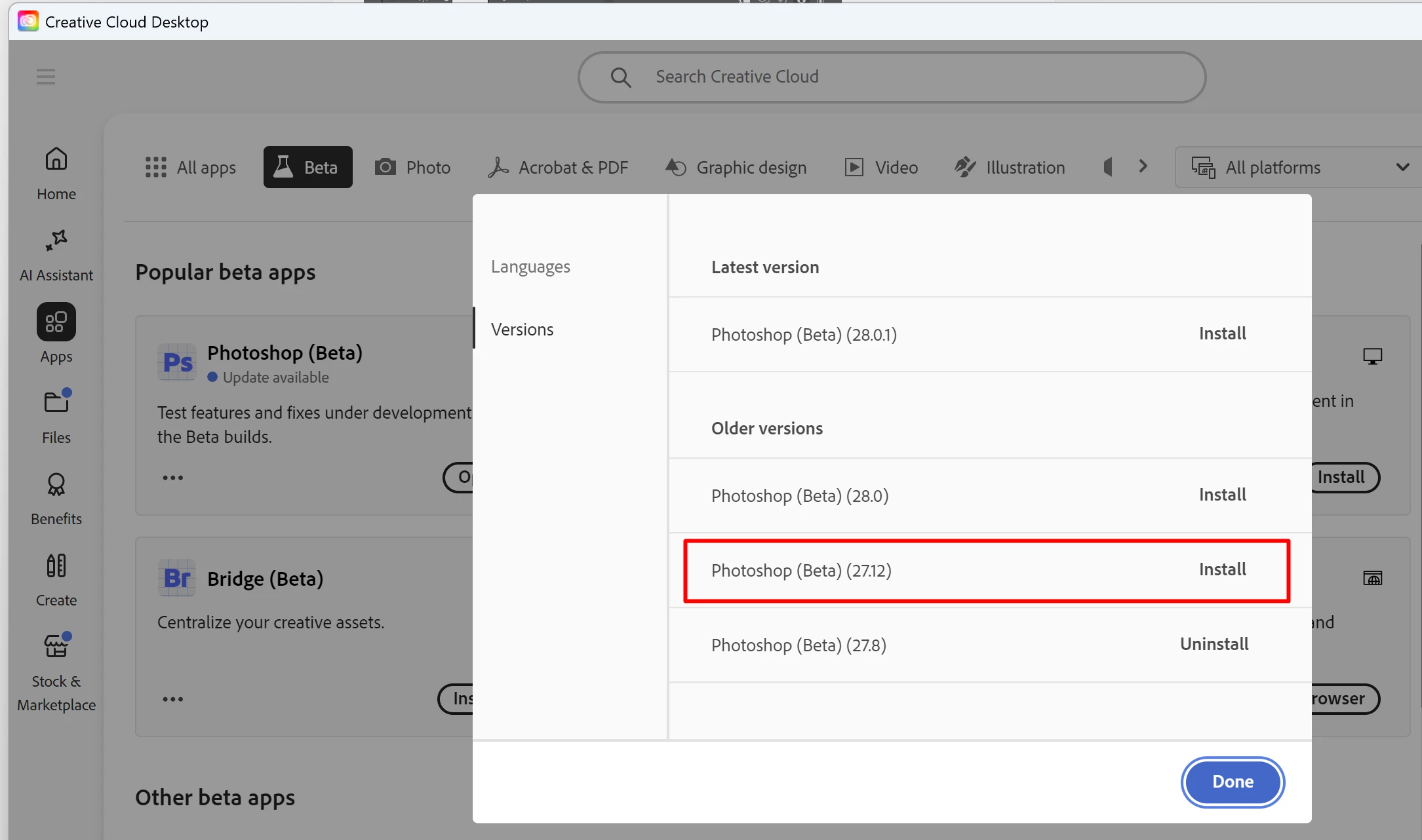
We'vetried to fix this issue in the recent beta release (27.12). Please give it a try and let us know how it goes.


145 replies

Participant
Jun 27, 2026 5:35 AM UTC

This issue is so annoying - I get it intermittently too, usually when I’m in a hurry to finish some work (of course).  It’s happening again today… The first time it happened (over a year ago) I assumed it was me as I was still ‘relatively’ new to PS so it’s disappointing to read that this has been a known issue for so long - especially considering the subscription price.

Translate
Participating Frequently
Jun 17, 2026 4:03 PM UTC

Why is the hue and saturation layer behaving this strangely? Is this normal? Am I doing something wrong?

Translate
Participant
Jun 23, 2026 8:35 PM UTC

no not just you. been happening for over a year. resetting preferences is NOT a permanent solution but a temporary one. same as closing the file then opening it again. this started when they added the revamped adjustment tab.


Translate
RealPeace
Participating Frequently
Jun 12, 2026 9:24 AM UTC

This does my head in and adds countless hours to workload having to constantly save and quit and reopen. It’s been a known bug for well over a year, why is this not being fixed?? We’ve had multiple updates with new features but why not fix these issues? This might push me to other software very soon.

Translate
Participant
Jun 1, 2026 2:00 PM UTC

Still happening - come on adobe - sort this out ...

Translate
Participant
May 10, 2026 1:44 PM UTC

This has been going on for so long… I will have completed Grand Theft Auto 6 before they fix this! It happens constantly and this is a tool I use all the time! Pull your fingers out!

Translate
Participating Frequently
May 7, 2026 12:29 PM UTC

This has been an ongoing thread that Adobe keep stating they have acknowledged, yet its been nearly a year without a fix.

You have had the entire community tell you over and over again how to replicate this bug.

Its a vital tool as per post

It requires a full reboot of the software, in 2026, to sort, this is inexcuseable.

I want to know why no one from Adobe is actually doing anyting about this. Who signed this off as acknowledged? Do you know you have to actually you know, go then do something, or it sits in limbo? Thats kind of what acknowledgement means. 

Ive posted about this myself at leats 5 times now. Everyone is fed up with the lack of action.

For the 50th time, seeing as it keeps getting ignored, this bug happens when layers are merged. then the tool breaks. go into the software, duplicate your layer, then merge them, then try make a hue saturation layer. 

Its the easiest bug to replicate. A year of investigation, or lack of.

Translate
D Fosse
Community Expert
Community Expert
Mar 28, 2026 7:19 PM UTC

Sounds like corrupt preferences. Resetting preferences returns the application to clean, out-of-the-box factory state.


Corrupt preferences can cause erratic behavior that usually looks like application bugs. Preferences are vulnerable to corruption because they are rewritten on every application exit.

Translate
Chris 486
Community Expert
Community Expert
Mar 28, 2026 7:54 PM UTC

adding on to ​@D Fosse response, here are the adobe instructions to do that.

Reset preferences

Translate
Robert________
Participating Frequently
Mar 28, 2026 6:30 PM UTC

Sometimes when I add a hue/saturation adjustment panel I am given a “mask” layer, instead of the H/S/L adjustment. I need to stop what I am doing and reset photoshop in order to get the adjustment panel. “Updating Photoshop” does not fix the problem. I’ve been dealing with this for months.

Translate
Creative Director 1
Participant
Mar 17, 2026 8:16 PM UTC

Have to reboot photoshop EVRY time to get this to work. Ridiculous.

Translate
Participant
Mar 13, 2026 9:30 PM UTC

I’m having this issue in the latest version, I see that this post is 10 months old. How is this bug still active?

Translate