Participant
April 29, 2025

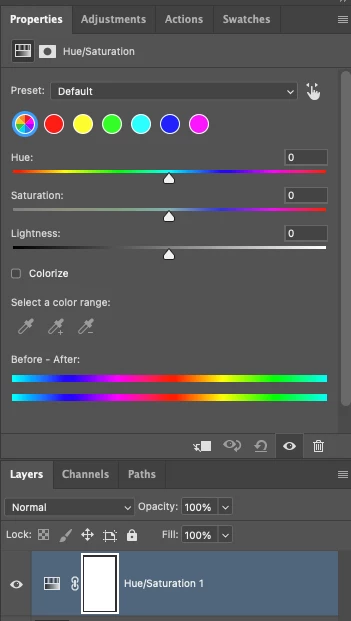
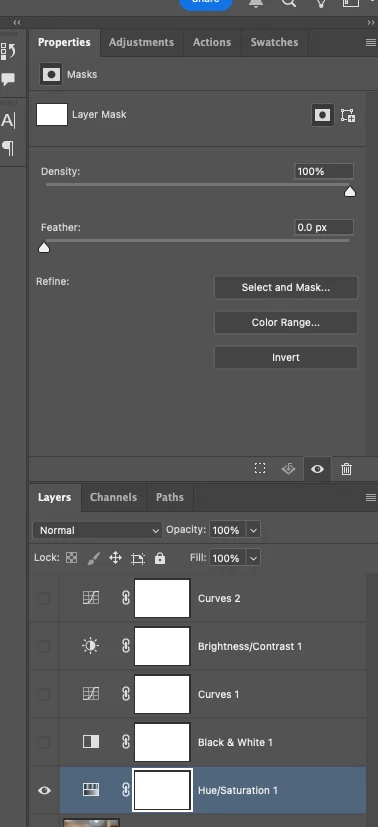
P: Adjusting layer properties doesn't work for Hue/Saturation/lum. HSL layers

  • April 29, 2025
  • 137 replies
  • 13454 views

The tab to click on and change the properties for an adjustment layer randomly disappears. Quitting and re-opening the app solves the issue, but it will happen again within minutes, usually when switching between different projects or different app on the computer. 

On Photoshop v26.6 - Mac Mini M4 pro, 32gb ram, 1tb ssd.


Any help would be appreciated!
ss

137 replies

Participant
August 27, 2026

Updated to 27.9.1 get it fixed guys ...this is actually really pathetic been going for months now...especially as a subscription service, you guys are too comfortable.

Srishti Bali
Community Manager
Community Manager
August 13, 2026

Hi all,


We have recently released build 27.9.1, which includes fixes for similar issues. Could you please install the latest build 27.9.1 and let us know if you are still experiencing this issue?

Looking forward to your response.

Thanks, Srishti Bali | Community & Engagement Strategist, Digital Imaging | Adobe
Inspiring
August 13, 2026

@Srishti_Bali ​@Srishti Bali 


No. It has NOT been fixed in Photoshop 27.9.1 as of Aug 14, 2026.


I previously provided a simpler way to 100% reproduce this bug, but threaded replies get buried easily in this new forum. So I’m gonna post it here again:

  1. Create or open any image
  2. Create a group and wrap a layer in it
  3. Flatten the group (⌘+E)
  4. Create a Hue/Saturation Adjustment Layer
  5. There is your bug, simple as that.


Please talk to the engineering team and find out if this error code (0ddf78.171) helps locating the bad codes. I believe they are related.


Participant
July 22, 2026

Just following up to see if this is something that Adobe is looking into or planning to fix. Been dealing with this for over a year now.

Sameer K
Community Manager
Community Manager
July 23, 2026

Thanks for the comment. The fix is in the pipeline. You can also check Photoshop (beta) from the Creative Cloud desktop app > Apps > Beta Apps section to verify if the issue exists.


Thanks!
Sameer K
(Type '@' and type my name to mention me when you reply)

Klaus Madengruber
Participant
July 3, 2026

Is this ever going to get fixed. I feel like it got worse again with the last update. I'm working in 27.8 on an M3 Mac Studio. 
To me it only ever happens when I’m working in 16bit and the files are quite large. 

Participant
June 27, 2026

This issue is so annoying - I get it intermittently too, usually when I’m in a hurry to finish some work (of course).  It’s happening again today… The first time it happened (over a year ago) I assumed it was me as I was still ‘relatively’ new to PS so it’s disappointing to read that this has been a known issue for so long - especially considering the subscription price.

Participant
June 17, 2026

Why is the hue and saturation layer behaving this strangely? Is this normal? Am I doing something wrong?

Participant
June 23, 2026

no not just you. been happening for over a year. resetting preferences is NOT a permanent solution but a temporary one. same as closing the file then opening it again. this started when they added the revamped adjustment tab.


RealPeace
Participating Frequently
June 12, 2026

This does my head in and adds countless hours to workload having to constantly save and quit and reopen. It’s been a known bug for well over a year, why is this not being fixed?? We’ve had multiple updates with new features but why not fix these issues? This might push me to other software very soon.

Participant
June 1, 2026

Still happening - come on adobe - sort this out ...

Participant
May 10, 2026

This has been going on for so long… I will have completed Grand Theft Auto 6 before they fix this! It happens constantly and this is a tool I use all the time! Pull your fingers out!

Participating Frequently
May 7, 2026

This has been an ongoing thread that Adobe keep stating they have acknowledged, yet its been nearly a year without a fix.

You have had the entire community tell you over and over again how to replicate this bug.

Its a vital tool as per post

It requires a full reboot of the software, in 2026, to sort, this is inexcuseable.

I want to know why no one from Adobe is actually doing anyting about this. Who signed this off as acknowledged? Do you know you have to actually you know, go then do something, or it sits in limbo? Thats kind of what acknowledgement means. 

Ive posted about this myself at leats 5 times now. Everyone is fed up with the lack of action.

For the 50th time, seeing as it keeps getting ignored, this bug happens when layers are merged. then the tool breaks. go into the software, duplicate your layer, then merge them, then try make a hue saturation layer. 

Its the easiest bug to replicate. A year of investigation, or lack of.