veljkor78535411
Known Participant
February 11, 2018

P: Applying the Same Filter to Underlying Layer Deforms the Layer Unpredictably

  • February 11, 2018
  • 20 replies
  • 490 views

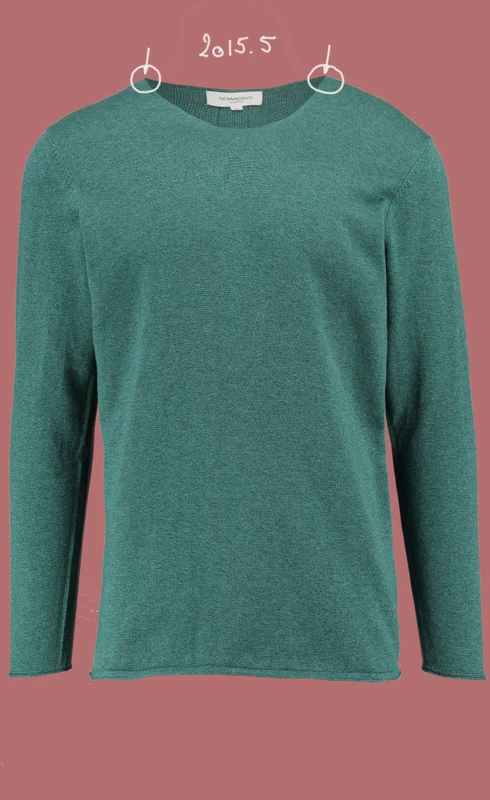
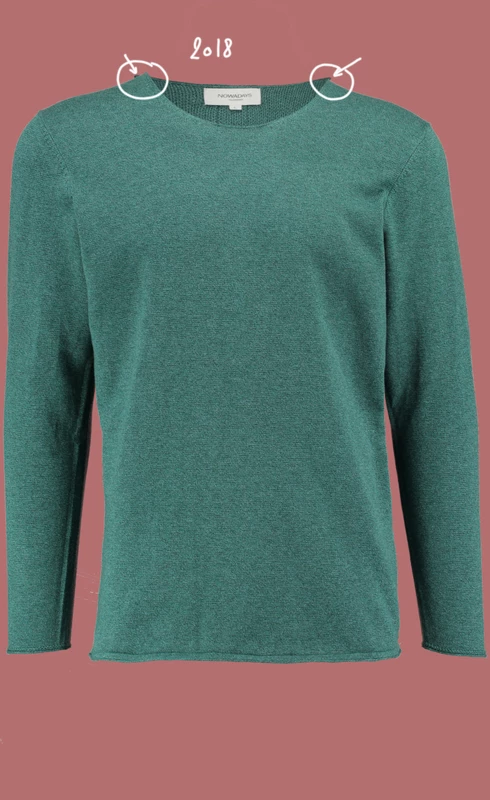
Liquify algorithm acting strange. I am reshaping one layer. Then I press ok. After that I want to reshape underlying layer at  the exact way. Until PS CC 2018, I just press CTRL+L and that layer deforms exactly as previous layer (they blend as they were). In PS CC 2018, when I do that, it deforms strangely, not even close to the  first liquifyed layer. 

This topic has been closed for replies.

20 replies

Hannah Nicollet
Community Manager
Community Manager
March 14, 2018
Hi Veljko,

After rewatching your video it looks like you're applying the liquify filter that you just used on the body of the shirt to the part at the neck with the tag. Wouldn't it make sense that it would deform that part differently since you're invoking the filter that you used on the body of the shirt on the neck? Can you help me better understand how the behavior changed from the 2015.5 version?

Thanks,
Hannah
Hannah Nicollet
Community Manager
Community Manager
March 13, 2018
Hi Veljko,

Your problem is in progress. I'll keep you posted with updates.

Thanks,
Hannah
veljkor78535411
Known Participant
March 8, 2018
Is there any news regarding my problem?
Hannah Nicollet
Community Manager
Community Manager
February 22, 2018
Got your file Veljko - thanks!
Hannah Nicollet
Community Manager
Community Manager
February 22, 2018
That's correct - I'm not sure why but I'm not seeing it. I emailed you at the email that I have on file so you could just reply.
veljkor78535411
Known Participant
February 22, 2018
I don't have PSD file because I deleted it when i finished recording but I can make it again
Hannah Nicollet
Community Manager
Community Manager
February 22, 2018
Sorry at first I misunderstood the nature of your post. I changed the title - is that more accurate?
Hannah Nicollet
Community Manager
Community Manager
February 22, 2018
Thanks - would you mind checking the spelling on my email? I'm not seeing an email from you. The reason I asked for the psd is so I can see the layers. The YouTube video is really small on my screen so it's hard to see exactly what you're doing.

~Hannah
veljkor78535411
Known Participant
February 21, 2018
I just emailed you original JPG files of the same object that was in video
Hannah Nicollet
Community Manager
Community Manager
February 21, 2018
Would you mind emailing the psd to me so I can see if I reproduce that behavior on my machine?