


P: Artboard display glitch in all versions since PS.22
Hi,
Since a few years, I have been struggling with a display bug that happen on PS since at least version 22 (and probably a few versions earlier but I cannot download previous versions on the creative cloud to test).
This bug happen on all computers I tried (laptops and desktops) and I would like to know if it happens also for anyone else. This bug make it difficult to move layers around to see the end result.
The steps to reproduce are in the screenshot.
The glitch only happen in artboards when at least 2 layers are selected. The layers have to be rasterized pixels or smart objects. If there is a shape layer or any layer FX, the glitch won't happen.
I already contacted the customer service and despite their best effort (driver updates, preferences settings etc) they couldn't fix this issue. This make me think it's a software related bug.
Kindly let me know if someone else is able to reproduce.
Regards,
Olivier
My actual specs:
Win10 -Ryzen 5900x - RTX 3070 - 64GB RAM - Multiple SSDs
(all my previous spec had a Nvidia discreet card if that matters)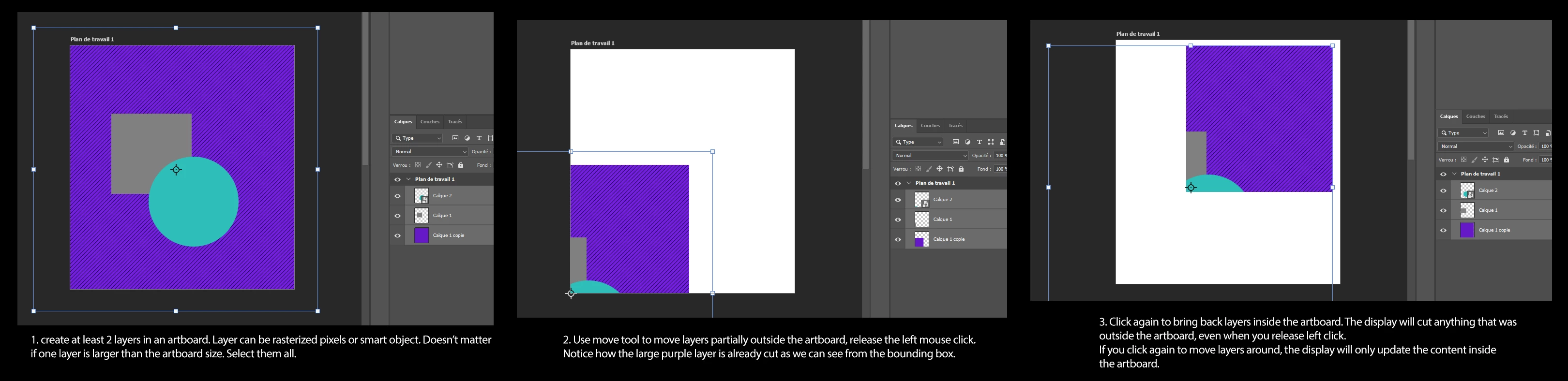
 AdChoices