

Barb Binder
Community Expert
Community Expert
March 28, 2024

P: Auto-numbered lists in Photoshop 2024?

  • March 28, 2024
  • 39 replies
  • 7352 views

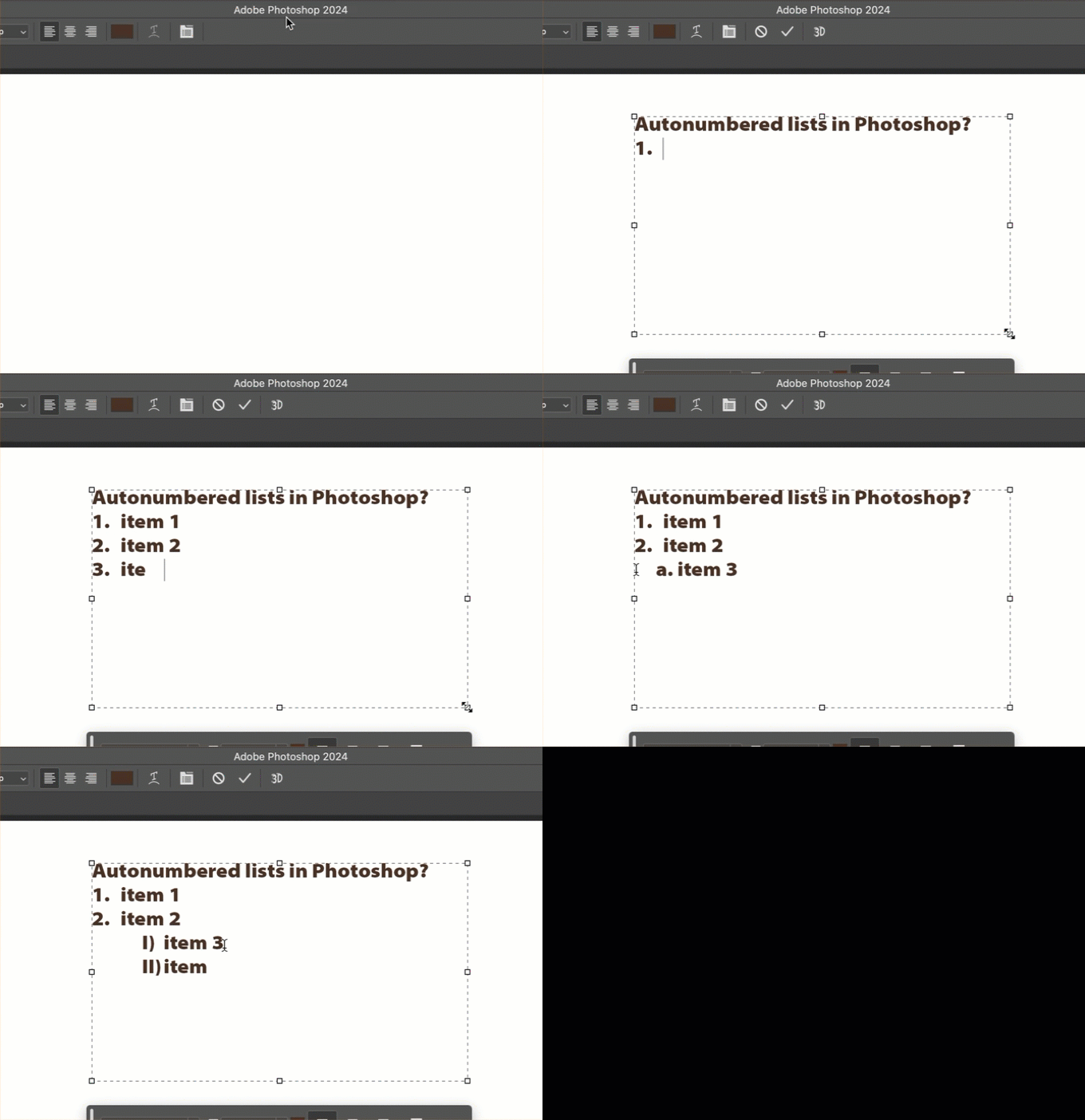
Can someone point me to the documentation that describes how to manage auto-numbered lists in Photoshop? I can't find any controls within Photoshop, other than what I stumbled on by randomly pressing tab or enter (looked in Settings, Properties panel, Options bar, Para and Char panels) and can't find any reference to these lists sudden appearance in Ps 2024 anywhere online!! 


TIA,

~Barb
 

39 replies

Legend
April 13, 2024

The most important thing is to be able to turn this off. Period.

@CShubert  you know we do appreciate getting new features but... does anyone at Adobe actually use your apps? I mean in professional production?

Here you are, adding auto formatting of text, but if I manually create a style, I can't make that persistent and available in all my new documents. I can't globally find and replace text in an open document with multiple text layers (yes I know about Find aand Replace in the Edit menu. It has a bunch of problems.) I can't script text formatting without using ungodly AM code. I can't easily import or export text. JUST text handling, I've had to become a programmer to do in a business production role as a photographer.

IMHO, the product teams frequently have priorities all wrong. You give us options that we could do with out but leave holes in the product everywhere. I'll never use auto bulleted lists but I would use scriptable find and replace and global styles applyable in a script or action ALL THE TIME.

i mean, yay, but, seriously? 

Stephen Marsh
Community Expert
Community Expert
April 13, 2024

@CShubert 


We all know that Photoshop isn't strong with text. Neither is Illustrator compared to InDesign. Isn't a true unified text engine long overdue for all 3 apps?


Adding such a feature without the ability to change the width of the indent is very annoying. I keep looking for the "tab bar" (think InDesign) above the text box to change the indent width.


Using a "soft-return" by shift-return should bring the text back to the left of a left-aligned paragraph text block, but it doesn't, there is a small space that appears to be the width of the auto-numbered digit.


By using the reset paragraph option, one can't continue to use the list to pick up from where one left off. So let's say that I reset after the first 3 auto-numbered lines, then wish to start again elsewhere in the same block, the auto-numbering doesn't begin again like it originally did.


Why force "auto" on anybody (intellisense)? Just let them select the lines of text and apply a list option manually instead?


Will there be an option to do this for bullet points?

Stephen Marsh
Community Expert
Community Expert
April 13, 2024

When you want this to stop, you can highlight the next line and use the Paragraph panel "reset paragraph".

Ged_Traynor
Community Expert
Community Expert
April 12, 2024

@CShubert why was there no announcement about this new feature, and what's going to happen in part two?

"any ideas you may have to make it better" I'd imagine it's hard for people to post idea's about the new feature when they assumed it was a bug, are there workarounds to bypass the feature if you don't like it or want it, a little more information about this new feature would help!

Legend
April 12, 2024

@CShubertas with any feature: good documentation, the ability to disable automatic behavior, ability to configure and save settings in presets, and ability to include in actions and scripts will make that feature better.

CShubert
Community Manager
Community Manager
April 12, 2024

Hi everyone,

This is a new feature that is rolling out in two parts and this is part one.  Please share with the team your issues with workflow that this may cause or any ideas you may have to make it better.


Thanks,

Cory - Photoshop Product Manager

Participant
April 11, 2024

Seems this is new in photoshop - if I type a number, capital letter, dash, etc. first and follow it with a space, photoshop makes it a bullet. I can find no way to turn this horrible feature off, much less a work around.

Peru Bob
Community Expert
Community Expert
April 11, 2024
StivO29716539
Participant
April 11, 2024

I just discovered this feature but it really annoys me a lot. Do you know how to deactivate it?

Barb Binder
Community Expert
Community Expert
April 11, 2024

I can't find any documentation on it. 


~Barb

~Barb at Rocky Mountain Training
Barb Binder
Community Expert
Community Expert
March 28, 2024

Hi Michelle! How are you? Thanks for the quick reply.


Actually, I was looking for some sort of documentation on a helpx page that documents how this feature works or even a reference to it within Photoshop. I can't find anything that talks about this specific feature, not even on a list of What's New in Photoshop 2024.


Someone stumbled on it by accident and TBH, if you had asked me this morning, I would have said that Photoshop can't autonumber lists! In case this is new to you too, add paragraph text (not point text) type in a 1 and a period and the next paragraph automatically numbers when you press enter. 🤯


~Barb

~Barb at Rocky Mountain Training
mglush
Community Expert
Community Expert
March 28, 2024

Thanks Barb!

I am doing well!--thanks for asking! And you are right--this is new to me also. My first query in looking for it showed that it wasn't available. So thank you! I am so used to using InDesign, that I don't normally use Photoshop for pararaph text.

And in my search, I didn't find any help docs that document it either.

Michelle


mglush
Community Expert
Community Expert
March 28, 2024

Hi!

Here is a recommended thread on the Adobe Forums that might answer your question:

https://www.ps-scripts.com/viewtopic.php?t=8211

Michelle