


Inspiring
January 13, 2019

P: Background Transparency Composite Issue

  • January 13, 2019
  • 7 replies
  • 314 views

The Problem:
Photoshop historically renders transparent differently with and without background, It is usually stronger than it should, that makes working with translucent color harder than it should.

Workaround:
So in my past experience, I have a workaround, that is toggle color setting's "Desaturate Monitor Color" by 0%, and turn off checkered background. That will make it's background composite back to normal, or the way it should represent across all softwares.

New Issue:
But then CC 2019 this method will cause it to glitch out. Since it wasn't able to render transparency, and result a blocky 1 bit blocks. Reverting to Legacy Composite engine doesn't help either. I even tried disable GPU acceleration, still no avail.

I hope the included screenshot could explain better. Tell me if I need also include other image software's result like Preview, Xee, or ClipStudio Paint. This is very photoshop specific issue since decades ago, and that workaround is broken now.

Thanks

System Spec:
MacOS High Sierra 10.13.6
iMac late 2013, and external Nvidia Geforce 970
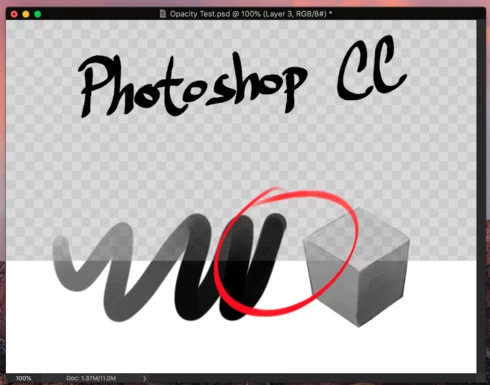
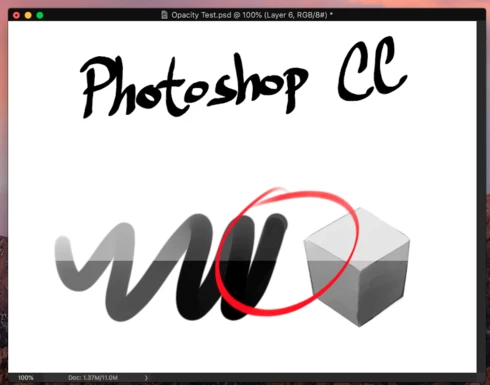

What you'll see in photoshop checkered/white background. I have no idea why the same white background will result different alpha render. Did photoshop render transparency twice?
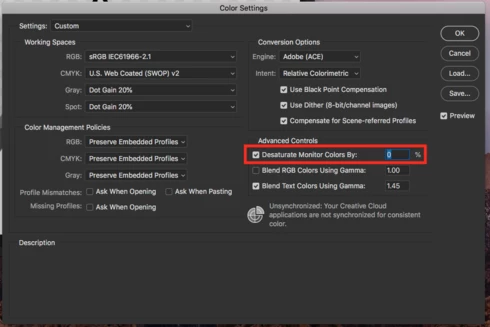
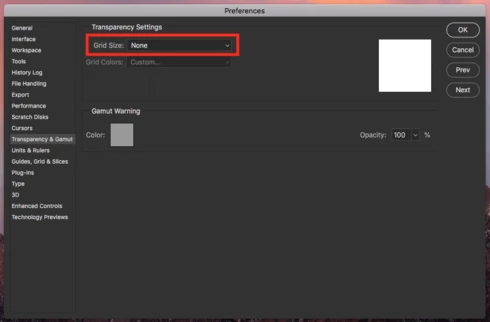

Toggle desaturate monitor colors and set to 0%. Then turn off grid background.
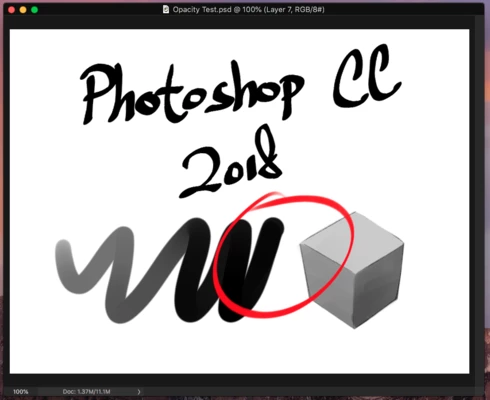
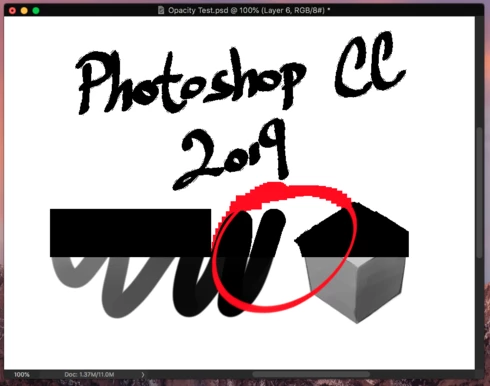


Using this method, CC 2018 display corrected alpha, but 2019 is broken here.

This topic has been closed for replies.

7 replies

Inspiring
April 2, 2020
I too am wondering if any progress has been made. I just spent a full day trying to figure out what was wrong with my files.
Inspiring
February 24, 2020
Update, the issue are carry over to Photoshop CC2020 21.1.0.106 too.
Inspiring
February 24, 2020
It's been a full year, the issue is still not resolved... any progress?
Legend
February 25, 2019
Thanks. That file was extremely helpful. I can see what you describe. I've asked engineering to take a look.
Inspiring
February 20, 2019
Yes, I did that too, it's only happen in CC 2019. But the double transparency on checkered background is something Photoshop always had (Been using it since ver6). Is there a reason why does transparency appear stronger than usual? 

I never do transparency works with default checkered background, since it's just too inaccurate. I often instruct my peers to create a solid background layer to error proof any transparent related works. It'll be really inconvenient if this trick doesn't work anymore.

Thanks

Here's the PSD for you guys to test it out. 
https://drive.google.com/file/d/1JsTjyy5G0mgJAekD223VHdeXV0bpbBjh/view?usp=sharing
Legend
January 15, 2019
Cy, curious, did you restart Photoshop between setting the "Legacy Compositing" preference? Could you please post your original source PSD file from above? That would help be debug faster.
Inspiring
January 13, 2019
good job.