


Participant
January 20, 2022

P: Bicubic (smooth gradients) doesn't work when resizing a Smart Object

  • January 20, 2022
  • 4 replies
  • 945 views

Technical info: Photoshop v22.5.5, MacBook w/ Retina Screen, Mac OS 11.6


When I downsize a photo that is a Smart Object, it appears to use Bicubic (Sharper) even when I select "Bicubic (smooth gradients)". To replicate this issue, simply open a high resolution photo, duplicate the background, convert the duplicated layer to a smart object, then reduce the photo by a large amount using "Bicubic (smooth gradients)" for the resample type. Zoom in to 400% and then compare the two layers. The smart object will be sharper than the background layer since it apparently uses Bicubic (Sharper) no matter what resample type is chosen, whereas the background layer was reduced using "Bicubic (smooth gradients)". Here is an image that shows what I am talking about using the exact instructions mentioned above:
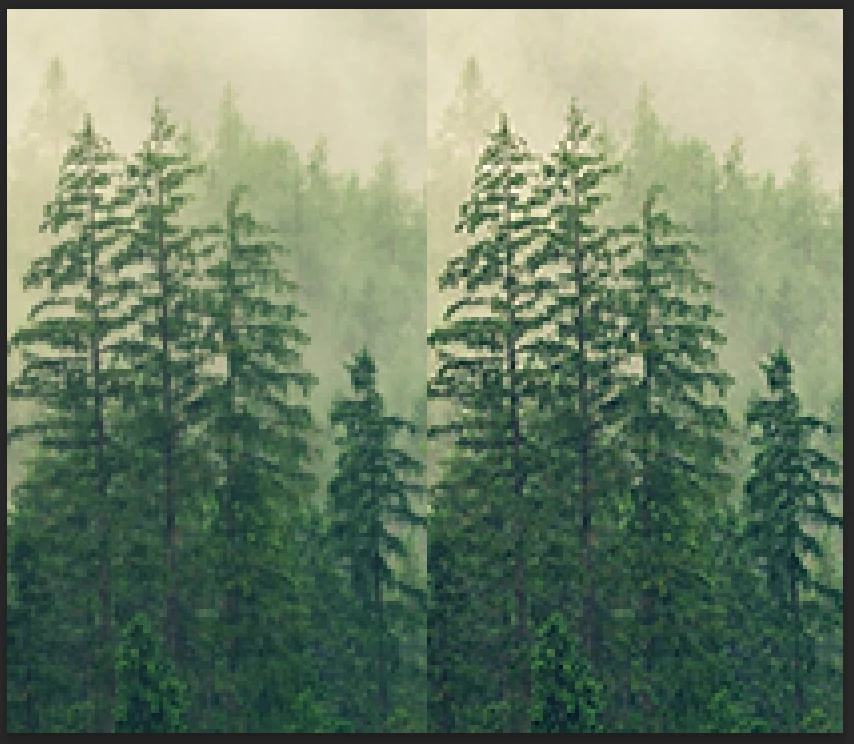
The raster background layer is on the left, and the smart object layer is on the right. The image is a screenshot of the image zoomed to 400%.

This topic has been closed for replies.

4 replies

Participant
January 21, 2022
The background layer gets its interplation from the Image Size dialog, and floating layers/Smart Objects get theirs from Preferences > General...


Hi Jeffrey! Thanks for clarifying that. It is confusing since if I am resizing a file that only consists of a Smart Object, it still behaves that way. Intuitively, it seems like the selected resample type in the image size dialogue should apply to whatever is in the file. 


Also, it appears you are saying that "floating layers/smart objects" use the preferences, however, from my testing it appears that only smart objects use the prefs, whereas the background layer and floating raster layers use whatever is selected in the image size dialogue.


Thanks much,

Shawn


P.S. This forum is a bit confusing and I'm not sure if I am replying to your comment or not. I clicked the "reply" button next to your comment, but when I clicked the "quote" button it quoted my original post.  So am I replying to you or myself? 🧐

Legend
January 20, 2022

OK. I know what's going on now. The background layer gets its interplation from the Image Size dialog, and floating layers/Smart Objects get theirs from Preferences > General...

Legend
January 20, 2022

I'm actually seeing the opposite effect. The background layer is slightly sharper than the smart object layer. https://shared-assets.adobe.com/link/28d2dc02-7967-4809-60cd-46dec8c49732

Legend
January 20, 2022

Just to confirm, you have your interpolation method for Bicubic (best for smooth gradients) set here: