



c.pfaffenbichler
Community Expert
Community Expert
July 2, 2025

P: Black Point Picker in the Curves adjustment works different from Curves Adjustment Layer

  • July 2, 2025
  • 4 replies
  • 288 views

Adobe Photoshop 26.8.1 on Mac OS 14.6.1


If I apply Curves to a Layer Mask and use the Black Point Picker after the White Point Picker it seems to produce a faulty result. (see gif) 
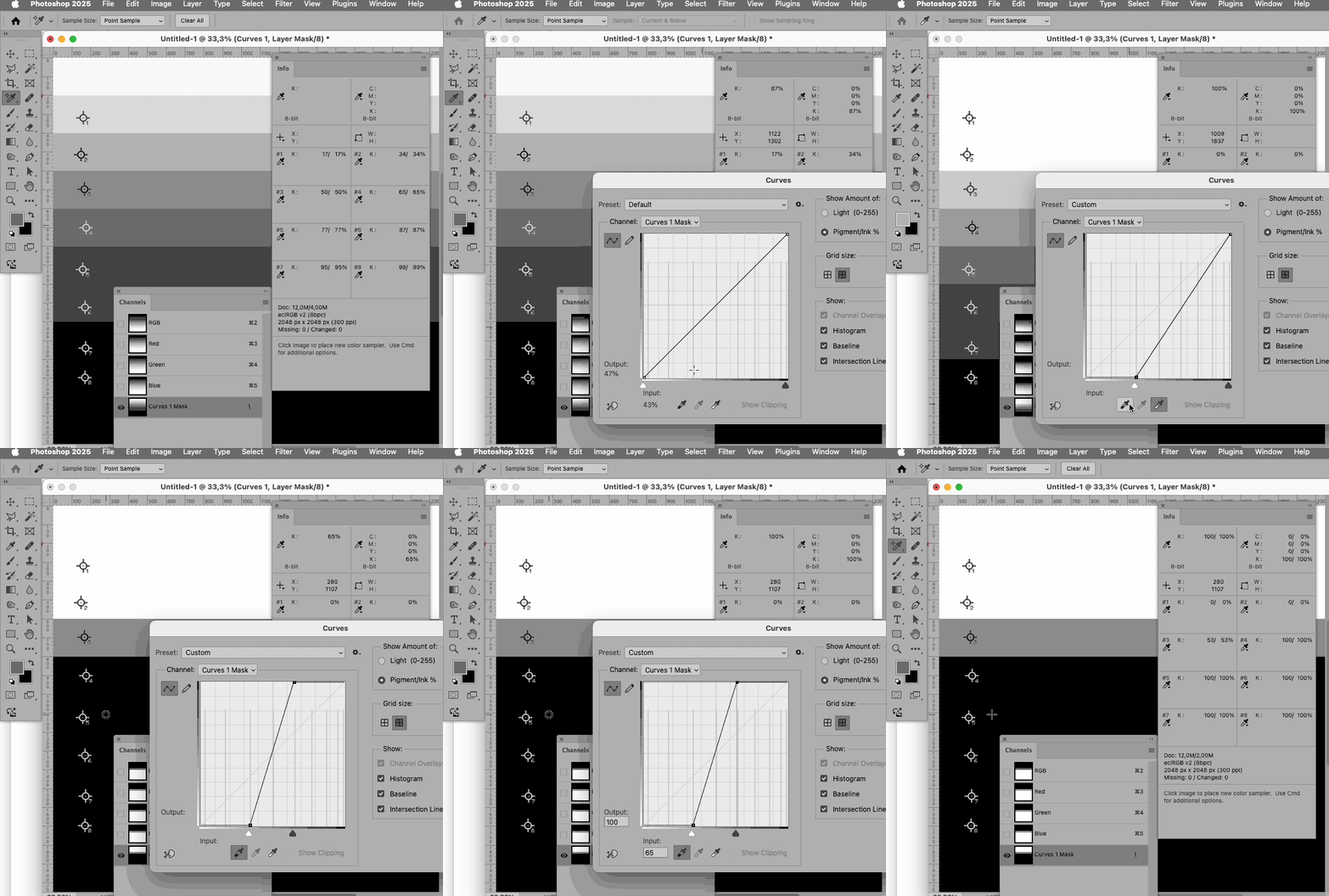
 

Can anyone confirm or has this issue already come up previously? 


Regards, 

Pfaffenbichler 

4 replies

c.pfaffenbichler
Community Expert
Community Expert
July 3, 2025

@Sameer K , further testing revealed that the problem is not connected to the Layer Mask or Grayscale image, but the Black Point Sampler for Image > Adjustments > Curves malfunctions if the White Point has already been set, even in an RGB image. 

I marked the values in the Info Panel and the feaulty results in the Curves dialog with red outlines in the gif. 

The same does not appear to happen with a Curves Adjustment Layer. 

Sameer K
Community Manager
Community Manager
July 10, 2025

Hey, @c.pfaffenbichler. Thanks for adding all the required details. I've shared it with the team to review and comment. 

Thanks!
Sameer K

c.pfaffenbichler
Community Expert
Community Expert
July 3, 2025
quote

I've verified that this behavior is consistent all the way back in 2021.


By @Sameer K 

At least in Photoshop 2024 the behaviour is not the same as in Photoshop 2025 and clicking with the Black Point sampler will cause the intended change. 

Please see the new gif below whch combines recordings of Photoshop 2025 and Photoshop 2024. 

c.pfaffenbichler
Community Expert
Community Expert
July 2, 2025

The black point should be set at the actual value of the selected pixel. 

In the gif I clicked in the field containing Color Sampler #5 – so the field containg Color Sampler #4 should not turn black. 


#5 originally has the value 77%, but the value that is being set to black is not 77% but 65% (see screenshots). 

I tested in Photoshop 2024 and the result is correct there. 


Sameer K
Community Manager
Community Manager
July 2, 2025

Hey, @c.pfaffenbichler. Thanks for adding the GIF. I've verified that this behavior is consistent all the way back in 2021. Could you also share a reference of how it should work and a detailed description of how the way it is working right now isn't expected behavior? 


Thanks! 
Sameer K