



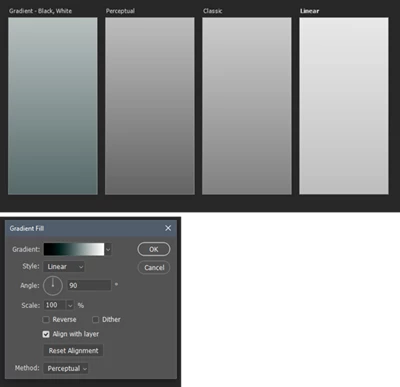
P: Black, White Gradient Preset and Perceptual Interpolation creates cool/blue cast
Looks like one of the Gradient Preset: (Basics, Black, White [0,0,0 to 255,255,255]) is wonky when used as is. The grayscale ramp turns green when set to Perceptual Interpolation. However, the same present works correctly when using Linear and Classic interpolation. If I remake or simply edit the gradient, it works as expected. It's not my preferences, and color setting or at their defaults and I'm getting the same error on my laptop with a fresh install. I also noticed when I tried to edit the endpoint it came up specifying "Web Safe" colors which might explain the issue. But the simple act of editing it triggered it to work correctly and setting it back to "Web Safe" didn't recreate the error. Weird!
Anyone else see or able to reproduce this issue?
I'm using the latest Photoshop update on Windows 10 and Windows 11 on the laptop.
 AdChoices