


Inspiring
April 27, 2019

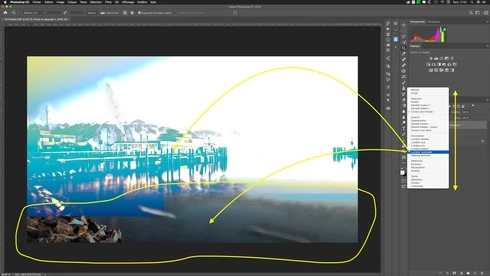
P: Blend modes are not displayed on the entire image

  • April 27, 2019
  • 7 replies
  • 315 views

If the image is adapted to the size of the window (Cmd + 0) the display is incomplete when we roll out the options of the fusion mode, if reduced image, it is OK, if enlarged image, it is also OK !

Photoshop 20.0.4


Nom du modèle :    iMac
  Identifiant du modèle :    iMac19,1
  Nom du processeur :    Intel Core i5
  Vitesse du processeur :    3.1 GHz
  Nombre de processeurs :    1
  Nombre total de cœurs :    6
  Cache de niveau 2 (par cœur) :    256 Ko
  Cache de niveau 3 :    9 Mo
  Mémoire :    40 Go
  Version de la ROM de démarrage :    220.250.368.0.0
  Version SMC (système) :    2.46f12

Radeon Pro 575X :
  Jeu de composants :    Radeon Pro 575X
  Type :    Processeur graphique (GPU)
  Bus :    PCIe
  Longueur de la voie PCIe :    x16
  VRAM (totale) :    4 Go
  Fournisseur :    AMD (0x1002)
  Identifiant du périphérique :    0x67df
  Identifiant de révision :    0x00c4
  Révision de la ROM :    113-D0008A-042
  Version VBIOS :    113-D0008A14GP-003
  Version du gestionnaire EFI :    01.01.042
  Metal :    Pris en charge, modèle de réglages macOS GPUFamily2 version 1
  Moniteurs : iMac :
  Type de moniteur :    Écran LCD Retina intégré
  Résolution :    Retina 5120 × 2880
  Profondeur de mémoire d’image :    Couleurs 30 bits (ARGB2101010)
  Moniteur principal :    Oui
  Miroir :    Désactivé
  Connecté :    Oui
  Rotation :    Géré
  Régler la luminosité automatiquement :    Non

This topic has been closed for replies.

7 replies

Legend
November 15, 2019
This issue should be fixed in the current version, Photoshop 2020 v21.x or later. Let us know if you're still having trouble.
Yves-CHAuthor
Inspiring
August 10, 2019
Photoshop 20.0.5 pas d'ammélioration ?
Toujours les même paramètres GDU et RAM, macOS 10.14.6


Yves Crausaz, Suisse, retraité actif dans le monde de la photo et des arts graphiques.
Legend
May 7, 2019
Thanks. The system info, card and screen resolution were key to reproducing. Engineering is investigating.
Yves-CHAuthor
Inspiring
May 6, 2019
C'est pareil pour tous les fichiers et ceci depuis mon changement d'ordinateur, c'est probablement lié à la carte graphique.
Si je travail avec la résolution de l'écran nominale, le problème se produit, si l'affichage rempli l'écran (cmd+0) il y a problème, si image affichée plus petite, le problème n'existe pas.
Si je baisse la résolution de l'écran, il n'y a pas de problème.

Il n'y a aucun changement si ou si pas enable "Legacy Compositing" .

It's the same for all files and this since my computer change, it is probably related to the graphics card.
If I work with the nominal screen resolution, the problem occurs, if the display filled the screen (cmd + 0) there is problem, if image displayed smaller, the problem does not exist.
If I lower the screen resolution, there is no problem.

There is no change if or not enable 'Legacy Compositing'.


Yves Crausaz, Suisse, retraité actif dans le monde de la photo et des arts graphiques.
Legend
May 6, 2019
Hi Yves,

Would be possible to get a copy of a file that reproduces the problem? I wasn't able to reproduce but I can't see the layers panel completely to make sure my layer set-up is correct. 

Also, if you go to Preferences > Performance and enable "Legacy Compositing" does it render correctly? 
Yves-CHAuthor
Inspiring
April 27, 2019
I have already tried various proposals, no changes!


Yves Crausaz, Suisse, retraité actif dans le monde de la photo et des arts graphiques.
JohanElzenga
Community Expert
Community Expert
April 27, 2019
Try this. Go to Preferences - Performance and play around with the Advanced settings of Use Graphics Processor.
-- Johan W. Elzenga