


pascalm3859019
Known Participant
September 2, 2016

P: Blur Gallery problems with adding noise to blurred area

  • September 2, 2016
  • 10 replies
  • 1028 views

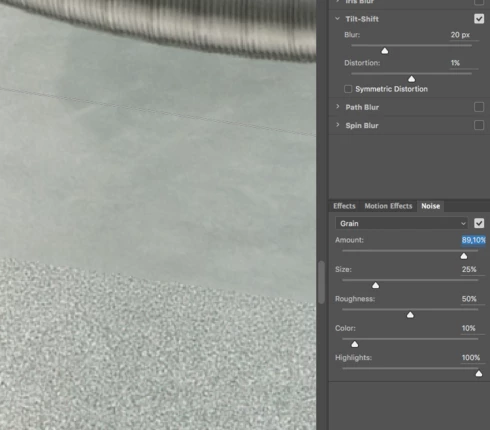
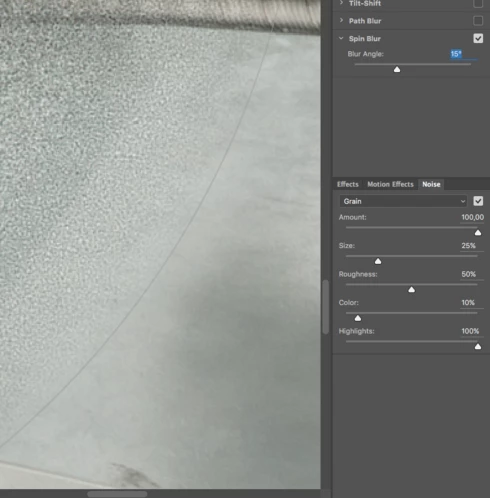
Photoshop CC 2015.5.1 - When adding noise to the blurred area it is not seamless. This happens with all filters in the blur gallery except with the spin blur filter where the noise is smoothly blended to the edge of the blurred area. These sample images have such a high amount of blur just to show the problem I have with the filters. It occurs on both Mac and Windows versions of Photoshop.

This topic has been closed for replies.

10 replies

Legend
January 25, 2018
Rather, it's was marked "As Designed" by Alan. Sorry.
Inspiring
May 9, 2017
That's because you have a very high level of noise coming up to an area with little or no original noise. The feature is not intended to be used this way. To attempt to taper the noise any further would result in a noticeable band of smoothness on images where you are adding noise at a level that closely matches the original noise.
Earth Oliver
Legend
May 8, 2017
Alan, i think the problem is that Blur Gallery is creating hard areas of transition when they should be soft. Here's a quick test i did which clearly illustrates the issue:


Inspiring
May 8, 2017
To further illustrate this, here is a test image with noise off and noise on. The original test image was generated by creating a medium gray layer and adding a Field Blur with amount 20, and adding noise with the settings shown. That captures the noise as it was generated by Blur Gallery. Then running Blur Gallery again with Tilt-Shift and adding similar* noise, we expect to see the noise restored with no seams. This is the intended use of noise in Blur Gallery - to match pre-existing noise, guided by the user. (*Blur Gallery randomizes the noise, so this is not a case of generating identical noise the second time.)


Inspiring
May 8, 2017
The noise feature in Blur Gallery is for matching original noise in the image that was lost due to blurring. You should adjust the noise settings to match the original noise. PS does not sense the noise in the image automatically. PS is careful to adjust the amount of noise applied in the tapered areas, but it starts with the amount you give it. Adding noise in the extreme will cause the effect seen in these images.

If you want to do artistic noising (adding noise that was not in the original image), I suggest adding a mild Field Blur with an amount of 1-3, to cause noising across the entire image. Also use High Quality for the most precise noising.
pascalm3859019
Known Participant
December 21, 2016
Thank you!
Legend
December 21, 2016
On further examination, I am see a harder edge at 100% in the rendered result. I've asked engineering to investigate. Thanks!
pascalm3859019
Known Participant
December 21, 2016
Hi Jeffrey,

the problem is also visible in your images! Noise starts with a hard cut in both of your images and is not blended in. To see the difference you should try spin blur. Here the noise is faded in or out smoothly.
Legend
December 21, 2016
I am not able to reproduce this problem with CC 2017 Tilt and Iris below - both cases the noise falls off with the shape of the blur:


Are you still able to repro with 2017? If so, can you post a PSD with the blurs applied as Smart Objects?
pascalm3859019
Known Participant
December 21, 2016


Hi!


I am using PS CC2017 and still found some quality issues when adding noise to an image with the tools in the blur gallery. Noise is added with a hard cut, it is not blended in or out smoothly except in the spin blur gallery, where it fades out smoothly to the edge of the blurring area.

You
can see this issue clearly when you add a very high amount of noise.
This bug does already exist since there is the blur gallery in
Photoshop.

Here is a link of the same problem in an older post with pictures attached:

https://feedback.photoshop.com/photoshop_family/topics/photoshop-cc-2015-5-1-blur-gallery-problems-w...


Is this ever going to be corrected because Photoshop should deliver the highest quality in imaging?