


Participating Frequently
February 19, 2020
Released

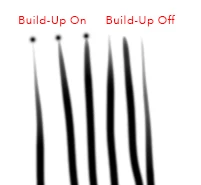
P: Brushes with "Build-Up" selected leave splotch at beginning of stroke

After updating to 21.1.0 this morning, all my brushes with "Build-Up" selected leave a splotch at the beginning of strokes. Toggling Build-Up to off will stop the behavior, but I have dozens of brush presets with this setting on, and I prefer the brush behavior with it on. Using a Wacom Intuos Pro. Rulers are off, and I have not had any issues previous to updating.
This topic is closed to new replies. Start a new post to keep the conversation going.

15 replies

Participating Frequently
February 20, 2020
I have found that turning smoothing off fixes the problem. Any amount of smoothing causes the problem again.
Translate
Participating Frequently
February 19, 2020
Behavior persists after updating Wacom driver (from 6.3.37-3 to 6.3.38-3)
Translate
Participating Frequently
February 19, 2020
I have been using a tablet professionally for many years in a production environment, and this particular tablet for at least three years, and have not had this problem until this morning when I updated to 21.1.0. 
Translate
Participating Frequently
February 19, 2020
Wacom Pro, OS X 10.14.5
Translate
PECourtejoie
Community Expert
Community Expert
February 19, 2020
Hello, are you using a graphic tablet, or a mouse? which operating system? are you using Windows ink, or wintab? https://helpx.adobe.com/be_en/photoshop/kb/tablet-support-faq-photoshop.html
Translate