Participating Frequently
April 14, 2021

P: Can't detect GPU

  • April 14, 2021
  • 156 replies
  • 8535 views

Recently I just did an update of Photoshop to V22.3.1

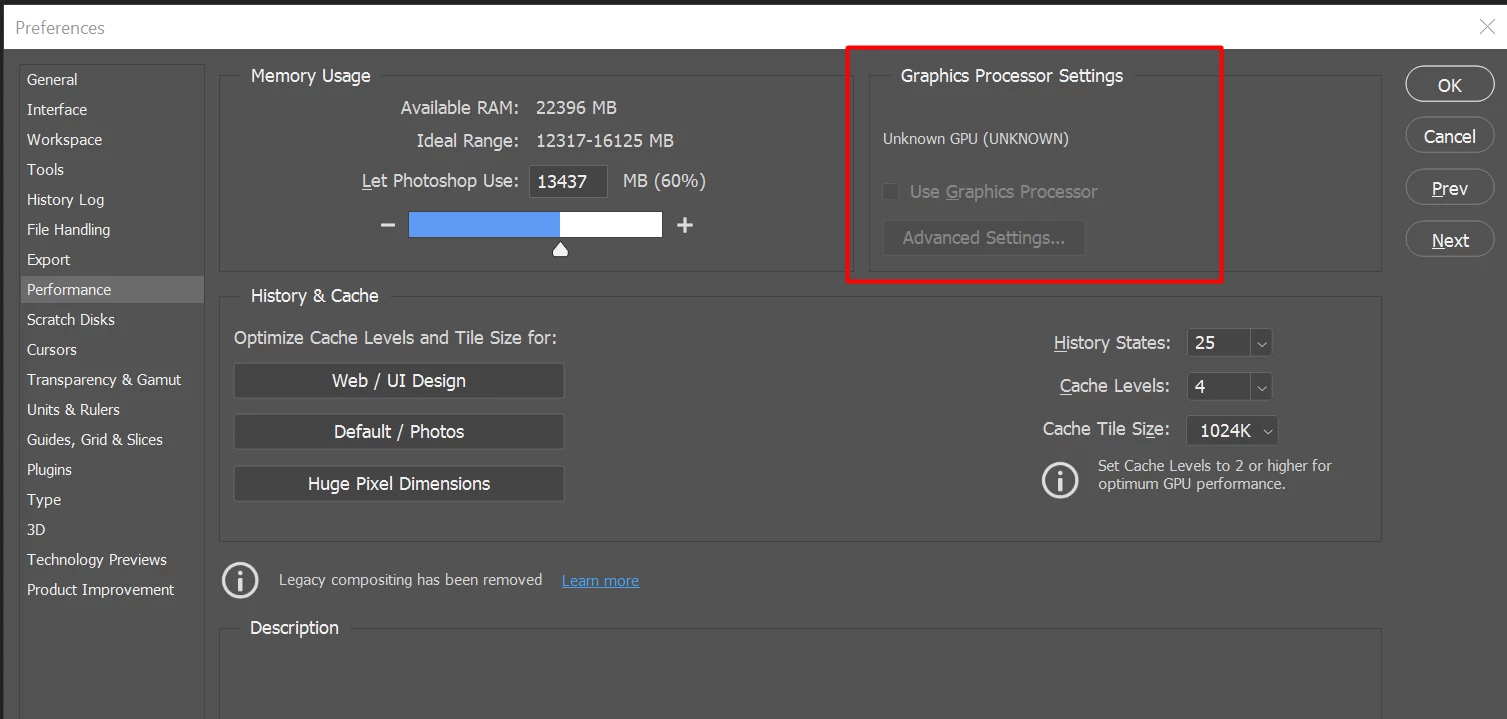
After I launched PS, and then go to the performance dialog box, then noticed that it can't detect my GPU GTX1050i.

This was working fine with the previous version of PS. I suspect that the latest update had something to with this problem.

Thank you

BR,

FS Wong

This topic has been closed for replies.

156 replies

AxelMatt
Community Expert
Community Expert
May 11, 2021

As you can read Adobe is working on an update to solve the issue.

My System: Intel i7-8700K - 64GB RAM - NVidia Geforce RTX 3060 - Windows 11 Pro 25H2 -- LR-Classic 15 - Photoshop 27 - Nik Collection 8 - PureRAW 6 - Topaz Photo AI
Participant
May 11, 2021

*GBussey I have the same AMD Raedon RX5700 XT and it is frustrating!! 

Participant
May 11, 2021

I had about half-dozen Adobe reps working on my computer and they can't figure out the problem. one even went as far as send an e-mail to AMD telling them that the graphic processor was corrupt!!!

CanyonJim
Participating Frequently
May 10, 2021

My apologies. I somehow missed that.  Thanks for the update.

Participating Frequently
May 10, 2021

@james_hansen_6831173 As you can read a patch is being prepared, fortunately 😁

CanyonJim
Participating Frequently
May 10, 2021

My system developed this problem after updating to 22.3.1.  My basic system is:
Adobe Photoshop Version: 22.3.1 20210406.r.122 990be2c  x64
Number of Launches: 1300
Operating System: Windows 10 64-bit
Version: 10 or greater 10.0.19041.928
System architecture: Intel CPU Family:6, Model:14, Stepping:10 with MMX, SSE Integer, SSE FP, SSE2, SSE3, SSE4.1, SSE4.2, AVX, AVX2, HyperThreading
Physical processor count: 6
Logical processor count: 12
Processor speed: 3192 MHz
Built-in memory: 16218 MB
Free memory: 8902 MB
Memory available to Photoshop: 14836 MB
Memory used by Photoshop: 60 %

I've spent a lot of time trying to figure out what is going on.  As can be seen above, it is a squirrelly problem to chase down.  FWIW, here are my observations, YMMV:

My GPU is usually unknown when starting Photoshop directly after not using it for a long time, it appears shutting it down and immediately restarting recognizes the GPU if Bridge is not running.  If Bridge is running, it seems I need to shut down Bridge for this to work.

If Photo shop has recognized my GPU and I directly restart it shortly after shutting it down without Bridge running, I have no GPU issues.

The GPU is much more likely to be unrecognized when it is opened via Bridge, "Open with" in File Explorer or equivalent, or using a custom cataloging program regardless how recently I shut it down.  Again, shutting down Photoshop (and Bridge if it's open) and directly restarting Photoshop almost always fixes the GPU issue and directly restarting Photoshop a second time has always worked.

I've also noticed that Photoshop takes a bit longer to start up when I get the Unknown GPU error, but I'm not sure about that.

Inspiring
May 10, 2021

Same here. It's the combination of a laptop with GForce GTX1650 Ti and an external monitor. Resetting Photoshop (several ways) solves the issue only for one time. After a restart of Photoshop or even after loading a new image, GPU is lost again.

An Adobe technician ensured me in a chat session that this is a know error which will be solved in the next update. And a replace of 22.3.1 by 22.3 is a temporary solution.

Participating Frequently
May 9, 2021

As you can read a patch is being prepared, fortunately

Inspiring
May 9, 2021

Same problem on an iMac with AMD Radeon Pro 5500 XT. OS 10.15.7, Catalina. I believe this problem may be why Photoshop is crashing whenever I try to open it. The crash report shows: "Crashed Thread: 13  GPU Sniffer Launcher"

I first noticed the problem with Ps v.22.3.0, and the problem persists with v.22.3.1.

Participating Frequently
May 7, 2021

Thanks Mark for the heads-up. 

I repeat an addition from my previous post: 'One advice though: the moment you see so many complaints, in this case with all sorts of graphical cards, it would reassure many people (and save them a lot of time) if you would ask for the specifics that you need to assess the situation, and just respond by: "OK, we see this has become an issue, we're on it, we'll come back as soon as we can make any predictions". Now it is too much US and THEM that does create a lot of angry comments. Not necessary in my eyes. The comms aspect is sometimes just as important as the tech part.'

I am looking forward to your patch!