



hellopaul4
Inspiring
November 3, 2016

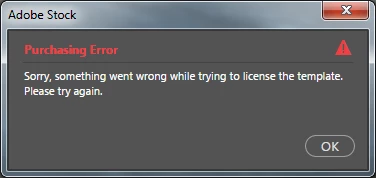
P: Can't download template "Something went wrong while trying to license the template."

  • November 3, 2016
  • 12 replies
  • 1709 views

Hello.
Today I updated PS to CC 2017, and tried to download some of the templates, but just get the error:
"Purchasing Error. Something went wrong while trying to license the template. Please try again."

I tried several times, with different templates, but always got the same error.

I'm logged in to my CC account.

Any suggestions, anyone?

Thanks!
This topic has been closed for replies.

12 replies

hellopaul4
Inspiring
November 3, 2016
Thanks for the suggestion Eric; I signed out, quit PS, signed back in, loaded up PS and I am now downloading a template successfully!

(And yes, the problem happened with any template I tried to download).
Participating Frequently
November 3, 2016
Hi,

Does this happen for all templates you've tried downloading?

Could you try closing Photoshop, signing out and back into the Creative Cloud desktop app and try downloading the template again?

To sign out of CC app, open it, click on the gear icon, select Preferences... in the menu, then click on the Sign Out button.

Thanks,
Eric