


P: Can't Highlight Numbers
Hi.
First I should apologize for bad English; English is not my language.
Here the problem:
Recently I updated my photoshop to latest version and i see this annoying issue!
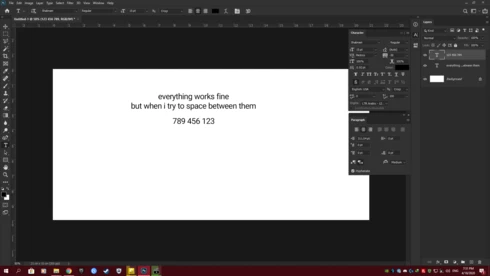
when I typing numbers from 1-9 (for example) and press space between 3 and 4 (123 456), when my Paragraph dircetion set on Right-to-Left, can not see highligheted nubmers:
I tried :
* Disable "Use Graphics Processors" ** (in Performance section)
* Check "Legacy Compositing" ** (in Performance section)
* Use "Basic/Normal/Advanced drawing mode in Use Graphics Processors Settings" ** (in Performance section)
* Increase/decrease "Cach level/Cach tile size" (idk why, but try it!) ** (in Performance section)
* Try to changing "Text Engine Options" ** (in Type section)
* Try to clean install adobe photoshop CC 2020
and none of them working.
I'm using latest Windwos 10 updates and Graphics driver (Windows 10 Enterprise, Geforce GTX 750 Ti)
So any suggestion for highlight numbering back to normal ?
Thanks.
 AdChoices