



P: Change to PSB UTI breaks Mac Spotlight and Quick Look plugins
Photoshop 21.0 on Mac inexplicably changes the UTI (Universal Type Identifier) of PSBs, breaking Spotlight, existing Quick Look plugins, and perhaps other apps and services. Prior to PS 21.0, the UTI for Adobe Photoshop Large Document (PSB) was "com.adobe.photoshop-large-image", but in PS 21.0, it's "com.adobe.photoshop-image-large". Why the gratuitous change?
Spotlight
With this change, Spotlight will no longer find files of type Adobe Photoshop Large Document (PSB) that were created by versions 20 and earlier. This will mystify users, who won't understand why Spotlight isn't finding their files. For example, Finder shows these four files with extension .psb, two created with 21 and two created with 20 or earlier: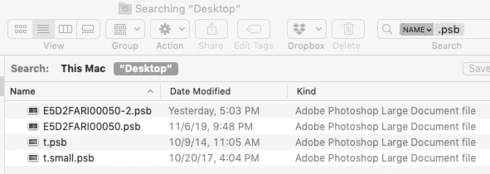
But it finds just two files with kind Adobe Photoshop Large Document (which were created with version 21):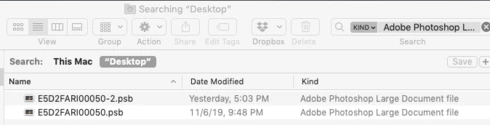
This is because Spotlight has saved the old UTI (com.photoshop-large-image) in its index for the two older .psb files:
$ mdls -name kMDItemContentType *.psb
kMDItemContentType = "com.adobe.photoshop-image-large"
kMDItemContentType = "com.adobe.photoshop-image-large"
kMDItemContentType = "com.adobe.photoshop-large-image"
kMDItemContentType = "com.adobe.photoshop-large-image"
The only workaround is to rebuild the Spotlight index, which can take tens of hours or longer for those with huge higher-latency network volumes and external disks. But most users won't ever figure out they need to re-index.
Quick Look plugins
My Quick Look plugin is registered for the old UTI (com.photoshop-large-image), and users upgrading to PS 21 immediately noticed it stopped working. I will release a new version that also registers for the new UTI (com.photoshop-image-large), but that is obviously a significant and needless inconvenience for all the plugin's users.
Technical Details
Mac OS has long defined the UTI com.adobe.photoshop-large-image in the bundle CoreTypes:
type id:            com.adobe.photoshop-large-image (0x237c)
bundle:             CoreTypes (0x220)
uti:                com.adobe.photoshop-large-image
localizedDescription: ..."en" = "Adobe Photoshop large document"...
flags:              active  apple-internal  imported  core  trusted (0000000000000065)
conforms to:        public.image
tags:               .psb, '8BPB'
But Photoshop 21.0 redefines that UTI as com.adobe.photoshop-image-large in its Info.plist:
<dict>
    <key>CFBundleTypeExtensions</key>
    <array>
        <string>psb</string>
    </array>
    <key>CFBundleTypeIconFile</key>
    <string>PS_PSBPrimaryFileIcon.icns</string>
    <key>CFBundleTypeName</key>
    <string>Adobe Photoshop Large Document file</string>
    <key>CFBundleTypeOSTypes</key>
    <array>
        <string>8BPB</string>
    </array>
    <key>CFBundleTypeRole</key>
    <string>Editor</string>
    <key>LSHandlerRank</key>
    <string>Owner</string>
    <key>LSItemContentTypes</key>
    <array>
        <string>com.adobe.photoshop-image-large</string>
    </array>
</dict>
 AdChoices