



johnrellis
Legend
November 8, 2019

P: Change to PSB UTI breaks Mac Spotlight and Quick Look plugins

  • November 8, 2019
  • 11 replies
  • 538 views

Photoshop 21.0 on Mac inexplicably changes the UTI (Universal Type Identifier) of PSBs, breaking Spotlight, existing Quick Look plugins, and perhaps other apps and services. Prior to PS 21.0, the UTI for Adobe Photoshop Large Document (PSB) was "com.adobe.photoshop-large-image", but in PS 21.0, it's "com.adobe.photoshop-image-large". Why the gratuitous change?

Spotlight

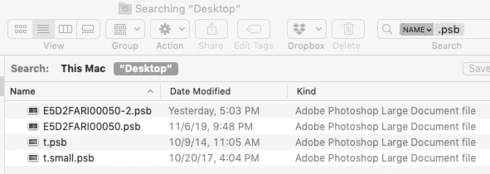
With this change, Spotlight will no longer find files of type Adobe Photoshop Large Document (PSB) that were created by versions 20 and earlier.  This will mystify users, who won't understand why Spotlight isn't finding their files. For example, Finder shows these four files with extension .psb, two created with 21 and two created with 20 or earlier:


But it finds just two files with kind Adobe Photoshop Large Document (which were created with version 21):
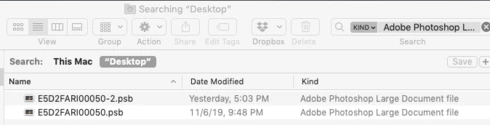


This is because Spotlight has saved the old UTI (com.photoshop-large-image) in its index for the two older .psb files:

$ mdls -name kMDItemContentType *.psb
kMDItemContentType = "com.adobe.photoshop-image-large"
kMDItemContentType = "com.adobe.photoshop-large-image"

The only workaround is to rebuild the Spotlight index, which can take tens of hours or longer for those with huge higher-latency network volumes and external disks. But most users won't ever figure out they need to re-index.

Quick Look plugins

My Quick Look plugin is registered for the old UTI (com.photoshop-large-image), and users upgrading to PS 21 immediately noticed it stopped working. I will release a new version that also registers for the new UTI (com.photoshop-image-large), but that is obviously a significant and needless inconvenience for all the plugin's users.

Technical Details

Mac OS has long defined the UTI com.adobe.photoshop-large-image in the bundle CoreTypes:

type id:            com.adobe.photoshop-large-image (0x237c)
bundle:             CoreTypes (0x220)
uti:                com.adobe.photoshop-large-image
localizedDescription: ..."en" = "Adobe Photoshop large document"...
flags:              active  apple-internal  imported  core  trusted (0000000000000065)
conforms to:        public.image
tags:               .psb, '8BPB'

But Photoshop 21.0 redefines that UTI as com.adobe.photoshop-image-large in its Info.plist:

<dict>
    <key>CFBundleTypeExtensions</key>
    <array>
        <string>psb</string>
    </array>
    <key>CFBundleTypeIconFile</key>
    <string>PS_PSBPrimaryFileIcon.icns</string>
    <key>CFBundleTypeName</key>
    <string>Adobe Photoshop Large Document file</string>
    <key>CFBundleTypeOSTypes</key>
    <array>
        <string>8BPB</string>
    </array>
    <key>CFBundleTypeRole</key>
    <string>Editor</string>
    <key>LSHandlerRank</key>
    <string>Owner</string>
    <key>LSItemContentTypes</key>
    <array>
        <string>com.adobe.photoshop-image-large</string>
    </array>
</dict>


This topic has been closed for replies.

11 replies

Inspiring
February 24, 2020
Well, my main concern was with Cmd 0 not providing a 100% zoom for PSD/PSBs ever since Apple reassigned it to that keystroke combination.. I know this comes from working with an older UTI and I hope Apple will allow you access to the updated one.

Still I want to thank you for your work on PSB Quicklook. It has stood in generating PSB thumbs between those dry years between 2013-2020 when Apple's quicklook could not. 
johnrellis
Legend
February 21, 2020
Good. You might start seeing differences in performance between built-in Quick Look and PSB Quick Look when you have a folder with tens or hundreds of PSBs or individual PSBs that are gigabytes in size.
Inspiring
February 21, 2020
Hi John,

I had that feeling Mojave is not going to fix that and Catalina is at 10.15.3, about the level I switch over to a new MacOS. So I upgraded both MacBooks, moved the PSB quicklook away and am very pleased with the results. I don't use very large PSBs, and I'm just happy to see those thumbnails again. 

Gene
johnrellis
Legend
February 21, 2020
"I upgraded to 21.1, (10.14.6)removed PSB Quicklook and PSB thumbs are either black or PSB icons. No idea how to fix."

The black thumbnails occur with PS versions 21.0 and later on Mac OS 10.14 and earlier.  PS 21.1 didn't change this behavior, only the Universal Type Identifier (UTI).

PS 21 defines a UTI for PSBs that is a subtype of "public.image", which causes Quick Look to try to generate a thumbnail.  On 10.14 and earlier, Quick Look doesn't know how to read PSBs, so it generates a black preview.  On 10.15 (Catalina), Quick Look can read PSBs and generate previews, even without the PSB Quick Look plugin, but it's much, much slower than PSB Quick Look for large PSBs.  
Inspiring
February 20, 2020
I upgraded to 21.1, (10.14.6)removed PSB Quicklook and PSB thumbs are either black or PSB icons. No idea how to fix.
Back to QuickLook.
Also the Layer Opacity slider does not seem to transition as I drag, so back to the old 21.0.3
johnrellis
Legend
February 20, 2020
I verified that Mac PS 21.1 creates PSBs with the UTI com.adobe.photoshop-large-image. 
Legend
February 19, 2020
This should be fixed in the 21.1 update that went out last night.
johnrellis
Legend
November 15, 2019
Also, when I google "com.adobe.photoshop-large-image", I find exactly two hits, this topic and this log file:
https://github.com/GoogleChrome/chrome-launcher/files/3312306/log.txt

The log file appears to be a dump of the Launch Services database, and it shows Photoshop CC 2019 (20.0.5) claiming UTI com.adobe.photoshop-large-image.   That seems a little curious, but I can't download 20.0.5 to verify :-<
johnrellis
Legend
November 15, 2019
"Mojave CoreTypes.bundle does not provide a UTI for the PSB.
Catalina CoreTypes.bundle does provide a UTI for the PSB."

Mac OS 10.15 (Catalina) defines a UTI because it provides a built-in Quick Look handler for PSBs.

When I first implemented PSB Quick Look in fall of 2014, I got the UTI "com.photoshop-large-image" either from Mac OS 10.9 or 10.10 or from a contemporaneous version of Photoshop.  Unfortunately, I can't download any of those to verify, given Apple's and Adobe's restrictive download policies.

I bring this up because there might be other unknown legacy implications of changing the UTI.
Eljay.Adobe
Participant
November 15, 2019
Hi John, excellent detailed write-up!

Photoshop 20.0 and earlier did not provide a UTI for the PSB.
Photoshop 21.0 does provide a UTI for the PSB.

Mojave CoreTypes.bundle does not provide a UTI for the PSB.
Catalina CoreTypes.bundle does provide a UTI for the PSB.

The macOS provided UTI is different from the Photoshop provided UTI, as you've noted in the feedback.  I will follow-up with Apple.