


Participant
December 19, 2012

P: Changing canvas size for smart object with mask crops to bounding box

  • December 19, 2012
  • 6 replies
  • 338 views

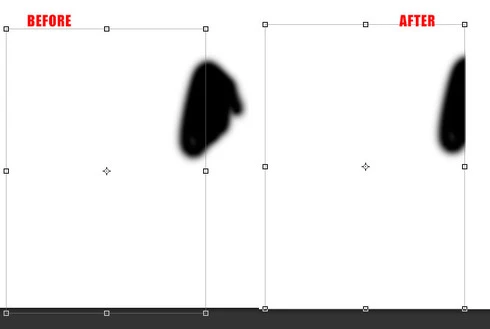
When I change the canvas size, or reveal all for a document that has a smart object in it(with puppet warp applied), the raster mask for the object itself clips to the bounding box of the smart object. I get that this is probably because of the Puppet Warp, but an annoying bug none the less. I had an action set to reveal all my document to prep my files, and notice that my document got messed up.
This topic has been closed for replies.

6 replies

Legend
February 3, 2015
Fixed in Photoshop CC (14.2 or later).
Participating Frequently
June 14, 2013
Hi; sorry for the gap in replies. I checked and I have the latest version (13.1.2 x64)
Here's an album of the issue happening. As I said, no puppet warp, just masks:


Participating Frequently
June 4, 2013
It was happening to me for two days. I was using a template file which was heavy on smart objects w/masks. AFAIK I'm on the latest update and on a mac as well but will check again and provide more details tonight.

Note: I don't think the file had puppet warp but it definitively had blurs and perhaps other filters
Participant
June 4, 2013
Eduardo, I think this was fixed soon after I posted this in one of the early updates. I just tested it and it isn't happening anymore, and I recall trying after early updates and this and a few issues seemed to be resolved. I'm on 13.0.2 on a mac. Have you tried updating? This is what I see now when I try to replicate this.
Participating Frequently
June 4, 2013
This just affected me with some smart object w/layer masks. Is there still no fix? The workaround works.
Adobe Employee
December 19, 2012
Thanks for the report. This is a known issue. For now, the workaround for this is to unlink the layer mask, change the canvas size, and then relink the layer mask. Please try this and let me know if it doesn't work for you.