

Inspiring
December 27, 2015

P: Changing icons in the History panel

  • December 27, 2015
  • 14 replies
  • 225 views

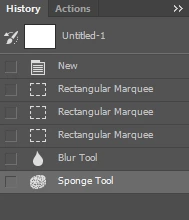
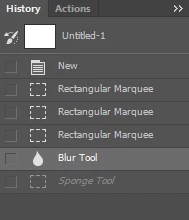
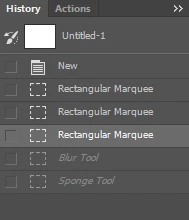
In Ps 2015.1.1, if I go back in history, icons of some operations will change, although they should not.

Example:

Going 1 step back:

Going 2 steps back:

OS: Windows 7 Pro 64-bit

This topic has been closed for replies.

14 replies

Legend
June 21, 2016
Legend
May 4, 2016
Thanks Milk_Dream. I can repro thanks to your video. I'll have engineering take a look.
Alexey Novoselov
Inspiring
May 4, 2016
I capture videon and upload it on post upheare!:)
Inspiring
May 2, 2016
I wasn't able to reproduce this on MacOS (and my windows machine will be compiling for the next few hours).
Alexey Novoselov
Inspiring
May 2, 2016
Legend
May 2, 2016
Do you have steps to consistently reproduce this issue? I haven't been able to reproduce it.
Alexey Novoselov
Inspiring
May 2, 2016
In my problem- I use a clear Photoshop without any 3rd party plug-in and this problem is regularity 🙂

Latest version Ps on 2016.05.02
Windows 7 x64 latest
Alexey Novoselov
Inspiring
May 2, 2016


In History panel brush tool change icon when undoing on eraser.


Legend
April 2, 2016
Is there any specific steps that seem to trigger it? I still haven't been able to reproduce it. I do see that you have a 3rd party plug-in installed that I do not. If you hold down the Shift key when you launch Photoshop and disable 3rd party plug-ins, can you reproduce the problem?
Chucksef
Participant
March 31, 2016
Oh and yes, it happens all the time. The icons will shuffle often too, especially when I click on a different history state.