



Open for Voting
P: Color Sampler handing by History and Action steps is inconsistent
Hi there, this is my first message here.
I've experienced an issue since many versions of Ps and I was hoping someone fix it but at the end I realized it's better to search where to tell someone to fix... and I finally came here.
This bug is still there since Photoshop CS or so until today. I'm using Windows 10 x64 and now Ps 24.0.1
Steps to see it:
- Open an RGB image
- Go to the Information tool
- Place a color sample anywhere into the image with the color picker sample tool (shortcut I and then shift+clic) (sorry I'm using the spanish version of photoshop, so no sure the english name of it)
- Select Lab color in the drop-down list in the color dropper icon just beside the R,G and B values in the Info tool:
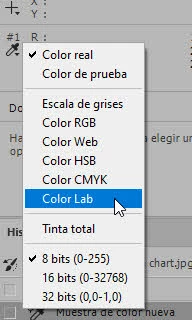
BTW: In this very same drop-down list I bet 0-32768 is a small mistake, it should be 0-32767.
- Do a color conversion from the actual color space to another one in RGB.
- Go to History panel and go a step back. you'll see it automatically changes back to RGB instead of keeping Lab values. that's the bug.
- If you change it again to Lab and go a step forward and then back again, you'll see the same behaviour.
I hope this helps you fix it. I know it's a small bug but sometimes when you're working with Lab values and readings it's very annoying.
Best regards from Barcelona.
 AdChoices