


Inspiring
February 17, 2017

P: Color SVG fonts - unwanted outline with overlapped glyphs

  • February 17, 2017
  • 11 replies
  • 417 views

Hello,
I was happy when I heard that Photoshop support Color fonts, but..
I  tested my OpenTypeSVG color fonts in Photoshop CC2017.0.1 and found a bug with overlapped glyphs:
first and second glyph are rendered correctly, but third and all next glyphs are rendered with "small outline". As example:
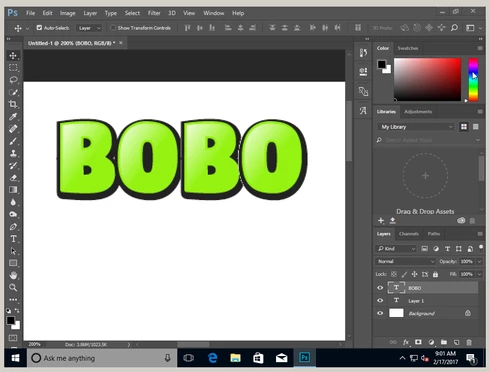


I think, it 's problem with incorrect background color for transparent pixels on edges of glyphs.

Font used: DigitaltS-fruits: http://www.glukfonts.pl/font.php?font=DigitaltS-fruits

Regards,
Grzegorz (gluk)

This topic has been closed for replies.

11 replies

Inspiring
December 3, 2019
OMG! Thank you! You save me!
franz_h
Inspiring
February 9, 2018
Gotcha, thanks David. 
David Mohr
Participating Frequently
February 8, 2018
Howdy Franz,

We don't report our bugs publicly, but the glyph overlap portion of this issue has been fixed.

The best way to report a bug to us is here.  I'm on the forums most days that I'm in the office.  You can always use my name to make sure the issue gets flagged in case I'm out.

Thanks,
David
franz_h
Inspiring
February 6, 2018
Hi, just checking whether there is a public way to view the status of this bug. Also, as AI & ID teams seem to favor uservoice.com for new bug reporting, what's the way forward regarding PS bugs?  Here and/or Uservoice? Thanks
David Mohr
Participating Frequently
March 10, 2017
Howdy Franz,

I was going to suggest the manual kerning work-around.  I've gone ahead and logged a bug on this.

Thanks,
David
franz_h
Inspiring
March 7, 2017
Hi, some additional findings on the overlapping issue:
  • Changing the anti-aliasing method did only affect the blending smoothness, but did not fix the edges issue. 
  • However, a Fontself user found out at that manually setting a kerning value between 2 characters would solve the overlapping problem and blend glyphs and edges as expected.

David Mohr
Participating Frequently
February 21, 2017
The different anti-aliasing modes will produce different effects.  If you want to make sure there is no ghosting, you should choose "None" for anti-aliasing.

Thanks,
David
Inspiring
February 18, 2017
Hi again,
it's look, problem with my Tofimpelik and Photoshop 2017.0.0 is outdated.
my apologies..
In 2017.0.1 work correct! (but with smooth anti-aliasing)


Grzegorz
Inspiring
February 17, 2017
Hi David,
thank You,
most probably it's not only anti-aliasing mode. I mean, this bug have to do with transparent pixels..
For example my other SVG-OT font Tofimpelik (work in progress) in Photoshop 2017.0.0:

and again first and second glyph ("To" only, "Th" and "Tk" are ligatures) are rendered correctly.
(unfortunately test font don't work in 2017.0.1)

Grzegorz
David Mohr
Participating Frequently
February 17, 2017
Howdy Grzegorz,

Actually, this is a function of your anti-aliasing mode.  If you set it to None or Smooth, you will find that the outline disappears.

Thanks,
David