


Inspiring
December 12, 2018

P: Content Aware Crop Error 1244 Illegal Argument

  • December 12, 2018
  • 7 replies
  • 1029 views

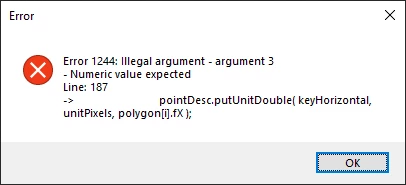
I found a repeatable error when testing at the extreme limits of the Content Aware Crop feature.  I created a 2 pixel wide by one pixel tall image.  Filled in both pixels with a color and attempted to crop out with content aware enabled.

This consistently gave me an error of Error 1244 - Illegal Argument, this error does not crash the program entirely and does not block the feature from being used in my testing.
7 replies

Participant
July 17, 2023

Hello , I just had this same problem and found out the solution.  In the cropping panel above your opened document choose Ratio instead of W x H x Resolution . Hope it helps !

PECourtejoie
Community Expert
Community Expert
February 1, 2023

The OP reported that it happened when out-cropping all four sides at the same time.

davidl28131511
Participant
February 1, 2023

Original image 3390  x 2899 pixels increased by 12% I have since found that if I rseset the crop tool, the content aware fill of transparent pixels works as it should. I'm using Classic version 24.1.1 on a Windows PC

PECourtejoie
Community Expert
Community Expert
February 1, 2023

Hi, @davidl28131511 could you give the specifications of the image, how many pixels w and h? What percentage of the image is transparent? What is the exact version of Photoshop?

davidl28131511
Participant
February 1, 2023

I have exactly the same error message when tryng to do a crop with content aware fill of transparent pixels. Photoshop 24.1.1 Windows 10 Pro 21H2

Inspiring
December 13, 2018
This is Photoshop CC 2019 20.0.1 and Windows 10 64 bit Version 1809.  I forgot to put in my steps that you need to crop to a larger size with Content Aware on.  I also cropped out on all four sides if that helps.
Legend
December 12, 2018
What version of Photoshop and what OS/Version? I wasn't able to reproduce this off-hand.