


P: Contextual (right click) brush menu fails to load pressure sensitive preview
This bug is 100% replicable across several versions of Photoshop. including cs5, cs6, and the latest CC (on PC though I haven't tested on Mac).
Steps to reproduce:
- Open Photoshop
- Open or create a document
- Select brush tool
- Right click within the document with a mouse (specifically a non-pressure sensitive input device), bringing up the brushes panel
- Click gear icon at upper right
- In the pull-down menu, select "Stroke Thumbnail" (if it isn't already)
- Observe that stroke thumbnail ignores pressure settings and renders brush previews as 100% for all pressure sensitive values (image 1)
If you repeat the exact same steps, but with a pressure sensitive stylus instead of a mouse, the brushes panel will display correctly (image 2)
Image 1 (my brushes displaying incorrectly) 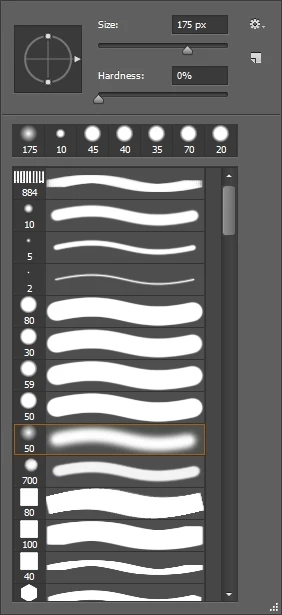
Image 2 (my brushes displaying correctly) 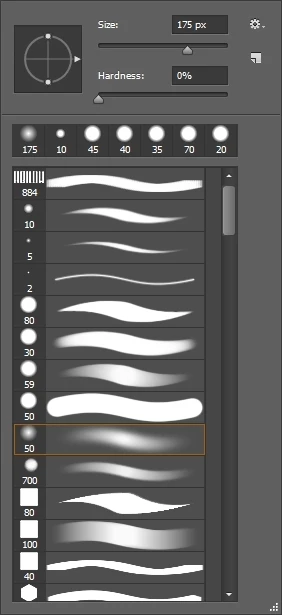
The frustration comes from the fact that whichever you use to display the brushes panel first will lock it in until you restart Photoshop. That is to say, if you right click with the mouse first, the brush stroke preview will display incorrectly and subsequent right clicks with the pressure sensitive stylus will also display incorrectly.
Likewise, if the right click context menu is initiated with the stylus when you first open Photoshop, the mouse button will also display the correct, pressure sensitive preview.
 AdChoices