
Participant
November 26, 2022

P: Crash every time I use iPad Pro as a drawing monitor
  • November 26, 2022
  • 7 replies
  • 613 views


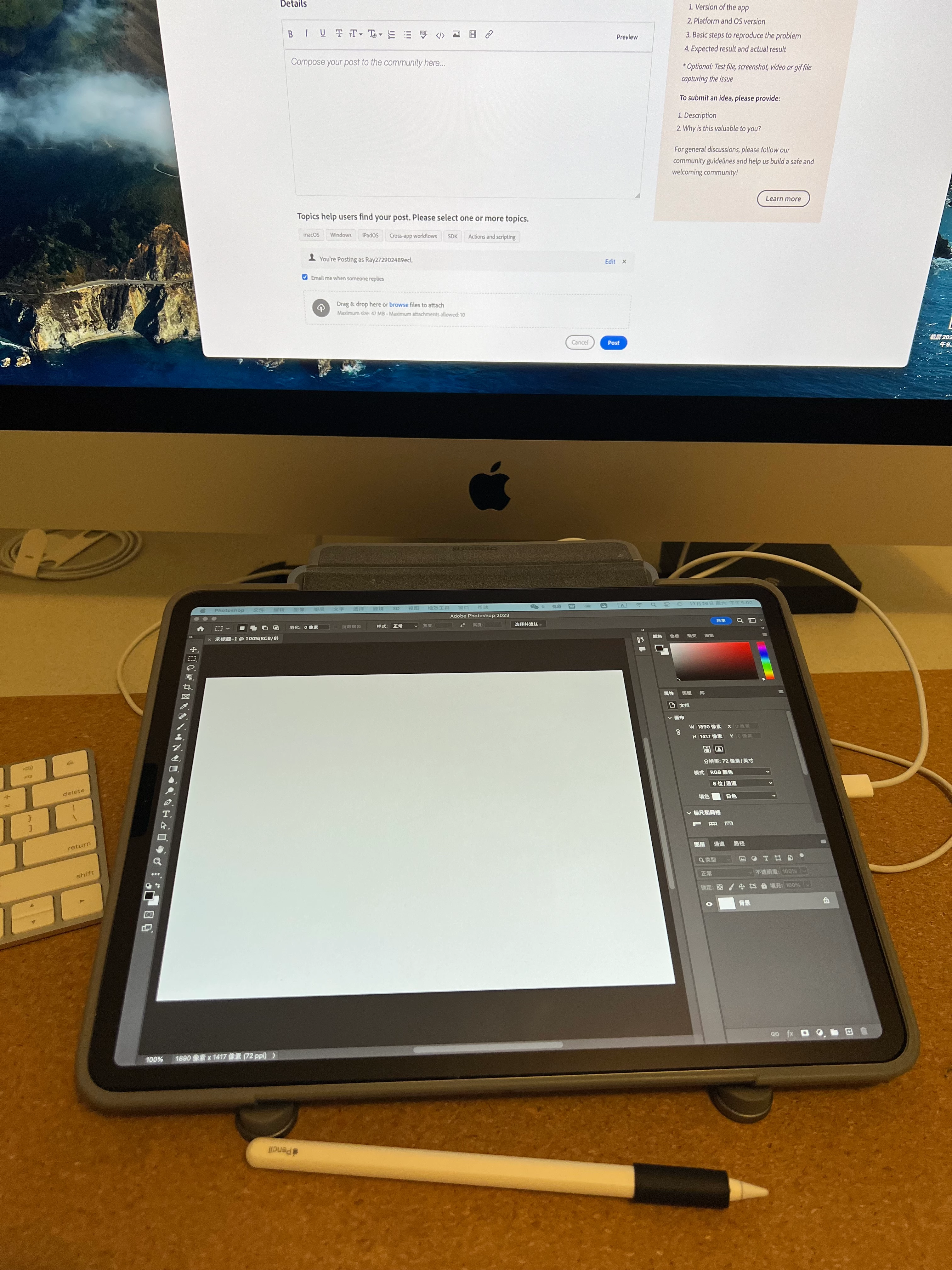
As shown in the photo, I'm using an imac27. I connected an iPad Pro to the imac as its second screen, and then dragged Photoshop2023 onto the screen of the iPad Pro, theoretically allowing me to use the apple pencil to draw directly on the screen. But every time I start drawing, Photoshop immediately crashes. It doesn't happen when I don't use apple pencil.

I'd like to know the reason and how to solve it. Thank you.

This topic has been closed for replies.

7 replies

Participant
November 28, 2022

You're right, I just received my iMac, and I placed an order for 2x16GB memory strips as soon as I saw your reply :D, but they won't arrive until Dec. Still, I don't think 8GB will cause PS to crash every time I start drawing, there must be something wrong.  Think you for your reply.

Legend
November 28, 2022

Thanks for submitting crash logs. I've asked engineering to take a look.

Legend
November 28, 2022

Just an aside, I would strongly recommend adding RAM to the iMac. The default 8GB is really borderline for running Photoshop. The 27" model has four memory slots and can be upgraded to 128GB; 32GB is probably enough for most of what you'd be doing.

Participant
November 28, 2022

Sorry I forget to state the details

imac 27 inch,2020, 3.3GHz  Intel core i5

Graphics card: AMD Radeon Pro 5300 4GB

Memory: 8GB 2667 MHz DDR4

macOS Ventura 13.0.1

ipadOS 16.1.1

I've tried both wireless and wired connections to make the screen mirroring, PS crashes every time.


I actually tried this a years ago, and it worked pretty well. But I was just trying it out, and I don't remember the OS version before. I don't see why it can't work now.

Think you for your reply

Participant
November 28, 2022

Sorry I forget to state the details

macOS Ventura 13.0.1

ipadOS 16.1.1

I've tried both wireless and wired connections to make the screen mirroring, PS crashes every time.


I actually tried this a years ago, and it worked pretty well. But I was just trying it out, and I don't remember the OS version before. I don't see why it can't work now.

Think you for your reply

PECourtejoie
Community Expert
Community Expert
November 28, 2022

Hello, please give more information, such as the specs of the iMac. It is one with an Intel Processor.

Which generation of iPad Pro ? Which iOS Version?

Are you using Sidecar? did you check https://support.apple.com/en-gb/HT210380#systemrequirements

Does it work with other applications? Earlier versions of Ps?


Omar.Fathy
Community Expert
Community Expert
November 26, 2022

It is working well with me. What is your OS version? 
How do you make the screen mirroring?