


snakehill
Known Participant
April 27, 2020

P: Crop Tool: Content-Aware Fill Error 54

  • April 27, 2020
  • 29 replies
  • 2102 views

Ever since Creative Cloud 2020 (definitely the past few updates), I run into the following error:

Error 54: Uncaught JavaScript exception: General Photoshop error occurred. This functionality may not be available in this version of Photoshop.
- The command "Fill" is not currently available..
Line: 63
->        throw err;
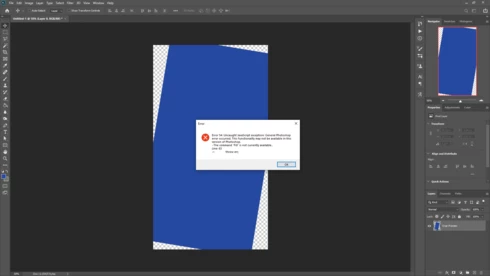


1) Crop Tool;
2) Rotate the image with transparent parts being introduced;
3) Have Content-Aware checked (it's specifically there for this very reason, to fill in the now transparent parts);
4) Select any Tool;
5) Error

When I click the checkmark in the Crop Tool settings first, it works and processes just fine, but selecting any tool used to work just as well (if not better, given the advantage of already having the next tool at your disposal). Apparently it now absolutely requires to click the checkmark first, for it otherwise will throw the error without exception.

If one forgets to press the checkmark, they either need to start all over, or would need to click away the error, manually select the transparent parts and use Content-Aware separately. Both these scenarios add at the very least 5 extra steps to the process.

And given how overly technical and not user-friendly the error message is, I highly doubt it is supposed to be like this.

This topic has been closed for replies.

29 replies

nigelharrison
Participant
May 29, 2020

I have found a possible work around to this, for me anyway.


I am using version Photoshop 21.1.3.


When I use the crop tool (c) and rotate the image all is ok. If I click on any tool in the toolbar to activate the crop process I get the error message.


However, this problem does not occur when I rotate, then click on the Crop tool to execute the function.


I have not gone through all the tools as I would loose the will to live.

Hope this helps.
Earth Oliver
Legend
April 28, 2020
47174, if ya need.
Legend
April 28, 2020
Good catch. Thanks for the assist @earthn7311904.
snakehill
snakehillAuthor
Known Participant
April 28, 2020
Thanks for making it an official bug!

It would be an issue on at least Mac OS 10.15.4 too, as that is what Yves runs and he was able to replicate the issue. I guess it's really just baked into the Photoshop version 21.1.

Here Ben__P is reporting to have it on Mac OS 10.13.6 High Sierra as well: https://community.adobe.com/t5/photoshop/content-aware-crop-error-54-topic-edit-for-brevity/m-p/1108...
Inspiring
April 28, 2020
Thank you for specifying your version of PS and the OS.


Yves Crausaz, Suisse, retraité actif dans le monde de la photo et des arts graphiques.
Earth Oliver
Legend
April 27, 2020
Good catch. I can verify the issue in Win10. I'll make sure the error is officially bugged.
snakehill
snakehillAuthor
Known Participant
April 27, 2020

Thank you for verifying, Yves!

I used to do it just so that I could continue with another tool right away, saving the step of having to click the checkmark (or Crop Tool icon apparently) and continuing to edit.

I only figured there was a checkmark later, and that clicking the Crop Tool also works I only really just figured out. It makes the bug less annoying, but it's definitely a bug nonetheless (and it does still unnecessarily interrupt the one step shorter workflow that was possible in earlier versions).

Inspiring
April 27, 2020

Pour moi, même comportement, par contre, pourquoi aller chercher un autre outil avant d'exécuter la fonction de recadrage ?
D'autre part dans PS 21.1.2 il n'y a pas de bouton V dans la barre pour valider le recadrage, il faut presser sur Entrée ou Retour pour lancer l'exécution du recadrage.
Si on change d'outil avant la validation du recadrage, l'erreur 54 apparait aussi chez moi !!!

For me, the same behaviour, on the contrary, why to go get another tool before carrying out the function of recadrage?
On the other hand in PS 21.1.2 there is not button V in the bar to validate the recadrage, it is necessary to be pressing on Entrance or Return to throw the execution of the recadrage.
If they change tool before the validation of the recadrage, apparait error 54 also to me!!!


There is therefore a bug proved to be in this version of PS.


Yves Crausaz, Suisse, retraité actif dans le monde de la photo et des arts graphiques.
snakehill
snakehillAuthor
Known Participant
April 27, 2020

That is what I said (or at least meant haha). It's exactly what the Content-Aware Fill is for, at least within the Crop Tool. 😉

Hereby a video demonstrating when the error does and does not occur (apparently the Crop Tool itself is an exception to the rule, that if you click that it still processes just fine, but any other tool throws the technical error):

 
Participating Frequently
April 27, 2020

@snakehill: I thought of a good use: After straightening a photo, to correct the now blank parts...