


Participating Frequently
August 2, 2012

P: CS6 - problem with scanning after upgrading to Mountain Lion (MacOS 10.8)

  • August 2, 2012
  • 48 replies
  • 1102 views

Hello

After upgrading to latest version of Mountain Lion i've got a problem with scanning directly into Photoshop CS6.

on the previous Lion version when I wanted to scan something, i just opened Photoshop -> File -> Import -> images from device
then a new window opened up where I could choose the device I wanted to use, and then I selected the scanner (Canon CanoScan 8400F) and I could scan directly into photoshop.

Now with Mountain Lion when I do the exact same thing, it opens a window, but it's impossible to select any device, as the new window is just a plain white window, with 2 buttons on top to rotate something that isn't there.
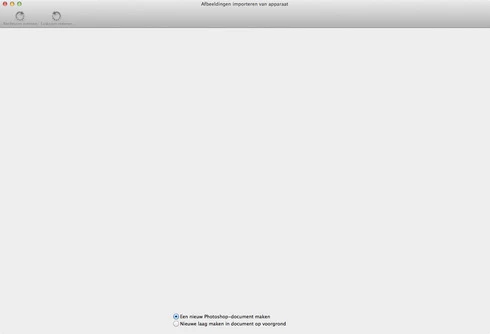

hope someone can help me out, I can scan the normal way and then save that picture and open it in Photoshop, but it has worked before, so am I doing something wrong? or is this just a little bug

thnx in advance for the help

This topic has been closed for replies.

48 replies

Inspiring
October 31, 2012
My new CS6 Photoshop does not recognize my Epson Perfection 4490 Scanner. How do I import from my scanner? It came up under "Import" in my previous Photoshop.

Big NoudAuthor
Participating Frequently
October 5, 2012
Thnx so much Paul, for looking into this and came up with some answers.
I guess we have to wait then for further problem solving by apple.

I recently had to buy a new printer for over network and AirPrint.
I bought the all in one Canon MG8250.
When I run PS CS6 now, I can scan in Photoshop with this AllInOne with the ScanGear solution from Canon.
Although I'm not completely satisfied with the scanned image, still figuring out I guess, I'm keeping my old scanner too and hopefully there's gonna be a solution for this in the near future

Arnoud
Inspiring
October 3, 2012
(1) I got help from Samsung CS rep named Erica, who assured me my scanner is 64 bit. Downloaded their latest Scan Driver (OSX 8.6, unfortunately) but it did enable a differentiated scanner window using their Quick Scan, Scan & Fax manager. Still, nothing in PS Import, & no res. over 600 dpi, but I could set a percentage as high as 400% & then use PS CS6 to refactor in Image Size.
(2) Our MacSpecialist tech suggested using Silverfast or Vuescan. I chose Vuescan (Scanner compatible) - spent some money, of course - installed it, & lo! there it is in Photoshop>File>Import, ready to be selected. Even better, I can choose any number of resolution options.
Inspiring
October 2, 2012
Thank you. I've thought those words for years. I just never met any of you before so I could express them.
PDFerguson
Adobe Employee
Adobe Employee
October 2, 2012
Thanks for your kind words, I have shared them with the Photoshop team.
Inspiring
October 2, 2012
By the way - one more thing - I think this Adobe product line is brilliant, astonishing, mouth-droppingly wonderful, even when I run into problems. When I think about the interlacing complexities that make it all work so seamlessly, I start to understand what "awe" means.
Inspiring
October 2, 2012
A Classically Situated guy. Now that I know you are responsible for EVERYTHING, I'll know whose ear the whining gets poured into.
PDFerguson
Adobe Employee
Adobe Employee
October 2, 2012
Hi Hilda,

Image Capture is a utility program in the Utilities folder inside the Applications folder, and is a standard part of Mac OS X. As far as I know, Image Capture does work properly in Mountain Lion.

ImageKit refers to the underlying Cocoa frameworks (programming interfaces) used by Image Capture as well as by Photoshop and other applications to perform scanning. For reasons I won't go into here, these are not working correctly in Photoshop, but are in Image Capture, which is the problem we're working to resolve with Apple.

The scanners that work with Image Capture/ImageKit are also a standard part of Mac OS X, which means that users do not have to go to a different web site (e.g. Epson's web site) to download and install drivers for their specific scanner, which you do have to do with TWAIN. Scanner support (numbering in the hundreds) through Image Capture/ImageKit is already included in Mac OS X "out of the box".

We added support for ImageKit scanning to Photoshop CS6 because we recognized it was unlikely that scanner manufacturers would go back and rewrite their TWAIN drivers to work in 64-bit mode (especially older scanners that are no longer manufactured).

One advantage is that as improvements are made to ImageKit and as more scanners are added by Apple to their Mac OS X releases over time, Photoshop users get those "for free", so to speak. Unfortunately, changes to ImageKit made for Mountain Lion have had the effect of breaking this feature in Photoshop, but we are confident this will get sorted out.

Paul
hildaw15478903
Participating Frequently
October 2, 2012
CS6 Photoshop is 64 bit only. No one seems to be able to find a scanner which works in 64 bit mode. Image Capture does not work on Mountain Lion (known fault). It seems Adobe are out of step here with manufacturers. Help please.

PDFerguson
Adobe Employee
Adobe Employee
October 2, 2012
Hi kdrandle,

If you are running CS 5.5, you should be able to continue running in 32-bit mode and use the TWAIN plugin to access your scanner without problem, or at least I've not heard of any TWAIN problems with Lion or Mountain Lion (the problems with ImageKit support have to do with Cocoa, and not scanning, so that is unrelated to TWAIN, which does not use that part of Cocoa.)

Photoshop CS6 is 64-bit only, so you cannot run in 32-bit mode at all, and this is a problem with TWAIN because there are almost no 64-bit TWAIN drivers available from any scanner manufacturers; the only ones I'm aware of are for late model Canon scanners.

And I'm not just a "6 guy", I'm a CS1 guy, a CS2 guy, a CS3 guy, a ... :-)

Paul