


Participating Frequently
August 2, 2012

P: CS6 - problem with scanning after upgrading to Mountain Lion (MacOS 10.8)

  • August 2, 2012
  • 48 replies
  • 1102 views

Hello

After upgrading to latest version of Mountain Lion i've got a problem with scanning directly into Photoshop CS6.

on the previous Lion version when I wanted to scan something, i just opened Photoshop -> File -> Import -> images from device
then a new window opened up where I could choose the device I wanted to use, and then I selected the scanner (Canon CanoScan 8400F) and I could scan directly into photoshop.

Now with Mountain Lion when I do the exact same thing, it opens a window, but it's impossible to select any device, as the new window is just a plain white window, with 2 buttons on top to rotate something that isn't there.
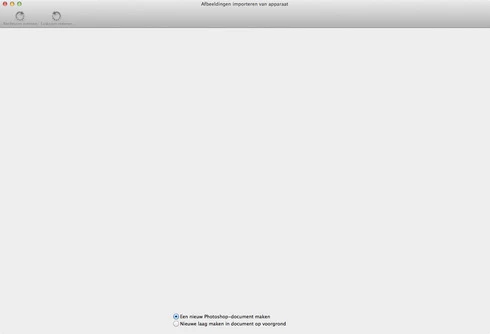

hope someone can help me out, I can scan the normal way and then save that picture and open it in Photoshop, but it has worked before, so am I doing something wrong? or is this just a little bug

thnx in advance for the help

This topic has been closed for replies.

48 replies

Inspiring
October 2, 2012
But now wait. Paul, I know you're a 6 guy - but can anybody tell me, then - I am running CS 5.5 - which means that I'm PS 5 (or v. 12.1 for Mac). I have no problem running TWAIN when I am at 32 bit. If I upgrade my OS from Snow Leopard to Mountain Lion, will I still be able to run TWAIN, using the PS version I am now?
Inspiring
October 2, 2012
Paul - thank you. Adobe should just buy Apple (stop laughing). We have a huge new Adobe facility going in about ten minutes from us. I think they'll make good neighbors. Especially if they are like you.
PDFerguson
Adobe Employee
Adobe Employee
October 2, 2012
Hi again,

Working with Apple engineers, we have identified the root problem of why the dialog appears blank when running Photoshop CS6 in Mountain Lion. Unfortunately, the fix for this is outside our control, so I cannot provide any information on when this may be fixed. I am still investigating possible workarounds, but at this point I am frustrated by this the same as everyone here is. I believe this will be fixed in the near future, but cannot promise anything.

To Alba: One possible solution is to use the VueScan TWAIN adapter in conjunction with the Photoshop CS6 TWAIN plugin (you'll need to download this plugin from adobe.com). I have heard that some users have found this to be a good way to enable scanners for which there are no native 64-bit TWAIN drivers available. This isn't an ideal solution, especially for people who are not currently VueScan owners.

To Hilda: I think the Epson comment was specific to TWAIN; many Epson scanners do work with ImageKit in 64-bit mode without needing to install any additional software. In Mountain Lion, you can confirm this by running the Image Capture utility application to perform scanning. Once Photoshop's problem is resolved, it will support exactly the same scanners as Image Capture does.

Again, I apologize for this situation. The last thing I expected when I implemented this feature earlier this year was to find everything so broken so soon after we released Photoshop CS6 (and not being able to fix it ourselves). Such is the nature of software development sometimes...

Paul
hildaw15478903
Participating Frequently
October 2, 2012
What Im doing is scanning in Photoshop CS5 in 32 bit mode . I have Mountain Liion and CS6, and although cannot find a scanner that will run in 64 bit mode, for CS6, continue to scan in CS5 32 bit for my photo restoration work. Not ideal but works while we are waiting for scanner manufacturers and Adobe to work this out.
hildaw15478903
Participating Frequently
October 2, 2012
I would be interested to know this as Epson told me there was no scanner for 64 bit mode operation and they had no plans to update any of their drivers.
Inspiring
October 2, 2012
For that, you'll have to talk to Apple and your scanner vendor.
Inspiring
October 2, 2012
Even reading Paul's mention that the problem is not w/particular scanner brands, can you tell me if there is a scanner model that does work with ML, allowing PS6 to access & scan at high resolutions?
Inspiring
October 2, 2012
In addition to all the problems above, I can no longer scan at more than 600 dpi, using the scanner independently of PS6. I also have ML OS. This is a real problem, since I need 800 dpi documents for press/printer.
Inspiring
October 2, 2012
I've been scanning the net for information about all this, to no avail. This is as close to real discussion as I've found. I'm running 5 in 32 bit mode - I have precious ancient photos to scan into a massive project - and TWAIN does a great job with it. But for other reasons, I need to upgrade my OS to Lion. Adobe told me that Lion was fine with Twain, that I could still use it - and from this discussion, I see that this is true. But ML, no. Tonight, desperate, I decided to run a scan with Twain and compare it to a scan done with Image Capture (I'm on Snow Leopard), because the only thing I've read people saying on line is that you're just going to have to use Image Capture from now on. HOLY CATS. When I put the two scans together, I gotta tell you - Image Capture is AWFUL. The scan was dark, dreary and anything but sharp. And both were set to 300 DPI - but the Image Capture scan was bumpy and I had to magnify it by more than 50% to achieve the same frame fill. Paul - PLEASE make this work. I have SO much important graphic and photographic work to do over the next several years. I cannot do it with a sloppy tool like Image Capture.
PDFerguson
Adobe Employee
Adobe Employee
September 14, 2012
Hi Hilda,

In Photoshop CS5, the only way to scan was to use the TWAIN plugin. As you correctly described, you have to run CS5 in 32-bit mode because your scanner's TWAIN driver is 32-bit only. To my knowledge, Epson has not released a 64-bit TWAIN driver for the Perfection V500; the current TWAIN driver I downloaded from their web site only has 32-bit PPC and Intel code in it (it is described as "Universal", but in this context, it uses the old, pre 64-bit meaning of the word "Universal", which does not mean it is 64-bit compatible).

So the issue with not seeing your scanner in CS5 (in 64-bit mode) or CS6 (at all) is because Epson has not updated their TWAIN drivers for 64-bit mode. There's nothing Adobe can do to fix this, it is solely Epson's decision whether or when to upgrade their TWAIN drivers to 64-bit.

In Photoshop CS6, we added an alternate way to scan, accessible through the File > Import > Images from Device... menu, which is the subject of this thread. As the messages above indicate, there are problems with the Import Images from Device dialog in Photoshop CS6 under Mountain Lion, making the feature unusable. This problem is not specific to any particular brand or model of scanner, it is independent of that.

Since I last posted on this thread, we are making headway in identifying and resolving this issue. I can't say much more about it than that at this point, but I do want to assure everyone this is a high priority issue for us, and as soon as I have more information to share, I will do so. We appreciate your patience, and I apologize for the inconvenience it may cause.

Best regards,

Paul