


Inspiring
June 23, 2015

P: Cursor disappears behind "Save liquify mesh" window

  • June 23, 2015
  • 26 replies
  • 1001 views

Hello,

I have noticed that, when I save a liquify mesh, the arrow cursor disappears behind the save mesh dialog. Instead of seeing the OS' regular arrow cursor, I can see the liquify brush behind it. This happens randomly, but more notoriously when the cursor touches any text input fields.
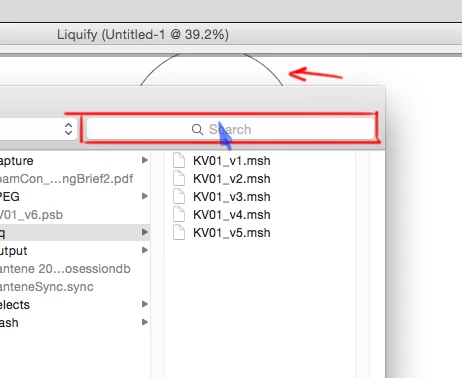


As you can see in this screenshot, the blue arrow I've drawn is where the cursor should be. Instead, you can see the liquify brush behind the window.

This happens with CC 2014 and remains in CC2015. Tried in various mac computers running Yosemite. Only happens in the LIQUIFY save mesh dialog, not the save document dialog.

Thanks

This topic has been closed for replies.

26 replies

Legend
January 25, 2018
This was solved a while back. Let me know if you're still having issue with current versions of Photoshop on current version of macOS.
Inspiring
December 15, 2015


The cursor still disappears when saving and loading liquify meshes. What's
up with that? Are you sure you're working on that?

Am I really the only professional who uses liquify meshes?

Participant
December 15, 2015
Thanks for Fixing it! There should be a discount! Not a great time for things to go bad!
Inspiring
December 1, 2015

Here's a small video showing the disappearing cursor problem.
I've updated to CC2015.1 and I was happy to see the updated UI in the liquify filter. Sad that the save mesh dialog UI wasn't updated as well. The problem is still there.
https://youtu.be/4jiJ1WOTzd0

Legend
November 16, 2015
We're investigating this issue with Apple. It appears the issue is in the OS/driver/
Inspiring
November 15, 2015
Hello? Adobe? Paying customer here!
Inspiring
October 7, 2015
Update please!
Inspiring
October 7, 2015
Hello. This is ridiculous. Worst client support ever.
Inspiring
September 28, 2015
Hey Jeffrey Tranberry. Are there any news on this issue? Thanks
Earth Oliver
Legend
September 10, 2015
Yes, these "sticky" issues have been driving me nuts too, lately.

They've been around since CC14 and the get in my way every day!

I'm not 100% sure if Adobe has acknowledged these problems yet, but they've persisted through 2 major versions and i've tracked them on many, many different kinds of Mac's, so i'm certain the bugs are widespread.

This may be one of those situations where Adobe is pointing the finger at Apple, unfortunately...