


Inspiring
June 23, 2015

P: Cursor disappears behind "Save liquify mesh" window

  • June 23, 2015
  • 26 replies
  • 1002 views

Hello,

I have noticed that, when I save a liquify mesh, the arrow cursor disappears behind the save mesh dialog. Instead of seeing the OS' regular arrow cursor, I can see the liquify brush behind it. This happens randomly, but more notoriously when the cursor touches any text input fields.
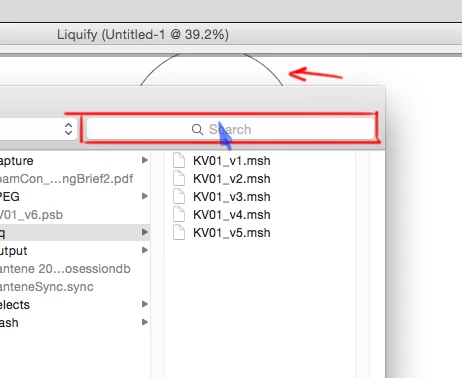


As you can see in this screenshot, the blue arrow I've drawn is where the cursor should be. Instead, you can see the liquify brush behind the window.

This happens with CC 2014 and remains in CC2015. Tried in various mac computers running Yosemite. Only happens in the LIQUIFY save mesh dialog, not the save document dialog.

Thanks

This topic has been closed for replies.

26 replies

Inspiring
June 30, 2015
Can someone in Adobe acknowledge this please...
Inspiring
June 28, 2015
I don't get it. Isn't this the support forum? Isn't it part of the CC service to get bugs looked at?
Why haven't I gotten a response in half a year? I'm not the only one having this issue and I've posted this on the Adobe forums as well.
Inspiring
June 25, 2015
Oh, will Adobe ever acknowledge this bug...
Inspiring
June 24, 2015
Can you please +1 the thread?
Thanks
Inspiring
June 23, 2015
Argh! finally someone! I been bumping this issue on the adobe forums for months now...
Earth Oliver
Legend
June 23, 2015
Tried this on my Mac running Yosemite/CC15 and i see the same issue.