


Participant
May 9, 2022

P: Deformed paths in PDF presentation.

  • May 9, 2022
  • 8 replies
  • 405 views

Hello!

As the title stated: whenever I'm using File>Automate>PDF Presentation, every path in that PDF is deformed. I assume it is a bug, cos it's not an issue, when I'm saving single files as PDF (File>Save as>PDF).

It's not a PDF preview issue either - that PDF presetation got pinted and the distortion is very visible on paper.

I'm using the newest Photoshop (ver 23.3.1), Windows 10.
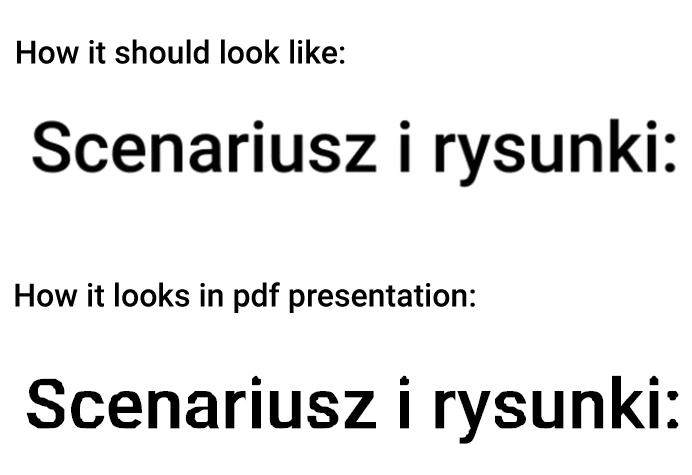
In the example above both texts are text converted to shape. First one is from PDF saved as single PDF and second is from the same file, but saved as PDF presentation. When I leave text as text it's not deformed.

This topic has been closed for replies.

8 replies

SinsitraAuthor
Participant
January 3, 2023

@jane-e

Every single printshop I tried/contacted had these requirements (either curves/outlines, rastrizing or embeding font) and I tried over a dozen only this year. Since english is not my first language and I'm printing in non-english shops, I checked random english-speaking printshops, and first 10 I found on Google also had these requirements, so I'm very confused? Option to embed font is - as far as I know - impossible in Photoshop.

I'm sorry for being a little off topic, but maybe there's something I don't understand and there is no need for me to be worry about converting my text to curves.


Still, it's a weird bug, but maybe I can ignore it.

jane-e
Community Expert
Community Expert
January 2, 2023

You should ask the print shop, as what they say supersedes what anyone else says — or find another print shop. I don't make my own typefaces and they may be unique in their requirements.


I've been creating documents in PageMaker, Ventura Publisher, QuarkXPress, and InDesign for 33 years and have never once converted fonts to outlines. 


Today is a federal holiday, so @J453 may return to this thread soon.


Jane


SinsitraAuthor
Participant
January 2, 2023

@jane-e 

Thank you for the suggestions, but using another program to do it isn't a soltuion either, especially since you mentioned paid software.


I don't understand what do you mean by 'why print shops are asking for outlines'? Isn't it a standard in printing to convert text to curves to avoid font changes from computer to computer? The font I usually use is custom made by me, so there is a chance something will go wrong. For now rastrizing works fine for me, because I'm printing in smaller formats, but I'm worried for bigger prints.

jane-e
Community Expert
Community Expert
January 2, 2023

@Sinsitra 


  • If you have Acrobat DC, you can convert to outlines in Print Production > Preflight.
  • If you have Illustrator or InDesign, you can convert to outlines, then create the PDF.


Photoshop has limited support for text. Both InDesign and Illustrator are far better for text.


I'm wondering why print shops are asking for outlines though. I would be looking for a new print shop.


Jane


SinsitraAuthor
Participant
January 2, 2023

Any update on this? Or at least any workaround? Leaving text as native text doesn't solve the problem at all, since print shops are usually asking for converting it to path and my only solution right now is to just rastrize the text.

Legend
May 18, 2022

Thanks for the files. I see you're using shapes or SVGs for text. The same problem doesn't happen if you use native text.


I've asked engineering to take a look.

SinsitraAuthor
Participant
May 18, 2022

It happens in every single PSD files that I conert to PDF Presentation. Here is the link to the exaple: https://www.dropbox.com/sh/ude1dzhek1ghq6m/AABPM8D50YUzJDnwlntKeKs2a?dl=0

Legend
May 17, 2022

Could you please share your source PSD and resulting PDF for us to help troubleshoot/reproduce the problem? Use CC files or dropbox to share a download link.